


JBin818
Members
-
Joined
-
Last visited
Everything posted by JBin818
-
Do you have RageNativeUI? The latest version is 5/28/2022. Make sure you have the latest version.
-
Do you have a packfile limit adjuster? I have my packfile at 7344. I don't see a heap adjuster setting in my main folder. So I'm not sure where you see heap adjuster at 1250.
-
I would uninstall Assorted Callouts by Albo. It hasn't been updated in so long and it's not going to be updated because there are more recent callouts that support the current versions of GTAV and LSPDFR. I think that may be causing the problem. Get rid of that one first. If the problem persists then you might get rid of Variety Callouts. That is a bit outdated. So, first, get rid of Assorted and try it. If that doesn't work, get rid of Variety and then try it. 686 Callouts is still good, I have that. Amazing would still be good, it was updated recently but I don't have that yet. Ambient AI is very cool but I think I was having problems with it, it was crashing my game at times. Not related to your problem though. I have Ambient Emergency which is different. Well, try the ones I mentioned and see what happens.
-
I've read about that to and it was usually an old/outdated callout that caused the problem. Are there any changes you made recently in any of your XML files? What callout plugins do you have installed?
-
I thought there was a problem with the FBI lines where it was missing the agencyRef= but in my Duty Selection it doesn't have a agencyRef= either. I don't know why but that is probably not the problem. Did you say that before you added those lines the game would load fine? Maybe remove all those you put in and try it to see if the game loads. Before changing anything else, please upload your RAGE log in your main GTAV folder. Even though it didn't go into game, that log will still give some information. I'm not good at reading logs but maybe someone else on here can help. So, please upload you RagePluginHook log. It's a text document in your main game folder.
-
Um, I'm not sure what you mean. Sometimes when you make changes, Rage will close out and go back to desktop. Just load Rage again and then it should work. Unless you made a mistake in your Duty_Selection xml. If you still have the problem then upload your duty selection and I'll see if there is a mistake.
-
Yeah, Basic or Ultimate Edition will do it. I also think there is another EUP Config by someone else and that would fix it too. Some others will put there own EUP configs out because maybe they changed parts of the uniforms but they all would fix this problem. Thanks for marking me the solution.
-
I think in the GTAV Story you are somewhere in between Missions 40-Caida Libre and 48-Monkey Business. In Caida Libre Trevor kidnaps Madrazo's wife because of a disagreement and since Michael was part of it , him and Trevor have to go into hiding in Sandy Shores until Mission 48-Monkey Business where some things are smoothed out and Trevor returns Madrazo's wife. In between those missions Michael and Trevor are not allowed in Los Santos and if they do go there then Madrazo's men will go after them heavily armed in SUV's and try to kill you. If you are Franklin then you are ok in LS. So if your last character saved was Trevor or Michael then you can't be in LS until you passed Mission 48. Save as Franklin and you should be able to play LSPDFR of. https://www.gtabase.com/grand-theft-auto-v/missions/
-
Yeah, it is a bit complicated to navigate to where the actual link is. Go to the link DarkVypr provided. It will take you to the first step in the picture I attached. Go from there. i use Firefox.
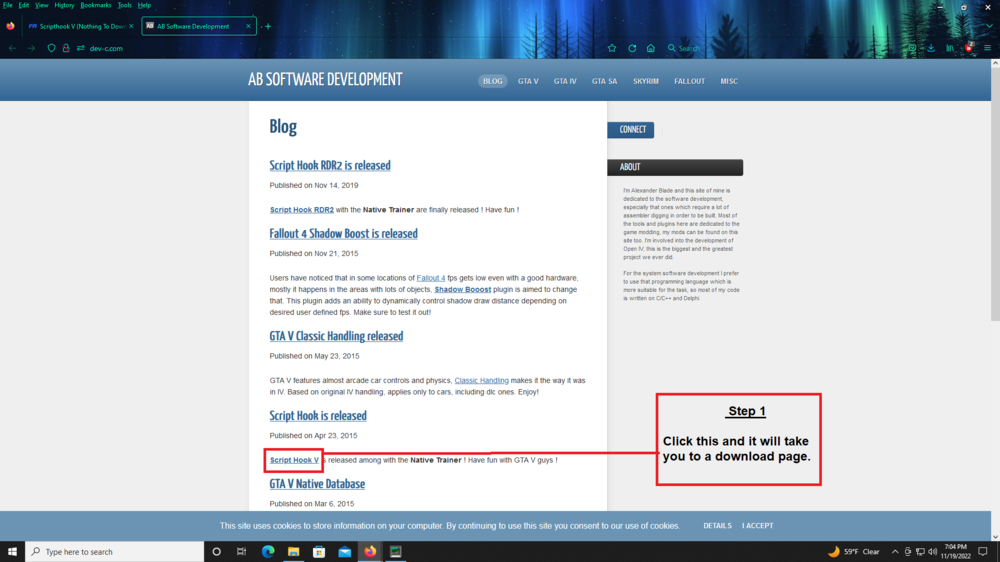
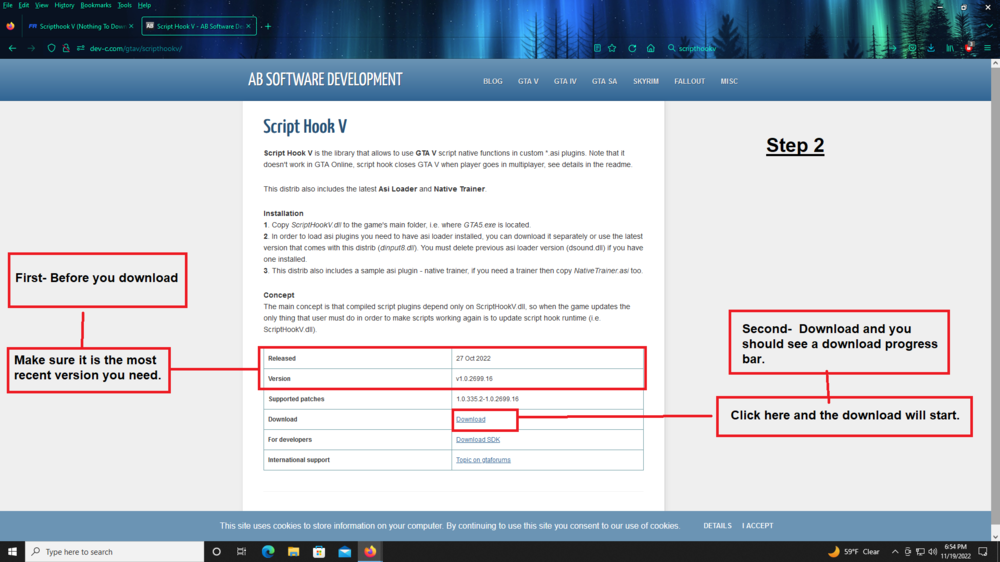
-
 Ok. I also noticed I have to press L Ctrl + P, not just P to activate the laptop. Unfortunately, P brings up the pause game menu. Of course I could change that. This mod is really neat so far. Ricy doing a great job on it. I actually got rid of my beloved Computer+ I've been using this whole time since this has those same backgrounds and other neat features.
- 707 comments
- 33 reviews
-
What is the best way to position the Laptop? When i select a vehicle from the garage it spawns me in it and I get your notice to use A D to move it. If I get out of the vehicle that notice goes away and I can't get it back so I have the laptop just outside my windshield. When I try to position the laptop in the vehicle in first person it is tough to try to get it to sit on the default laptop. I find a good view would be in first person just outside the vehicle but again you left your vehicle so the notice goes away. Also once you set it so it saves as xml, how can you re-adjust it? I know to go to Internal>laptop position xml but do you minimize the game then make adjustments to the xml then go back in? What's the best way to get it to sit where you want it? Thanks
- 707 comments
- 33 reviews
-
That could manually be fixed but it would take time to find the right Upper Skin in EUP and have to do that with all the uniforms you are having a problem with. Download and install this should fix it.
-
If you can't get winrar to work then you might try 7zip. I use this to extract rar files. Don't know why it is only with this site you can't open files. Also, if you have any live scanning that is part of your anitviruse then disable those also. Sometimes disabling the anti virus doesn't disable the live scanning, if you have that. I've had problems with McAfee in the past trying to download files from this site. https://www.7-zip.org/
-
In your main GTAV folder go to the lspdfr folder, then data folder, then go to Duty_Selection XML and open it. Under the <Vehicle Descriptions> add new lines for your add on vehicles.
-
Is the current gameconfig still working or does it need to be updated? I don't see an updated gameconfig yet anywhere for the 2699.16. I updated LSPDFR, RAGE and SHV but in my experience a gameconfig needs to be updated also. I haven't had time to try it yet after updating those.
-
Is it only on certain vehicles? Like does it only happen to particular vehicles you installed? I wonder if it is a problem with the vehicle(s) you installed. Or did you edit your carcols file in the past that may be causing that? I'm not sure.
-
Is that your video? Interesting to see how they slowly move up to clear the street. Nice pics.
-
I think we are still waiting for an updated gameconfig. I would think that is why you are having that problem. I just loaded it 30 mins after I commented and it loaded good with my current game config version 2699. Got on duty and everything seems fine. So I guess it's not a gameconfig issue. Not sure what your issues are. Also, just to make sure since you didn't mention it, you did install the latest lsfdfr, right? So there are 3 that needed updates LSPDFR, RAGE and SHV.
-
 When contacting Dispatch can you say for example 1-L-18 instead of 1-Lincoln-18? In a hurry to tell dispatch but you should give out your callsign, it is quicker to say the Letter rather than the Word at times. Just wondering if the speech recognition would understand that or not. Of course that is if it is properly added in the XML. Dispatch 1L18 or L 18 request Backup, Tow Truck, Air Support.
- 1,357 comments
- 85 reviews
-
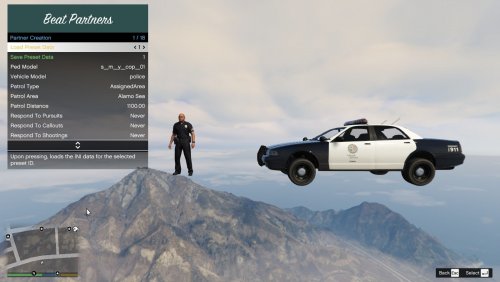 I see in the title, the last word is Supervisor. What and how do you use a supervisor? I don't see it in the description.
 -
 I'll check this out. When I request roadblock from Ultimate Backup it seems to always put the Block on the wrong road. Like the road next to the pursuit. I always get that Roadblock ineffective notice. It's like, yeah no kidding, you put it on the wrong road. Hopefully this will work better. I want to request roadblock while in pursuit. I probably wouldn't be interested in the manual Block but I'll explore it.
- 248 comments
- 17 reviews
-
Reinstall the current version of EUP then, if needed, install the EUP-UE. When you install EUP it will overwrite the old files. I don't know how to uninstall but if you just need to get the uniforms to look right then it would be just a reinstall of both.
-
The title updates are still coming and it could be a pain to deal with but not as bad as it use to be I think. I started in March 2018. You just need to know what needs to be updated. Most mods/plugins are updated within a week.
-
Quick and Easy would be if you kill too many civilians then your own colleges turn on you and you get a "warrant star" or maybe they just shoot you dead lol.
-
I was able to play this mod after 2 or 3 missions. I personally like to open it up to all 3 characters. Be aware though, if your last saved character was Trevor then when you play LSPDFR and drive by the Biker Gang Garage in Mirror Park then they will shoot at you. Since Trevor isn't too friendly with the Bikers. When playing this mod the game seems to link you to the last character you played in order for it to work.



