


Matosh
Members
-
Joined
-
Last visited
Everything posted by Matosh
-
The driving mechanics and car damage in GTA IV were a step in the right direction. It was what made every chase unique and complex. It took skill to drive and better it looked completely realistic in the way the cars moved. Now with the GTA V, the new mechanics, the driving looks cartoonish and more like an arcade game. This is a step backwards. Now if you crash a car, fantastic damage detail is gone, instead you will get the same type of damage as you would from any normal racing game. So every car is essentially a tank now. It is a good thing not to be too much excited about something, like for example GTA V because now I would be very disappointed. I hope that they are going to fix the driving mechanics in the PC version.
-
Make sure that you are running the game with the administrative rights by going to GTA IV/EFLC folder, right click on GTAIV.exe/EFLC.exe, select 'Properties' then 'Compatibility' and enable option 'Run this program as administrator', also do the same exact thing to the LaunchGTAIV/EFLC.exe (if you have Windows 8, then ignore LaunchGTAIV/EFLC.exe part).
-
I don't know what exactly is the problem with your video mode settings, if you could gives us more information that would be great. I can see that you forced antialiasing but yet the antialiasing quality is set to zero (disabled), maybe setting 'ForceAntialiasing=true' to false could fix something. Also, if your resolution in-game and in .ini file is set to 1920x1080 then why forcing it with the 'ForceDisplaySize=true' option?
-
-
Install or update DirectX.
-
***Nothing to see here***
-
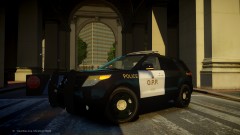 I don't know if anyone noticed it, but dont you think that those wheels/rims are little bit bigger than the ones from the real life?
 -
You can only arrest one of them at the same time, but you can arrest one then call transport unit, arrest two then call transport unit and arrest three then call transport unit.
-
Make sure that you are running the game with the administrative rights by going to GTA IV/EFLC folder, right click on GTAIV.exe/EFLC.exe, select 'Properties' then 'Compatibility' and enable option 'Run this program as administrator', launch the game.
-
http://www.lcpdfr.com/page/tutorials/index.action/_/vehicle-modification-tutorial/
-
Open Policing.ini file from the scripts folder then locate and set Resist Arrest = TRUE to Resist Arrest = FALSE. Download and extract latest Scripthook.dll and ScripthookDotNet.asi files (http://www.hazardx.com/details.php?file=83) to your GTA IV/EFLC folder, and overwrite the existing ones. If you're in the vehicle pursuit or when you are responding to callouts generated by Braveheart's Policing Script, then LCPD:FR will not recognize it as a pursuit or the active callout and therefore the backup keys will not work and the backup units will never arrive.
-
http://www.gta-modding-chest.com/database/327-2013-ford-police-interceptor-liberty-city-police-department-els7/index.html http://www.gta-modding-chest.com/database/320-federal-signal-valor/index.html
-
Make sure that you are running the game with the administrative rights by going to GTA IV/EFLC folder, right click on GTAIV.exe/EFLC.exe, select 'Properties' then 'Compatibility' and enable option 'Run this program as administrator', also do the same exact thing to the LaunchGTAIV/EFLC.exe (if you have Windows 8, then ignore LaunchGTAIV/EFLC.exe part).
-
Create ELS folder inside of GTA IV root directory and move default_config.ini to ELS folder.
-
Then it's probably some kind of bug.
-
So in the game lights are still yellow/amber?
-
It's DEFINITELY emerlights_emise texture file, you are obviously doing something wrong. emerlights_emise - lights emerlightse - lightbar glass colour
-
As far as I know the lightbar lights are always or usually mapped onto the emerlights_xxxx texture files.
-
http://www.gta-modding-chest.com/database/311-2013-ford-explorer-code-3-21tr-plus/index.html
-
'?do=embed' frameborder='0' data-embedContent>>
-
The link for the model is inside of this pack (http://www.gta4-mods.com/textures/rapid-towing-skin-pack-f20422).
-
'?do=embed' frameborder='0' data-embedContent>> http://www.gta-modding-chest.com/database/101-texas-dps-highway-patrol-pack-els/index.html '?do=embed' frameborder='0' data-embedContent>> '?do=embed' frameborder='0' data-embedContent>>
-
-
Mirrors should be black even if you make the template all white, I think.
-
http://www.gta-modding-chest.com/database/334-2013-ohio-state-patrol-charger/index.html http://www.gta-modding-chest.com/database/310-liberty-state-police-emergency-vehicle-package/index.html http://www.gta-modding-chest.com/database/284-2013-dodge-charger-liberty-city-police-release/index.html http://www.gta-modding-chest.com/database/247-2x-2013-liberty-city-police-department-dodge-charger-police-package/index.html http://www.gta-modding-chest.com/database/203-2012-dodge-charger-tomar-blade/index.html http://www.gta-modding-chest.com/database/231-2012-dodge-charger-us-border-patrol-els7/index.html http://gtapolicemods.com/downloads.php?do=file&id=2284 '?do=embed' frameborder='0' data-embedContent>>
