


Fhsig13
Members
-
Joined
-
Last visited
Everything posted by Fhsig13
-
Hello. I am new to using LML to add non-els packs to GTA V. I am trying to add the pack below, however when I do so by automatically converting it, it crashes my game. I've tried adding the pack and/or vehicles manually, however the lights and sirens do not work when I do. Any help is appreciated. Install.xml attached below. EDIT: Siren issue solved, lighting still not working. install.xml
-
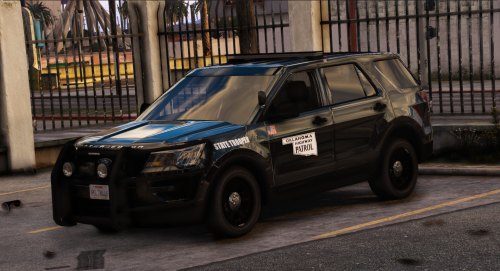 Good looking model. Only critique I have is that there is no red/blue environmental lighting in front of the vehicle. The wig-wags are there, but nothing else. I think the two extras that aren't being used are the ones that would be used for a red and blue flood in front. (That said, I could be mistaken). I should mention that I also found it necessary to change extra_5 from red to blue, as I found the all-red flood to the rear a little immersion-breaking.
- 15 comments
- 3 reviews
-
-

- 1
-
-
-
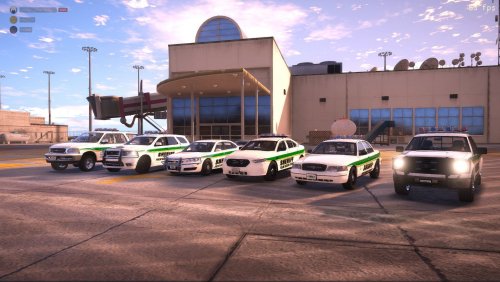 Sorry, but I have a couple more questions...which VCFs go to which cars, and why are there only seven VCFs for a nine car pack?
- 31 comments
- 5 reviews
-
@krazzy I just downloaded your pack and, forgive me if I'm wrong, there don't seem to be any ELS files. There is only the FiveM Ready version and the templates. The singleplayer version seems to be missing, or if there wasn't one, the ELS VCFs are.
- 31 comments
- 5 reviews
-
 I've only tested out the Harley, but's its got a bit of a problem. The headlight shows up in the wrong spot. Instead of the lighting up the headlight, it takes over the left/blue ELS spot. (See screenshot)
- 110 comments
- 39 reviews
-
-
- 1
-
-
2020-01-299_06_08PM.thumb.png.05419732b81f473886f7062b8903602e.png) @Gary. If you don't mind my asking, how did you go about converting the files? I've made multiple attempts and I always end up with non-functional lights, game crashes, or both.
@Gary. If you don't mind my asking, how did you go about converting the files? I've made multiple attempts and I always end up with non-functional lights, game crashes, or both. -
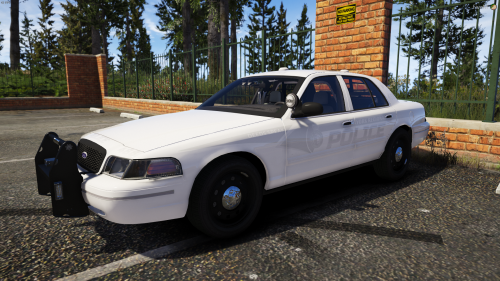 Great, work aside from the strobes in the reverse lights on the crown vic. They're so bright that I can't turn the brightness down in the visualsettings.dat far enough to make tolerable without ruining my ELS brightness. You might want to adjust them.
- 3 comments
- 2 reviews
-
Thanks for the response. I don't think it was a gameconfig issue, as I deleted my mods folder and remade it from scratch, and everything seems to be working fine now.
-
Yep, this guy again. I had to factory reset (without deleting my files) my PC, and when I reinstalled GTA V, LSPDFR, RPH, and everything else I normally run in my game, I encountered the "ERR_SYS_FILELOAD" Crash. I've never seen this one before, and there isn't much helpful about it on the the web, so once again I'm appealing to the wisdom of the crowd. I do use a gameconfig, and I've tried removing and remaking my mods and plugins folders. Everything seems to be installed correctly, and when I verified the game files, everything necessary was present. I have no clue why this would happen. My GTA V, RPH, ScriptHook V, ScriptHookVDotNet, and all my mods are up to date as well, so this doesn't really add up. If anyone knows anything about this, I'd very much appreciate the help.
-
Thank you, but I don't think so. I'd been making edits to it all day that day, and nothing happened.
-
My game has been launching and playing fine up until today when I started receiving a crash with the message "Load failed, Please check your storage device and try again" from GTA V. I tried reinstalling RPH and my savegame, but to not avail. I had changed nothing that should've broken the game before this happened. I had just been playing, quit to change a value in visualsettings.dat, and haven't been able to get back in since. There isn't anything useful about this error online, so any help would be appreciated!
-
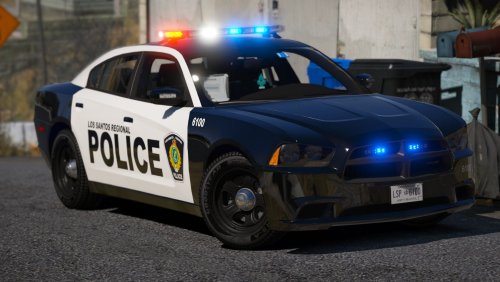 Hey @Jedahdiah, I love this pack, but I've just noticed a discrepancy between these cars, and their real-life counterparts. I know that LSPDFR models are never meant to be 100% accurate, but I think this is worth looking into. It would appear that the slicktop FPIS and FPIU in real-life only have lights at the top of the windshield on the left side if looking at the cruiser from the front. (Right side if looking from the back). It's a not a major issue, just a little bothersome for me. There also seems to be an issue with one of the headlights coming on at ELS Lstg3. Thank you for taking the time to check this out. Example photos:
- 22 comments
- 17 reviews
-
Thank you, but I figured it out. I downloaded and added in the newest version of Interaction+, which seems to have fixed it.
-
Interaction+ is a no-go for me at least, it crashes LSPDFR 0.4 when use it to ask for ID during traffic stops.
-
-
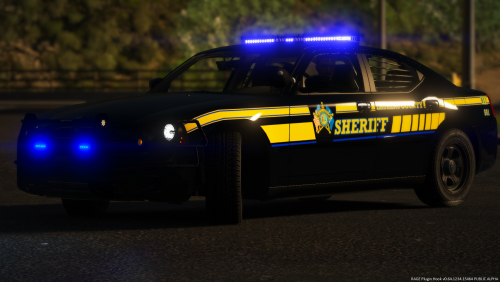 Great looking pack, dude! The one thing I'd love to see, if Laurens County uses them, would be a slicktop version of that awesome 2015 Tahoe. Otherwise, you couldn't have done better.
- 14 comments
- 2 reviews
-
-
- 1
-
-
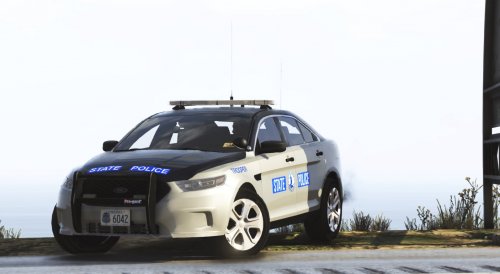 Thank you. I did some more testing, and it seems to be an issue with all of the unmarked vehicles in the pack. The slicktops (Motor Unit Tahoes and FPIU/Explorer) are fine. I've seen this before with other packs, and I haven't found many solutions as of yet, and the ones I do know of didn't work here, I.E. various AllowENVlight=true's being set to false, the slicktop=true/false thing I mentioned before. Hopefully you can figure it out, because I love the models and their lighting setups, just that little bug irks me.
- 36 comments
- 4 reviews
-
@Cameron Waller Great pack, tons of variety, just amazing all around. The one and only issue I have, is that on the Unmarked FPIS (Taurus) and the Umarked CVPI (Crown Victoria), and Unmarked Charger when I change slicktop=true to false to allow environmental lighting all around the vehicle instead of just behind it, there is no blue light flooding directly in front of the vehicles. Just the strobes. It's not a huge deal, it just irks me, as I have a thing for Unmarked FPIS's. It doesn't happen with the Slicktop/Unmarked SUVs that I've tested so far either, if that helps.
- 36 comments
- 4 reviews
-
The slot in the example VCF is police, and the video I believe is police3. It happens in any slot though, but doesn't affect the unmarkeds in the pack.
-
I encountered an issue a while back with @Fabe's SAHP Pack. At nighttime, only the red environmental lights show up, to one side of the vehicles, on the lightbar-mounted vehicles at least. This occured a with a couple of his other packs, and not just for me. I checked the VCFs, and nothing in the ENV column is set the false, and slicktop is set to false as well. I haven't been able to find a solution, and I'd like to try the pack again, I'm appealing to the wisdom of the crowd. VCF Example: Video Showing Issue: If anyone knows anything about this kind of thing, please pass your knowledge along! I know I'm not the only one who'd appreciate it! TIA.
-
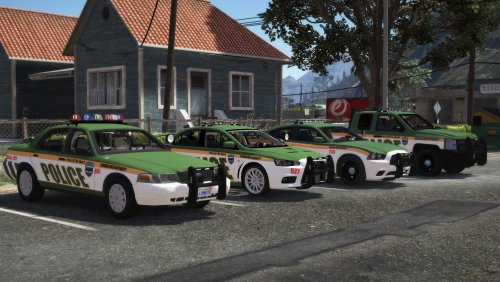 Before I begin, I would've given you another half star if the system allowed for it. That said, I love the liveries on this pack, and that you included Peds, but I don't love that the first two ELS stages have no lighting in them, and especially that you used a rambar that was meant to have lights on it, but you blocked them out. (It took me quite a while and several attempts at cleaning and tint removal before I caught that thy were grey bars and not lights). I really do like your vehicle choices and the inclusion of a K9 livery, but I just can't hand you a five star review when the lighting isn't as realistic as it could be. I do apologize if this comes off harsh, but I really do mean it in the most constructive and respectful way possible.
- 8 comments
- 6 reviews
-
-
- 2
-
-
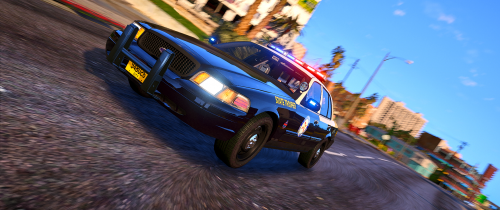 @Trooper D. I seem to have stumbled onto another bug/issue with one of your vehicles, I'm afraid. The lighting on the slicktop changer, well bang on, doesn't flood in front of the vehicle, regardless of slicktop= is set to true or false in the VCF file. When it comes to emergency lighting, this is a major pet peeve of mine, but I understand that it isn't for everybody, so I'll leave it to you to make the call on fixing it or leaving it be.
- 58 comments
- 8 reviews
-
I recently had to reset my PC, and in the process of re-downloading and reinstalling everything, I thought I had followed all the instructions. However, when I launch my game and go on duty, I receive a message that Traffic Policer, Arrest Manager, PeterUCallouts, and Assorted Callouts are not installed correctly and therefore won't load. I ran Albo's troubleshooter, and it allows for autofixing, however it gives me an error message stating that it doesn't have file permissions, when I attempt the former. I can't figure out why this might be happening, aside from the fact that when I installed LSPDFR, it created a second plugins folder inside the orginal, which is where the mods installed originally, before I cut and pasted them to the correct one, and deleted the duplicate. If any one knows how to fix this, I'd appreciate it, as I'm two days into this now. Troubleshooter log is as follows, TIA!:
-
@Trooper D. Is there a fix for the back left light on the charger not lighting up yet, by any chance? I tried redowloading the pack and replacing the VCF, as well as replacing the text in the VCF with the one your provided above, but to no avail.
- 58 comments
- 8 reviews
2020-01-299_06_08PM.thumb.png.05419732b81f473886f7062b8903602e.png)
