


YatzNexus
Members
-
Joined
-
Last visited
Everything posted by YatzNexus
-
 @TdePadua Parks is aware that some people are experiencing this. He'll be looking at it when he has some time to get around to Custom Backup again. As a side note, I have found that for me it only affects certain types of backup. For example, I have a DismissTime of 0 and when I call Local or Noose SWAT, they never leave as intended. But if I call Local Backup, they leave pretty quickly. So, something for a future update.
- 378 comments
- 23 reviews
-
Don't know why it has taken me more than a year to actually try this mod out. Now, I could never play LSPDFR without it. Easily one of my top 3 mods. Period.
- 378 comments
- 23 reviews
-
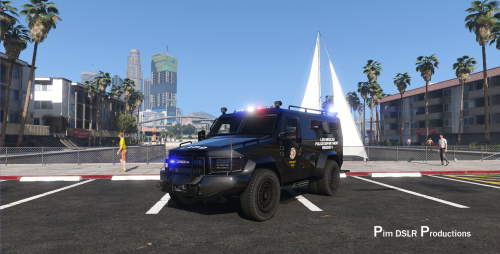 Great additions to Cosmo's original! Lights look great and the other features are much appreciated!
- 67 comments
- 11 reviews
-
For anyone having an issue with vehiclelayouts.meta, please see my post here: http://www.lcpdfr.com/files/file/10301-lenco-variation.
- 67 comments
- 11 reviews
-
-

- 1
-
-
 For those having trouble with the vehiclelayouts.meta provided by Cosmo here or in PimDSLR's updated version at http://www.lcpdfr.com/files/file/12411-lenco-bearcat-swat-code-3-arch-liberty-more-lights, the bit Cosmo quoted above is not correct (@Cosmo, including you so you know as well if you are still doing this stuff). Take note of the Seats and Entry Points from Cosmo's quote above and you'll notice some with numbers at the end. There are custom entries in a different part of the meta file that defines those and that's what is missing (therefore causing the game to crash). Additionally, if you replace the entire meta file, there are changes to the granger, bikes, and other vehicles which have nothing to do with this modification, so you may also crash because of those. I did a full comparison and here is what you need to change in the meta file... First, use Open IV to grab a clean, original vehiclelayouts.meta from "...\steamapps\common\Grand Theft Auto V\update\update.rpf\common\data\ai". If you already have your own customized vehiclelayouts.meta, then open that one instead. Next, search for the following section: Immediately after that section, INSERT the following: Next, SEARCH for the following section: Immediately after that section, INSERT the following: Lastly, you replace the section Cosmo partially mentioned above. Basically, search for a large section about 2/3 down the meta file which begins with: Highlight everything from <Item type="CVehicleLayoutInfo"> all the way down to the end tag noted in the next spoiler tag (please note you should ONLY highlight down to </item> - I have included the second line so you know for sure where to stop; in other words, do NOT INCLUDE the second line in your bulk highlight): That highlighted section needs to be replaced with the following: Unless I have a typo or syntax error above, that should correct things for those of you that are crashing and ensure you are only putting what needs to be put inside the meta file. I have extensively tested this as best I can in my own game, which is highly customized with many vehicles, my own custom DLC packs, and lots of changes to these same files and Cosmo's and PimDSLR's vehicles both worked as expected, including multiple passengers, multiple entry points, trailer hitch, etc. Also had no game crashes at launch or when getting into some of the other vehicles mentioned above. Hope that is helpful! Thanks for the mod Cosmo and PimDSLR!
- 80 comments
- 19 reviews
-
-
- 2
-
-
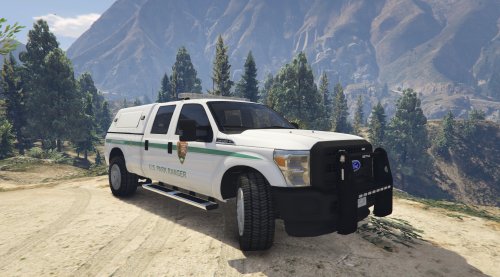 Simple, clean, realistic, quality texture. And it includes all my vehicles as a bonus! Great work as always Parks!
- 11 comments
- 4 reviews
-
 Great work as always from Stealth. What first sold me on this callout pack were the ambient events. I was at a stop arresting someone for a DUI in Sandy Shores. In the background, I saw a guy running with a knife (and thought that was pretty odd). Then the guy ran up to a truck, dragged the driver out and started to drive off. A bystander did the whole "let me get this on camera" thing we are all used to, except as the perp was drive away, I got a call from dispatch that a carjacking had just been reported. I let the DUI go and sped after the carjacker. Later I realized it was part of this mod. The level of realism is superb. And you have to make real decisions. LSPDFR doesn't have a way for you to call in something like this, so you have to choose sometimes the greater of two evils, so to speak. Additionally, the mod has never caused a crash for me. Every once in a while, a callout or ambient event will have a minor issue or be a little confusing, but even that is rare. Definitely an always enabled callout pack for me!
- 423 comments
- 73 reviews
-
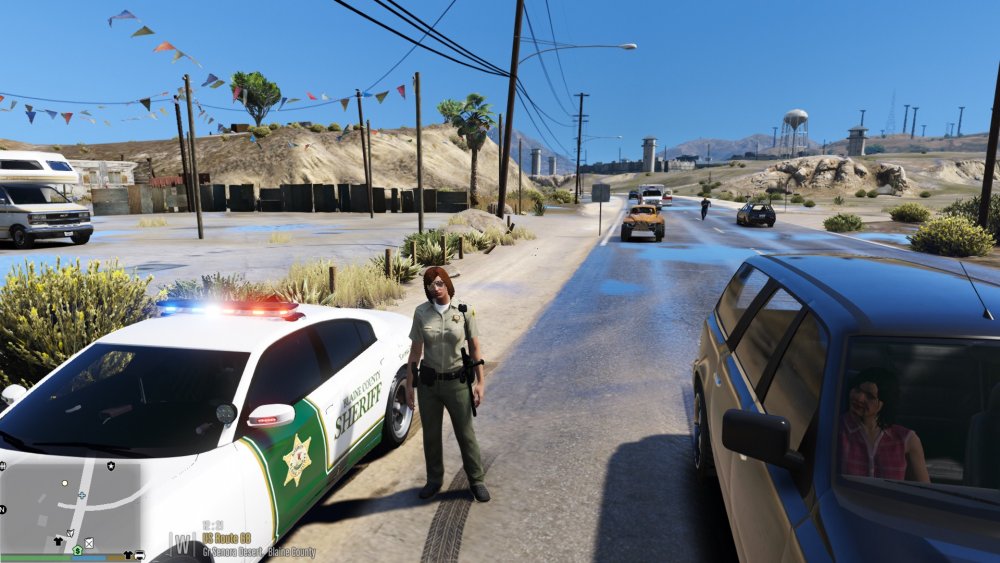
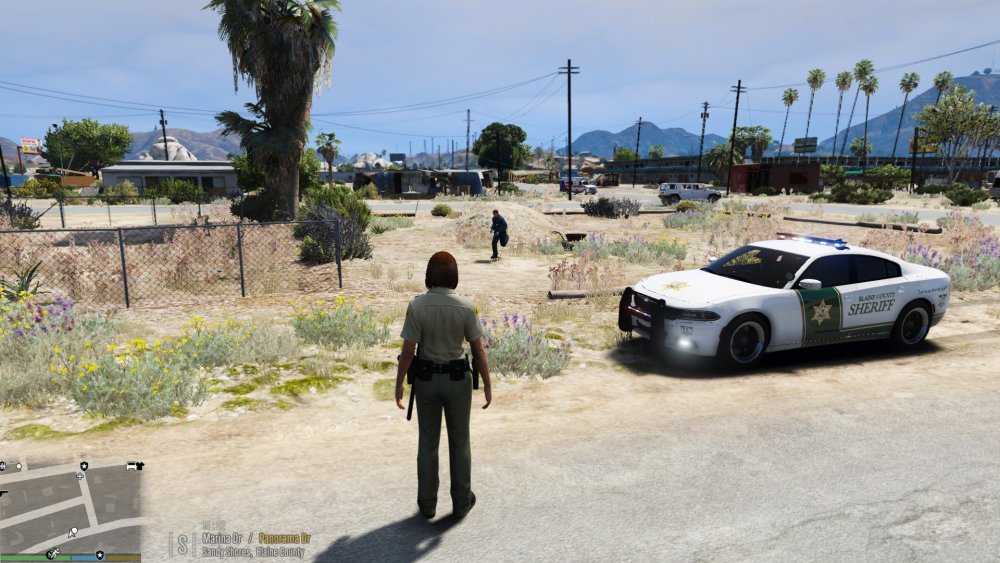
@PNWParksFan screenshot as requested. Not as far as usual, but still a good example. Will try to get some more if needed. Dead ped is a short distance below the picture. The only entry I recently changed in your INI is "WarpCloserDistance = 250". BetterEMS.ini Another screenshot attached. Sandy Shores pretty close to medical center. Notice no traffic. Dead ped is just to my left against the fence. The EMT ran all the way there and will then run all the way back when done.
-
 Yeah, let me see what I can get. Appreciate your help. Might take a few minutes to get a good example.
- 783 comments
- 86 reviews
-
@PNWParksFan Lately my ambulances are MOSTLY stopping a really long distance away and running to the scene. Close enough to see them, but like 30+ car lengths away. Variety of locations. I did change the quick warp distance from your default value to a value a little further away so they aren't immediately on site when I warp them closer, but changing it back didn't help. Any ideas?
- 783 comments
- 86 reviews
-
 Love this mod! A lot of options and they all seem to work well. Already placed a couple of other mods I used regularly. Appreciate the work!
- 108 comments
- 24 reviews
-
 Assuming I am understanding you correctly this time, you mean they aren't on your weapon wheel at all, correct? If that is true and it is correct in the INI, then for the flashlight it usually means you have a mod conflicting with it (author gives one example in the mod description, but I've seen others as well). You just have to find the mod that is conflicting. That's about all I have had experience with myself. One thing I just thought of - some mods will crash if the settings file is not formatted correctly. Could be something as simple as a misspelling or bracket missing. For other mods, the mod works fine, but that one item does not work. Since I don't know how the author is parsing the INI file, you may just want to double check everything in your custom INI file as compared to the original to see if there might be any errors. Just taking a shot in the dark here, but thought it was worth mentioning.
- 75 comments
- 33 reviews
-
@SHERIFF/EMS/FIRE, I'm using OD Loadout with the latest version of the game, latest version of RPH, latest version of Albo and Darkmyre's mods, several other LSPDFR and GTA-5 MODS, and a custom heavily modified personal DLC pack. No problems with OD Loadout at all. As with another gentleman before you (earlier in comments) it is likely a conflict with another mod. Also, sometimes the logs can be confusing as to which plugin actually crashes (not suggested you misread it - just saying some people do). @DANIELCHIA, the flashlight is a Melee weapon, so it shows as a secondary or tertiary weapon at the bottom of the weapon wheel (where you see the hand, you have to scroll with the mouse wheel, depending on your keybindings, to cycle to the flashlight). Hope that is what you meant. Sorry if I misunderstood. @TdePadua, as others have requested, any chance you can add the fire extinguisher (or maybe add a framework so that we can add whatever we want by it's in game code name)? I am actually able to put out fires quite frequently to stop car explosions, so it's very helpful (and realistic to have in the squad car). Would be appreciated. For now, I just spawn it in with a trainer as needed, but that breaks the immersion.
- 75 comments
- 33 reviews
-
 Thank you very much for the update and the callouts in general. Appreciate the work! First, just a note that you may want to consider the version when compiling your library. No matter which version of your DLL I look at, the details always say 1.0.0. Since the download, folder name, etc., don't have a version number, the only way I'm able to differentiate versions is because I always rename the folder myself with the ver number. Just a thought. Second, was curious if you would ever consider an options file (INI or XML) that allows enabling/disabling callouts. Just out of personal preference, there are a couple I don't usually use. I role play and it breaks immersion to ignore a callout or press X to cancel and call another callout, especially since I don't use X normally or anything like Callout Manager. I just wait for the callouts to be broadcast normally while I do normal patrol and ambient events. Obviously not that important, just wanted to see if you'd mind. Thanks again!
- 329 comments
- 53 reviews
-
 Great collection of callouts. Unique, entertaining, and immersive. All of the callouts have been 100% stable for me so far (latest GTA and RPH). Great support also. Thanks PeterU!
- 546 comments
- 103 reviews
-
 Very immersive, well thought-out multi-part callouts. Prepared scenes, easy to follow prompts and instructions. Great addition! Can't wait to see what else gets included in the future!
- 166 comments
- 75 reviews
-
Was just about to post the same issue. Thanks for looking into the issue, LowRid3R! If you specifically need any additional logs or testing to help/confirm, let me know. Otherwise, I'll wait patiently for the update. Great mod, thanks!
- 166 comments
- 75 reviews
-
-
Very odd. Sorry you're having the issue. I just recently updated everything. Started from fresh GTA V folder and latest RPH, ScriptHookV, etc. Even using potentially buggy beta versions of Albo's mods not yet released publicly, along with Darkmyre's Search Warrant (which includes an option to loadout from your own trunk) and no crash. In fact, I just finished more than 3 hours without crashing, including using all the weapons from what I have set from this mod (never had that happen before). Had one idea IF it isn't something else entirely. Perhaps it's something you have set in the INI? Maybe a particular setting doesn't work well in the new version? That's a stretch, but something to try out after you've looked at other things. Hope it works out.
- 75 comments
- 33 reviews
-
-
Thanks for the response PeterU! And I understand losing sight - happens to me with my own code at work many times. The flight boarding one makes a little more sense now with your description. I don't use that particular Search Warrant, but I do use the new Police Search (successor to Vehicle Search, which now includes ped search), so I'll test that out next time I get the callout and see how that works. As to the log, I unfortunately recently cleared the historical logs because I just started testing Albo's unreleased versions and wanted a clean set. Usually I back up logs before clearing them, but didn't see the need this time. Murphy's law in action :) I haven't gotten that callout again yet, but as soon as I do, if the situation happens the same way, I'll be sure to save the log and send it your way. Thanks again for the great work and support!
- 546 comments
- 103 reviews
-
So far really enjoying the new callouts. For my part, no crashing or callouts not working. It's more just confusing. I've figured out most of them, but the tips can be a bit confusing (that post in the top-left corner). No problem with trying to do a little "police research", but for some of these, the research is very much not intuitive in some of them. A prime example is the flight boarding one. When I arrived, the individual described was walking away from the airport to their car. Saw them immediately and pressed Y to initiate dialog. All I could do is get their ID which came up clean. Could not initiate any other conversation tree with them using your mod or the base game (E for example after stopped a ped). The vehicle was not far away and I beat the potential perp to it, but I could do nothing with the vehicle at all. No keys allowed interaction (except F to break in and drive it). The tips mentioned placing a GPS - no way to do that. There is a way to set a GPS "waypoint" to the vehicle through your Y menu, but it didn't do anything (the purple blip was already on the map before I even did that, and setting it didn't do anything further). So, I waited. Perp entered vehicle and just sat there... for 10 min... Didn't drive away, didn't leave the car, nothing. Just really confused :) On the flip side, loved the burglary callout. I was an idiot and approached code 3 and gave myself away immediately - nice touch. Still ran him down and ended up being able to go back to the scene and collect the evidence. All worked well. Next time I got the callout, I had learned my lesson and approached silently and caught the perp. So, callouts like this all made sense and worked well. Just one or two that really have me baffled - maybe it's just bugs?
- 546 comments
- 103 reviews
-
TdePadua, not sure if possible, but it would be nice to have different loadouts in addition to the default that can be tied to something like a particular cop type (s_m_y_sheriff_01 vs. s_m_y_cop_01, sheriff vs. police for example). Or maybe just 2 additional loadouts that you can select from default, 1 and 2 via a hotkey? The idea being to make it immersive based on what you're playing at the time. The latter might work out better for folks who play British vs. American style as well since the laws are different. Anyway, just an idea. Easy to change the INI and unload/reload LSPDFR in game. This idea just makes it a little more immersive in game. Thanks for the great mod!
- 75 comments
- 33 reviews
-
Perfect addition to LSPDRF! I have always used a trainer (when I don't care about immersion) or Vehicle Search (when I do care about immersion) to provide a better weapon loadout. Now, I just use this. The flexibility you have provided in the INI file is a nice bonus, especially where attachments are concerned. Such a simple mod to install that adds a lot of value. Much appreciated! UPDATE: Just a note that 2 months later, this mod has never left my mod list. It has become a staple that I prefer over all the other loadout mods available to date.
- 75 comments
- 33 reviews
-
 Brilliant addition! Variety of callouts and what's involved (different actual tactics) really make this enjoyable. If I may make one suggestion, for the bank heist, it would be nice to have an option to not use SWAT at all. Anytime I use them, the results vary wildly and I'm a bit OCD (so, yes, my problem, I admit it). I can go in and clear a few perps without SWAT, but most don't spawn until you send SWAT in (unless I'm missing something or doing something wrong). It does help to go in first, but ultimately to be able to do the entire thing by myself strategically and tactically would be very rewarding. Anyway, great mod that actually made my game MORE stable after install (NOT an exaggeration at all). Thank you!
- 1,081 comments
- 166 reviews


