



Harper
Friends of LSPDFR
-
Joined
-
Last visited
Everything posted by Harper
-
Haha. "The Theme From Vice City" Small update from me, I haven't really gotten around to going through the files, I'm too ill to even attempt it. Sorry man. EDIT: Upon further research, it could possibly be a parody of the "Miami Vice" theme tune.
-
Nothing to see here! This topic has been closed by G17 Media staff. If you feel that this topic has been closed in error, please report this post.
-
Take this as an official warning. Don't post another thread on this subject, use your other thread here: Next time, I won't be so kind.
-
Easily, but they don't use CVPI's anymore.
-
After seeing a touching story in the paper yesterday, it gave me a new idea for a skin Long story short: 7 year old kid has terminal leukaemia, Arlington PD and fire rescue helped him act as batman for the day, even using their code 3's. What also surprised me was that they have 2012 dodge chargers.. Therefore I'm making a three-car skin pack of their livery (which is quite nice IMO) which will be for Any Tahoe, EVI'S 2012 Charger and any older dodge charger.
-
Yeah it's different, everything is in one folder with confusing names
-
In that case, modifications will work with downloaded versions of the game (i,e: Steam) usually without a hitch.
-
I'm not fussed about the reputation but I think I have VC installed, I'ma go take a look EDIT: So there's 1,222 WAV files in the game files, this could take a while..
-
We don't support the use of torrented software and therefore cannot guarantee any modifications working correctly
-
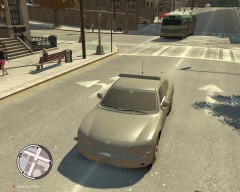 God dammit it Jacob! I said no more hotboxing in the car!
 -
Let's think about this. High poly car mods + ELS x 8 people = tons of crashes.
-
Speaking from experience, it is not wise to use car modifications for MP Groups. We had tons of crashes when we used Sam's non-els cars in the Official group. Just a friendly warning..
-
Make sure you have EITHER dsound or xlive. Don't have both
-
Nothing to see here! This topic has been closed by G17 Media staff. If you feel that this topic has been closed in error, please report this post.
-
Use your duplicate thread for further discussion on this matter.
-
A legitimate copy of the game.
-
Fuckmuck. Google it, it was on Russell Howards Good News and I laughed my ass off at it.
-
Right click your GTA IV Shortcut, click "Properties" and make sure "Read Only" isn't ticked.
-
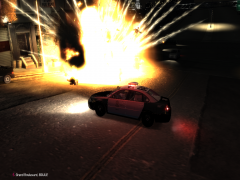
From the album: Yo Dawg, I heard you like photos..
At first glance, any person would think its the film set for the new Fast & Furious film, alas it is not. At around 11:13pm today, residents of sleepy Bohan were awakening to the sound of police sirens roaring over the hill and down into the suburbs, eyewitness accounts report seeing a beat up Rumpo being pursued by four LCPD vehicles and once relentless LAPD impala. The van quickly caught fire before the gas tank exploded, sending the surrounding vehicles into nothing but crumped wrecks. It has been reported that they have been eight fatalities, including NoOSE officers and the suspect himself -
Update your game to the latest patch.
-
Uh, attaching the lightbar using the "Attach" section in zModeler, placing it under the hierarchy won't do anything, it'll just be floating.
-
It means its open to updates. Open = Developer will continue updating it Closed = No more planned updates Discontinued = No updates or tweaks to come, mod finished completely.
-
Nothing to see here! This topic has been closed by G17 Media staff. If you feel that this topic has been closed in error, please report this post.
-
-
You say you check alleyways, most of them in Star Junction can just fit a cruiser down, you can also walk. As for trailers, I think there is a mod, look in this video around the 4:38 mark You can see him hit the truck which causes the trailer to detach and fall onto its side


