


DrGrommel
Members
-
Joined
-
Last visited
Everything posted by DrGrommel
-
Well one solution would be to rename the files of one of the vehicles to another stock vehicle's name that you don't mind replacing and just add those renamed files to the vehicle.rpf you are using. Keep in mind though that handling, LODs and other stuff might be very different between cars and that the vehicle will most likely not fully work as intended if you don't use the slot the vehicles's creator edited it for (if you don't drive the vehicle yourself it might not matter much and still work ok enough though). If you wanna do it properly you would have to edit the global vehicle.meta-file so that the lines for the slot you are using are matching the vehicle's intended slot. Or at the very least change the handling-id so it fits the vehicle you are installing.... this is what I meant with tedious :P
-
Yea those packs tend to go overboard and add way too many vehicles with way too many polygons. Plus with the latest update many cars from older packs have issues with their lights now. I'd love to have something like this that works, but for now I just started replacing assorted in-game vehicles with models that work and are not too taxing on performance. It's a little tedious but it also avoids other issues that add-on cars can cause.
-
 The uninstaller from one of the previous versions was said to be buggy I think. The latest one definitely works. At least for me everything worked when I upgraded to the newsest one.
- 779 comments
- 187 reviews
-
Did you use the uninstaller before reinstalling? Because if you didn't you probably messed up your global vehicles.meta. Use the uninstaller and then reinstall the latest version. If that doesn't help delete your mods folder and do a clean install. Also mind that if you install any .oiv package that includes a vehicles.meta (even visual V has one of those inside) you will most likely mess with the cars of this pack. To avoid issues like that install this pack last if you are doing a fresh rebuild of your mods folder. Captain14 set it up so that it only edits specific lines in the vehicles.meta and doesn't overwrite the entire file (which is exemplary and how people should configure their installers!).
- 779 comments
- 187 reviews
-
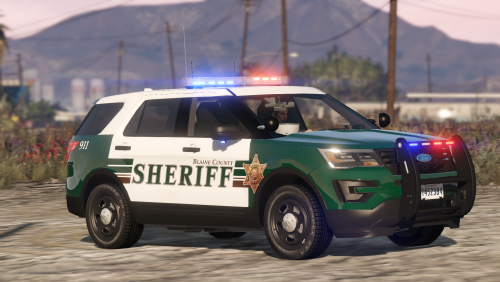 Excellent Quality models. Handling is good and they work nicely along with further carcol modifications. Big thumbs up!
- 77 comments
- 32 reviews
-
Did you get engine sounds to work on the vehicles in question? If so: Try out siren mastery by Albo and add lines for the add-on cars. That gave some of my add-on cars sirens (audio) even though they had no proper audionamehash set. Could be a workaround for your issue. As for lights I gave up on trying to use carcol lines from a custom dlc folder and started editing the global carcols.ymt because I never got the dlc meta to work as well.
-
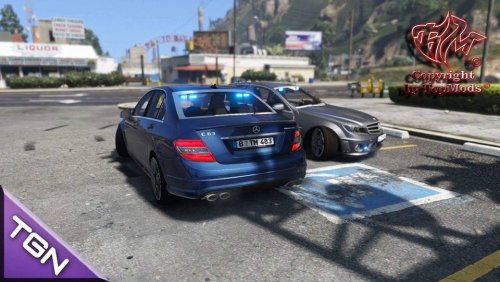 Ok model overall but it needs work. Those odd bright window frames look bad with most colors and the rear center breaklight doesn't look like it's fitted in properly and it glows white. The damage model is also not great. Stuff breaks very easily on slight crashes which I don't like on a police vehicle and the damaged states look kinda meh. Would really like to have a more polished version and if possblie one with lore friendly US-license plates.
- 1 comment
- 1 review
-
-

- 1
-
-
Check out custom visuals in the misc download section. It's a good alternative to radiance and within the download there is a separate taxi sign fix workaround with instructions. You can use that regardless whether you wanna use the rest of the mod or not.
-
Are you doing this all within the dlc folder for this pack? Because as I understand it the carcol lines from this pack are in a separate carcol file within that folder and not in your global carcols.ymt. So assuming siren 37 is from this pack the renamed vehicle files need to be put in the the vehicles.rpf of this pack as well.
- 779 comments
- 187 reviews
-
 I read that some issues can be caused by Trainers. I removed the native Trainer and lspdfr became more stable, yet it still crashes after a while while using simple trainer. I'm running the Game with a 970, 8 gigs of ram and on ssd, so I doubt it's the pc. Installation was pretty straightforward too and I can't see what could have gone wrong with that.
 -
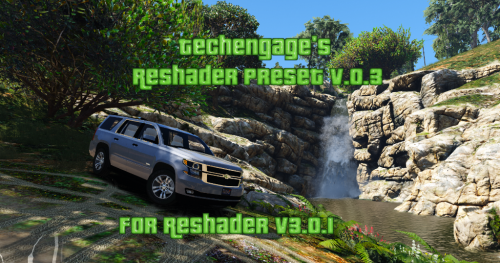
I really want to try this out further, but reshade causes some issues. Using it and launching the game with ragehook causes some weird glitches at times and some crashes of lspdfr. Deleting the native trainer from scripthook helped somewhat, but some issues (like callouts not starting and lspdfr crashing) persist. The visual results are breathtaking in some light and weather conditions, but look a little meh in others. Your presets are a good start and look ok overall but for me they are just too colorful in general and the sharpening could be tuned down just a little. Looking forward to further updates
-
-
 After testing out many mods of that kind I can say this one easily gives the best visuals with visual V in current game verison. Keep up the good work!
- 110 comments
- 23 reviews
-
-
- 1
-
-
 High Quality Callouts accross the board! Didn't encounter any bugs or instability caused so far.
- 166 comments
- 75 reviews
-
Yea I replaced the window dds on the impala with one from bxbugs models and that fixed it on that model. Will try to find some other models with fitting windows or do some editing myself. I can't seem to remember having issues like that before the biker-update. One of bxbugs chargers which was working nicely before suddenly had very dim rear-lights after for example. So there still could be a value to crank up somewhere that could also do the trick, but i'm no expert. Btw your custom visuals seem to give the best results in the current game patch overall (not too bright, not too dim), so I can heartily recommend it also for this pack!
- 779 comments
- 187 reviews
-
Sorry just replacing the visualsettings.dat doesn't fix the issue for me. I'll try go all blue with the files in your pack now and see how that goes. Thx for trying to help though. This just does make everything superbright to the point that some lights are now working as intended but others are way, way too bright (the chargers rear-light bar for example). I still think the issue is texture related (i.e. rearwindows and/or sirenlight-glass-texture).
- 779 comments
- 187 reviews
-
Yea. Well technically I was using the visualsettings.dat from various mods for testing (visual v, radiance 1.8, 1.6 and custom visuals) and the issue persisted. Replacing all the templates seems to be a rather complicated workaround but I guess I'll try that later tonight then.
- 779 comments
- 187 reviews
-
First off those are excellent vehicles. Nice handling, great looks and not too taxing on system performance. However I keep having an issue with all of those models (except the charger) where the rear window tint makes the interior siren lights very dim despite using radiance. Changing the window tint with simple trainer doesn't fix the issue. It also affects interior brake-lights. I'm using visual V 2.90 and running the latest steam version of the game. Anyone knows a fix (other than shooting the window out)?
- 779 comments
- 187 reviews

