exrex0015
Members
-
Joined
-
Last visited
Everything posted by exrex0015
-
 very awesome model template is a bit off where the trim on doors is would have 5 stared if template didnt give me such problems when creating a skin took twice as long as other vehicles
- 148 comments
- 34 reviews
-
-
-
 i have installed tjhe cvpi in police 1 slot with the file u included in IF YOU WANT CVPI IN POLICE SLOT carvariations and lightbar lights up but not grill or rear window lights plz help i did copy police from that carvariations file is that correct?
- 139 comments
- 22 reviews
-
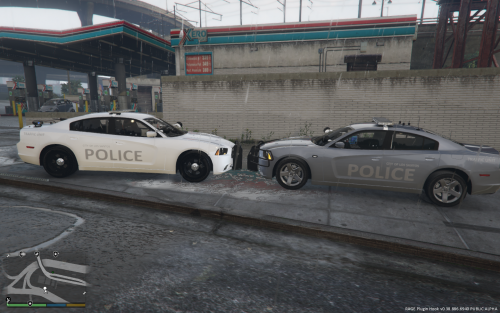 this is a skin i made for the 2014 dodge chargers made by carper who has released 3 modals all of which are on gta police mods and for bxbuggs did my best at a stealth lspd model, works the best on carperinos unmarked unit and vehicle color set to silver is a small bug on drivers side real texture has bleed over not a straight line if some on can fix and send me the edited file i can release and credit you on that dont have time to fool with right now decided to release this and see the thoughts on it! NOTE: THIS IS ONLY THE SKIN, YOU WILL NEED TO DOWNLOAD ONE OF THE CARS ITSELF BEFORE YOU CAN USE MY SKIN Credits for the car models go to Carperino (FARTKNOCKR) and BXbugs123 also his other version not on this site http://gtapolicemods.com/downloads.php?do=file&id=4406 Installation instructions Download and install one of the 2014 dodge charger models. (see the links above, more info on how to install these cars can be found on the download pages) Using OpenIV go to the installed car(s) files and open the texture files (the .ytd files). On the left sidebar search for a file called (without the quotes) "chr2_sign_#" The # represents any number. You should see a file named: "chr2_sign_1". (In case you don't see them make sure you're in the right .ytd file.) Replace any of the existing ones with the file in the 'Texture' folder included in this rar file. If you want to ADD this texture as an additional skin, rather than replacing a skin, simply import the file from the 'Texture' folder and be sure to rename it so the # becomes the first number that's not in use already. (For example if you have "chr2_sign_1" and "chr2_sign_2", and you want to add my skin, import my skin and rename it to "chr2_sign_3") Go to the link above and tell CARPERINO AND BUGGS they did an awesome job on the cars! Play GTA V and enjoy your new skin!
 -
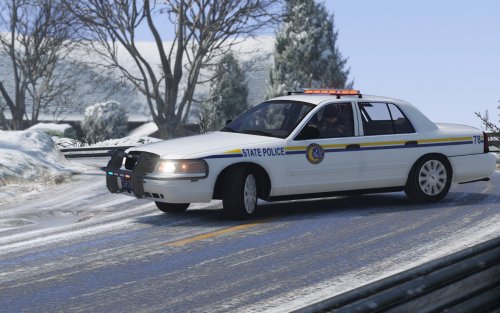 I NEVER play in north yankton but it may not have anything to do with ur model as another is having same issue with police 3 and fbi2 models spawning as they are only THEHURKS models spawning
- 42 comments
- 5 reviews
-
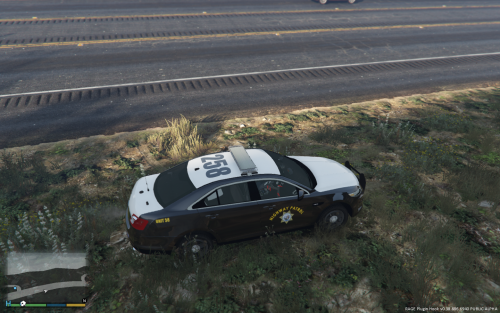 this is a skin i made for the 2013 lspd FPI by THEHURK, inspired by texas dps (state Troopers) for cali highway patrol NOTE: THIS IS ONLY THE SKIN, YOU WILL NEED TO DOWNLOAD THE CAR ITSELF BEFORE YOU CAN USE MY SKIN Credits for the car models go to THEHURK and RoegonTV . Installation instructions Download and install the 2013 lspd FPI. (see the links above, more info on how to install these cars can be found on the download pages) Using OpenIV go to the installed car(s) files and open the texture files (the .ytd files). On the left sidebar search for a file called (without the quotes) "intercepter_sign_#" The # represents any number. You should see these three: "intercepter_sign_1" , "intercepter_sign_2" and "intercepter_sign_3". (In case you don't see them make sure you're in the right .ytd file.) Replace any of the existing ones with the file in the 'Texture' folder included in this rar file. If you want to ADD this texture as an additional skin, rather than replacing a skin, simply import the file from the 'Texture' folder and be sure to rename it so the # becomes the first number that's not in use already. (For example if you have "intercepter_sign_1" and "intercepter_sign_2", and you want to add my skin, import my skin and rename it to "intercepter_sign_3") Go to the link above and tell THEHURK he did an awesome job on the car! Play GTA V and enjoy your new skin! GTA5 2016-05-06 01-06-39-84.bmp GTA5 2016-05-06 01-06-48-67.bmp GTA5 2016-05-06 01-06-45-79.bmp
 -
 i have same problem but his fpiu unit shows as well can get the others to spawn with trainer but wont spawn while chrimes are done also my handling is set to police3 but car drives funny should i change it ?
- 112 comments
- 36 reviews
-
i installed this in police1 slot for use in los santos instead of north yankton and now the only model the lspd use is fbi and fbi2 police1 wont spawn wirthout a trainer now, did i change something?
- 42 comments
- 5 reviews
-
-
-
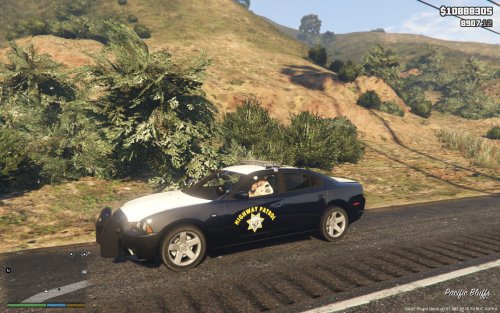 yes it is his look on post it is his charger but with amber light bar from gta police mods
- 6 comments
- 1 review
-
this is a skin i made for the 2014 Dodge Charger by Carperino, inspired by texas dps (state Troopers) for cali highway patrol NOTE: THIS IS ONLY THE SKIN, YOU WILL NEED TO DOWNLOAD THE CAR ITSELF BEFORE YOU CAN USE MY SKIN Credits for the car models go to Carperino and BxBugs123. http://gtapolicemods.com/downloads.php?do=file&id=4406 his amber in light bar version here! Installation instructions Download and install either the marked or unmarked version of the 2014 Dodge Charger. (see the links above, more info on how to install these cars can be found on the download pages) Using OpenIV go to the installed car(s) files and open the texture files (the .ytd files). On the left sidebar search for a file called (without the quotes) "chr2_sign_#.png" The # represents any number. You should see these two: "chr2_sign_1.png" and "chr2_sign_2.png". (In case you don't see them make sure you're in the right .ytd file.) Replace any of the existing ones with the file in the 'Texture' folder included in this rar file. If you want to ADD this texture as an additional skin, rather than replacing a skin, simply import the file from the 'Texture' folder and be sure to rename it so the # becomes the first number that's not in use already. (For example if you have "chr2_sign_1.png" and "chr2_sign_2.png", and you want to add my skin, import my skin and rename it to "chr2_sign_3.png") Go to both of the links above and tell Carperino he did an awesome job on the car! Play GTA V and enjoy your new skin! i will also be adding a california state trooper version later
- 6 comments
- 1 review
-
-

- 2
-
-
 i get this error when installing this mod using windows 10 on ntfs file system
- 1,081 comments
- 166 reviews
-
 great plugin mostly accurite not yet compatible with newest game update thou
- 149 comments
- 29 reviews
-
-
- 1
-
-
 mine keeps saying traffic policer.dll is in wrong folder please place in gtav/plugins/lspdfr and it is already there i have tried to auto fix and it says its successfully corrected but if i close the application and rerun it it still says the same thing also give error wildernesscallouts foler installed in wrong folder wildernesscallouts.dll installed in wrong folder i have re downloaded all files and placed them in the file it and the mod creator says to install them in but still gives me the same error when i run your application the problem im having is that everytime i start a traffic stop an cx runs i call in back up and the back up units make the arrest and lspdfr crashes as they slap on the cuffs
- 379 comments
- 113 reviews
-
 not working crashes game <ul class="ipsList_reset"> <li> <a href="http://www.lcpdfr.com/messenger/45752/#comment-243856" target="_blank" class="ipsType_blendLinks"> <i class="fa fa-envelope" title="Message" data-ipsTooltip></i> code 3 crashes </a> </li> </ul>
- 423 comments
- 73 reviews