



Caramel Please
Members
-
Joined
-
Last visited
Everything posted by Caramel Please
-
 Yeah DOJ uses Thehurk's non ELS pack. But you have to ask before you use them which is what @Killer0034 has done.
- 952 comments
- 158 reviews
-
 Just realised I haven't reviewed this awesome pack yet :( This pack along with the lspd pack was the best pack pre ELS release. Amazing work. I look forward to any future work from you. Very good mod author.
- 445 comments
- 108 reviews
-
 Just realised I haven't reviewed this awesome pack yet :( This pack along with the sheriff/fbi pack was the best pack pre ELS release. Amazing work. I look forward to any future work from you. Very good mod author.
- 779 comments
- 187 reviews
-
I think it was a Dell Studio XPS 8100. If I am not 100% certain that is the model but if I had to bet money on it I would.
-
-
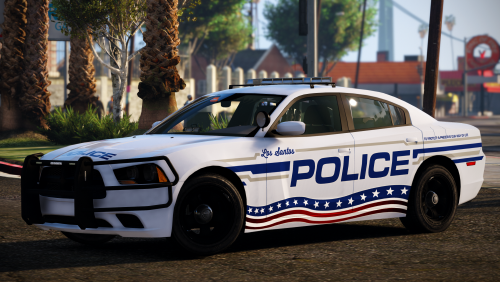 These textures are beautiful! Changing all my vehicles to use these textures. I appreciate your time and effort making these.
- 16 comments
- 13 reviews
-
-

- 1
-
-
Go to the XML file and make it so it says "<LstgActivationType>auto</LstgActivationType>" at the top just under <INTERFACE> I do this for all my ELS vehicles as it activates stage 3 with a single press.
- 952 comments
- 158 reviews
-
 Currently ELS only has access to the following siren strings: • SIRENS_AIRHORN (Main air horn, 0x0EA58C7C.wav) • VEHICLES_HORNS_SIREN_1 (Main wail, 0x0D329446.wav) • VEHICLES_HORNS_SIREN_2 (Main yelp, SIREN_2.wav) • VEHICLES_HORNS_POLICE_WARNING (Main priority, POLICE_WARNING.wav) • VEHICLES_HORNS_AMBULANCE_WARNING (Ambulance priority, AMBULANCE_WARNING.wav) • VEHICLES_HORNS_FIRETRUCK_WARNING (Fire truck horn, 0x14BFBCE3.wav Make sure the sirens are in the correct hash slot so an example make the main wail tone renamed to "0x0D329446.wav" Here are the tones already renamed for you.
- 221 comments
- 40 reviews
-
That is the one he uses.
-
I am 95% sure that they are not meant to have have flash patterns for stage1 and 2 and it is intended for stage 3 only. I believe the xml file was set in the past so that stage 1 came on first then 2 and then 3 but people complained that there were no lights except on stage 3, so Thehurk made the xml file so stage 3 comes on first to avoid the complaints.
- 952 comments
- 158 reviews
-
Yeah so this is performance issues related to scripts, Not hardware or optimistaion issues. That is good news as we know its not your system that is causing the issues. I haven't done it myself yet but your best bet is to install all your mods 1 by 1 and test the game after each mod is installed to see which mod causes the performance drop. This is obviously a pain in the ass and will take a long time hence why I haven't been bothered yet. You said your game is lightly modded, so in your case it shouldn't be a huge pain to do this. I know this is a mod/script issue as in regards to my computer, when I lower my graphics I obviously get better fps in GTA but as soon as I go on duty it drops to the same fps as on max settings.
-
This is confusing me, are you talking about LSPDFR or GTA in general. GTA 5 Is a pretty good optimised game that sides towards being a CPU intensive game. Can you please tell me what fps you get when you launch the game up and do not go on duty, go to both Downtown Los Santos (near the police headquarters) and then go to sandy shores and tell me the fps at both those places. Then can you go on duty and repeat the same steps as above. For your specs assuming you are playing at 1080p, you should use the following to get around 80-100 fps; (Going by a friend that had the same hardware you and my memory) FXAA: on MSAA: x4 Population Density: max Population Variety: max Distance Scaling: max all " " " quality on very high except Reflection put that on ultra and reflection msaa on x2, Grass on high Post fx: Very high Anisotropic filtering: x16 Ambient occulusion: high Tessellation: very high In advanced graphics I can not remember what my friend had but I think it was everything on/max and fram scaling off. Scripts can really impact the performance. Some individual scripts can cause performance issues by themselves and a mixture of scripts can do the same. If you want to, you can post all the scripts/mods you use. You replied to me in a different thread but I will say it again here.
-
Yes, you open GeForce Experience and in the top right click on the icon that looks like a triangle with small circles on each point. Then you can configure the heads up display and keybindings and settings. Once you do that you can record by using the keybinding you set. So when ever I want to record I just launch my game and when I want to start I just press the keybinding which for me is alt+/ it will then record until the game is closed or until you stop it. You can set it so it acts as a recorder for you whole computer rather then just games by changing it to allow desktop capture. This means you can record just sitting at desktop and it will record everything on the screen. By default when you are in a game and you alt tab it "pauses" the recording and does not show what you are doing whilst alt tabbed. Desktop capture shows anything on screen whether that is a game or you browsing the web.
-
@qwertyK Shadowplay imo is one of the best software if you just want to record without worrying about settings. I have been using it since 2015 and never had an issue with it. Quality is great, no lag in the recording and no performance drop in games when recording. Other software is out there that is better if you are a content creator but for a casual user it is great.
-
A pack is in the making as we speak! The author is taking his/her time with it which is very good as the contents will be perfected instead of rushed. There was an lapd pack on here but imo it was rushed and had bugs. (not hating on the author as they already have better skills then me in modeling vehicles) Here is the thread regarding the pack in the works.
-
yeah haha. I couldn't play lspdfr without all of my mods so its a sacrifice I am willing to make.
-
Just chipping in, Keep calm has had multiple reports that it causes performance loss. Just to give you an example of how alot of mods and scripts can cause performance lost; I had a rig with an i5 4590 and a 970, I would get around 80 fps at a mixture of high and very high settings without being on duty. As soon as I would go on duty I would get 40-60 fps. I recently built a new computer with a i7 7700k and a 1080 Ti; I get around 135 fps at max settings whilst off duty, and on duty i get an average of 90 fps with sometime drops to the 60's, in Downtown Los Santos I get drops to 40 fps. I use a very heavily modded game, and I enjoy these mods so I deal with it. One day I will spend a long time to install my mods one by one to figure out which ones cause the performance loss.
-
@Scuderio I can not wait to have an LAPD pack! Thanks for doing this. I appreciate you taking your time to perfect the vehicles rather then rush them out. I am not American but always wanted to have a lore friendly fleet of vehicles for GTA 5. We have got a CHP pack and soon we will have this. Gonna PM you about something as I have looked at your profile and can not find a link to it.
-
"spawn hwaycarX". X is replaced with the corresponding number for the vehicle you want.
- 952 comments
- 158 reviews
-
CPU: Intel Core i7-7700K @ 4.8ghz Cooler: Noctua NH-D15 SSO2 D-Type GPU: Aorus Xtreme 1080 Ti @ 2025MHz Motherboard: MSI Z270 Tomahawk RAM: 16GB (2x8 GB) Corsair Vengeance LPX DDR4 @ 3200MHz SSD: Samsung 850 EVO 1TB SSD HDD: 7TB of storage Case: Fractal Design Define R5 Case fans: 3 x Noctua NF-A14 PWM PSU: EVGA SuperNOVA G2 Gold 750W
-
 I think it is the one that is 6.12KB as it contains a .dll that was modified most recently.
- 17 comments
- 12 reviews
-
-
- 1
-
-
You dont need to buy anything... Winrar and 7zip are both free. They can also both open pretty much every type of archive including zip and rar.
- 952 comments
- 158 reviews
-
I have the addon version and the vehiclesmeta file already has the flag line for them. In the pack there is a link to the textures which you download then just replace/import. So yes they do support multiple liveries,
- 952 comments
- 158 reviews
-
I think they made it like this on purpose as new comers can access the callouts in the mix of the other plugins. It is a reoccurring thing for some newcomers to ask why isn't there anymore callouts as the base LSPDFR only has I think less then 3. Its not that much of a hassle to click on that "Callout Plugins" then click a category and then click the scripts/plugins section to get the rest.
-
Bloody awesome mate! Your work is marvelous and is always appreciated by the community. The OIV pack makes it so much easier to install so thanks for that. These vehicles are accurate and adds to the authenticity of role play in LA. Big kiss from me to you Mwah oxox
- 952 comments
- 158 reviews

