


Destroyer11687
Members
-
Joined
-
Last visited
Everything posted by Destroyer11687
-
 Yea, I don't know either. All the modding I did seemed to screw up my game and it stopped working properly for no apparent reason. So I did a fresh install and installed your bearcat and replaced the vehiclelayout.meta right away before I did any other modding, and it worked. Thanks!
- 80 comments
- 19 reviews
-
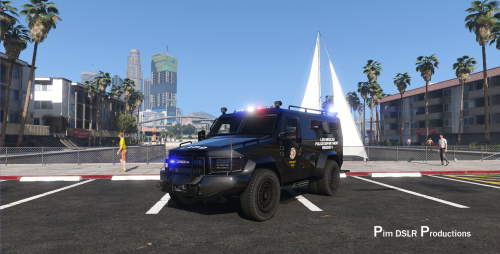 Thanks for the model! I love having more lights as an option. One question I have is that the rear globe light on the left side has a missing strobe it seems. One other user took a picture but I didn't see a response to his question. I'm just wondering if this intentional or not? Thanks!
- 66 comments
- 11 reviews
-
So, I tried to edit the Vehicle Layouts meta without replacing because I have already edited it, and my game crashes every time. I checked and rechecked the file, and it still crashes every time. Is there more code in there that needs to be edited other than what you provided? It works fine if I leave that meta file alone.
- 80 comments
- 19 reviews
-
@Officialjake In the vehicle meta file my guess is there is no audio hash since it's suppose to replace the riot. You might have to go into the meta file and change it to this <audioNameHash>riot</audioNameHash> because right now my guess is that it just has <audioNameHash />. Hope that helps!
- 80 comments
- 19 reviews
-
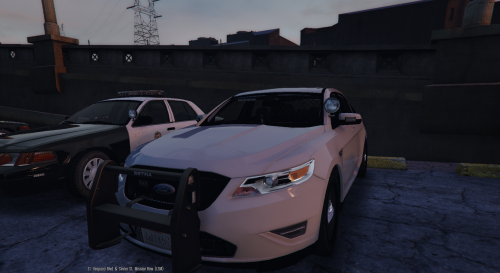 Am I the only one noticing the windows don't shatter with gunfire? Is there going to be an update to address this? Thanks! I absolutely love the car and the lights. I just don't like how the windows don't break.
- 68 comments
- 14 reviews
-
 @Stealth22 Thanks for being kind in your rebuttal. I thought the same thing I just was reporting what was happening. I was running the game without RPH and it was doing it. I couldn't figure out why so I took out the stealth.common.dll after trying a few other things and it acted normal. I then put back your .dll and it did it again. Took it out and it didn't. I have no idea why. I will run it again tomorrow and see if it behaves differently. If it does I'll let you know.
- 338 comments
- 46 reviews
-
.thumb.png.51baaeb139dc5d77c38ef43af920797b.png) I absolutely love this skin pack. Thanks so much! Any chance of making any more?
I absolutely love this skin pack. Thanks so much! Any chance of making any more?- 9 comments
- 7 reviews
-
@Stealth22, I posted on your relevant script page, but you said on it you rarely check the comments, so I thought I'd post on one of your popular plugins. I've got something weird going on with my game and I've narrowed it down to your stealth.common.dll file. When I'm playing the story mode and not lspdfr, during pursuits, the helicopter AI flys away from the main character whenever he stands still. If he's moving the helicopter joins the pursuit, but as soon as he stops, they immediately fly away and de-spawn. It took some time, but I narrowed it down to this file. Once I removed it from my directory, the helicopter AI went back to normal. But when I put it back, it did it again. I'm not sure what is conflicting in my files with this .dll that causes th AI to act in such a weird way, but I wanted you to know. I will just have to remove the .dll file whenever I play story mode and put it back in when I play lspdfr for now.
- 338 comments
- 46 reviews
-
@Stealth22, so, I've got something weird going on with my game and I've narrowed it down to this .dll file. When I'm playing the story mode and not lspdfr, during pursuits, the helicopter AI flys away from the main character whenever he stands still. If he's moving the helicopter joins the pursuit, but as soon as he stops, they immediately fly away and de-spawn. It took some time, but I narrowed it down to this file. Once I removed it from my directory, the helicopter AI went back to normal. But when I put it back, it did it again. I'm not sure what is conflicting in my files with this .dll that causes th AI to act in such a weird way, but I wanted you to know. I will just have to remove the .dll file whenever I play story mode and put it back in when I play lspdfr for now.
- 7 comments
- 2 reviews
-
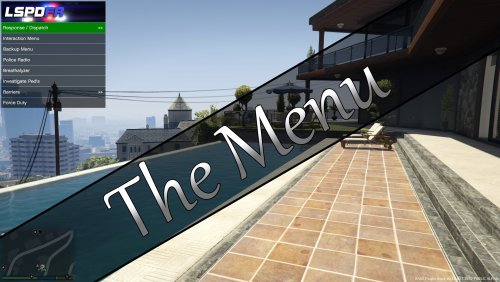 This is an excellent mod! It works exactly as I hoped it would. It being my first time editing .xml files, it was a steep learning curve for me, but it was worth it. Just remember, any errors in your .xml code will make the menu not work. What helped me figure out how to make it work was to just download it and take a look at the menu in the game, then cross-check what I saw with what was written in the .xml file. I learned how the code connected with what was shown in game, and presto! Now I have several mods all connected to the menu, each just a few button presses away. my only wish is that the in-game controls would somehow be over-ridden while using the menu, as it can sometimes be annoying to have my character perform actions while I'm scrolling through the menu. But that's just a small issue that is easily overlooked. Awesome mod! Thanks for all your work!
 -
Ok. Thanks!
-
 I just started using this mod and I love it, but my game keeps crashing periodically with this installed. The end of my RPH log says "new ped recognized as cop" and then the game crashes. This happens periodically. Or the game crashes when it is trying to load an ambient event for one of my patrols like pullover (on a custom zoned cop). I'm only using tha default .ini that I've made a few changes to using the provided config program. I'm not sure what is going on? It doesn't crash every time, just sometimes it seems to hiccup when it's loading a ped or an event and then it crashes. Also, do you know if it's possible to edit the spawn location of the police vehicles that GTA V spawns by default? Thanks!
- 270 comments
- 19 reviews
-
I love this mod. It was a steep learning curve for me, but I figured it out. I was wondering if it's possible to make it larger for 4K? It's so small on my 4K screen that it's hard to read now. thanks for the mod!
-
I have the new 1080 card and I have quite a few scripts and plugins running, and I would say yes, it can make a dramatic difference. I have a hard time getting the game to run at a solid 60fps no matter how low of settings I choose, even with a 1080. Some of the scripts and plugins seem to both cap and kill my fps. Keep calm is one that can take anywhere from 20-30 fps depending on the situation. Arrest manager and ALPR+ have also given me performance issues. It's tough because many of the mods I have make my experience so much more enjoyable, but they really seem to kill my fps. I've notified the authors and I hope they're are fixes for some coming (especially keep calm). I'm not sure what else you can do other than go through each one and see which are your biggest culprits. It sucks that there isn't a bit more cohesion between the modders as many of them have the same features, but simply have one or two unique things about them that make me keep them. But I know that without them we wouldn't have any of this, so, I just try to work with what I've got, hoping that perhaps things might get better.
-
 To me, this mod is essential to lspdfr. Without it, things just get so out of hand with peds running everywhere and cars creating chaos when police pull out their weapons. Sadly though, this mod, in its current state, just decimates my fps. I have 20-30 better fps without it. The author seems aware that many are having issues, but at this point, I haven't heard back from him about any sort of fix. I hope it gets fixed because while I still use it, it really damages my performance.
- 268 comments
- 44 reviews
-
 I have the same problem. I love the mod, but it would be nice to have this fixed.
- 220 comments
- 55 reviews
-
-

- 2
-
-
Great mod @Stealth22! Have you had any success getting the toggle to work allowing emergency vehicles through? They all still stop at the edge of the cone for me. I know it's in beta and I was just wondering if you e heard anyone have success with it?
- 338 comments
- 46 reviews
-
 That's understandable. All I can say is that In my game, every time I activate ALPR I lose about 10fps, and when I deactivate it, I gain it back. It fluctuates depending on how much it's scanning and how many cars are around. But if you can't duplicate it, then I see how there's nothing you can do about it. I'm not trying to wish bad luck on you but I hope you can so that a solution might be found. It's a great addition!
- 153 comments
- 32 reviews
-
 it happened as soon as I forced duty, which makes sense to me, as the file loads with lspdfr. However, it makes no sense why that would be the case, since I didn't call them. Perhaps there is something running in the background? All I can say is that it seemed to cap my fps and I couldn't get anything more than 75 or so when I was getting 100. I am still using it and it doesn't seem to cause any problems below the 75 fps, at least no more than many of the other mods. I just found it odd to see such a performance dive after installing this mod and I'd thought I'd let you know. i have a i7-6700 and gtx960 so I can't see it being a CPU or gpu issue.
- 781 comments
- 85 reviews
-
I hope I'm not a pain in your side, but I sent you a message about keep calm as I'm doing a systematic performance check of each mod, and I wanted you to know that after doing this mod as well, my fps dropped by about 10-15. It was not as bad as keep calm but it caused a significant decrease in performance. Your traffic control mod seems to work just fine, but these two really seem to effect performance. Removing it got my fps back to normal. my system is i7-6700,gtx 960,SSD if that helps at all.
- 153 comments
- 32 reviews
-
I love this mod...however, after having my old GTA v game slow way down after installing a bunch of mods, I decided to do a fresh install and systematically go through each plugin and check the performance of my game. After installing this mod, my fps dropped by about 10-15 points (of the 10 or so others I've done, only keep calm had roughly the same outcome). I have no idea why this mod would cause such a drop, but after removing it, I'm back to normal. Just wanted to let you know.
- 781 comments
- 85 reviews
-
I really do love this mod...but, while I know many have said this already, I did a fresh install of GTA v after it just got way too slow, and one by one installed the mods, checking after each one to see performance. This mod caused my fps to go from 100 staring into the sky to 75, and when looking and running in the streets of LS, from 75 to about 55-60. Something in this mod is causing weird things. I hope that perhaps the issue is discovered because this mod makes things a lot more realistic. After removing the plugin, everything went back to normal.
- 268 comments
- 44 reviews
-
-
- 1
-

.thumb.png.51baaeb139dc5d77c38ef43af920797b.png)
