




AlconH
Members
-
Joined
-
Last visited
Everything posted by AlconH
-
-
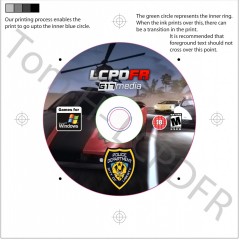
From the album: LCPDFR Products
Hopefully lilQ won't mind me using his image as the background, He usually doesn't. Anyway, Here's V2 of my disc design, let me know what you guys think.© Tom H (Design) & lilQ (Background Only)
-
Please try not to double post, instead use the edit button. I wouldn't worry about that unless it is a persistent problem.
-
Yeah, I think removing the vehicle mod, Even just temporarily to see if it fixes the problem is a good idea.
-
Delete one of the above ^^ Dsound or Xlive. If you plan to play online delete xlive.
-
Check your root directory, is there both "dsound.dll" and "xlive.dll" ? Also, did the diagnostics tool crash? if so run it as a admin
-
I know it wouldn't have it on, But it kinda looks a little bare without and I'm running out of ideas about what to put on them. It really is only to practice in photoshop and it's really only a novelty. EDIT: Just made a new one:
-
Can you post the results from the diagnostics log please? make sure to check the EFLC option.
-
Hey Sam, Thanks! Here's what I quickly put together, please tell me what you think. Its far from finished so am looking for suggestions on what to add to it.
-
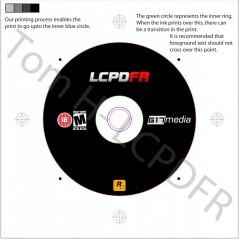
From the album: LCPDFR Products
Note- This is no where near finished. Suggestions are appreciated.© Tom H - LCPDFR
-
Ah wow, Thanks buddy +1.
-
I'm not the biggest fan of non-els but i'll give it a shot for sure :)
-
Hi Guys, I have been creating LCPDFR 'products' I suppose you could call them that. So far i have created the game case, and I have a friend who can professionally print images etc onto DVD's and CD's. I have trawled through the forums for a old topic where a member of staff posted all the different LCPDFR and G17 Media logos, But I can't find the topic. I know it was started by aparna when she was deigning the LCPDFR enforcer vehicles. Would a member of staff please post the logos so I can create designs for more merchandise? Thanks! Tom EDIT: Here's the game case if you want to see it. EDIT2: Found the original topic - Thanks, This can be closed now.If its a .asi file and a .ini yes. Just read the "readme" file included.Not possible, GTA can only use one siren at a time. Pick one and both fire, police and ems will all use that one.NYPD Sirens: Click Here. FDNY Sirens: Click Herewow, I would love to go there for a winter.....Yeah, I agree being able to approach from whatever side you want would be a very good idea. Also, How about a gunpoint traffic stop, where you get a callout to a vehicle, then you stop in front or behind it, get out and draw your weapons then arrest the suspect(s)I would abandon my CVPI but the problem is that it's the only one I have ever seen with this lightbar. I'll post a screenshot later to see if anyone else knows of one.It would either be that you have AI ELS enabled in the .ini or the car is just to high poly for the game to handle. Try disabling AI ELS in the .ini file and if that doesn't work remove the vehicle mod altogether.Go into the FirstResponse.ini (Grand theft auto ivScripts) Find the "PreloadAllModels = False" and change the "false" to "true".Check out this. Made these a couple of months back. If i get the time I might create a proper labeled disc to go along with it.

