




sixium
Friends of LSPDFR
-
Joined
Everything posted by sixium
-
-
Happy b-day, man.
-
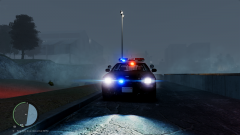 SEXY. DO WANT.
 -
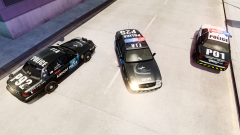
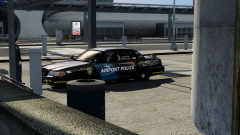
FIA Airport Police [TRADITIONAL] Texture Packs for the Ford Crown Victoria Police Interceptor Based on Bxbugs123 CVPI Template Fictional FIA Airport Police vehicle skins for vehicles used by the Airport Police division of the LCPD, under the supervision of the Liberty/Alderney Port Authority based at Francis International. Everything made from scratch by me, and is based loosely on my previous FIA Police pack skins; however, this pack features traditional black-&-white designs with a much more streamlined and clean design, based upon LAPD and CHP B&W styles. Why not, right? My previous "highly-conspicuous" designs are not everyone's cup of tea, lol. Like I said above, there are two flavors to this pack, an "LAPD-style" design with all-white doors and roof, and "CHP-style" design with only front-white doors and roof. K-9 versions are included as well. Four skins per design, so that's 16 skins in this pack. Unit numbers in the pack: Standard Police Units (CHP-style) included: P03, P09, P12, P26 Standard Police Units (LAPD-style) included: P04, P06, P13, P27 K-9 Police Units (CHP-style) included: P9A, P9B, P9C, P9D (best when used with K-9 models) K-9 Police Units (LAPD-style) included: P9E, P9F, P9G, P9H (best when used with K-9 models) Here is a short video of both of these designs in-action =) http://www.youtube.com/watch?v=d3pn5zrBFUg You can grab the models I used here: Whelen Delta, by Lt.Caine - http://gtapolicemods...?do=file&id=506 Slicktop K-9, by Bxbugs123 - http://gtapolicemods...?do=file&id=972 Enjoy! And please let me know what you think =)
- 5 comments
- 4 reviews
-
A gallery of day-to-day pictures of day-to-day operations at Francis International Airport
-
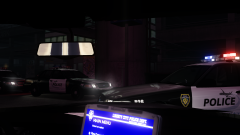
From the album: FIA Operations
I was able to sneak aboard one of the new paint-scheme CVPIs and snap a pic. Is the FIA Police changing paint jobs??? -
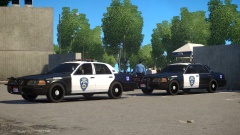 Haha, those cars are so "Californian" how about you release both?? =D
 -
I think they look pretty cool and are definitely unique. You should make it! =)
-
-
![FIA Police [Traditional Pack Experiment]](//s3-gallery.int-cdn.lcpdfrusercontent.com/gallery/album_3066/sml_gallery_29300_3066_904546.png) Hey there. You released the LAX skins! Awesomeness! =DDD Here are links to the models: Whelen Delta, by Lt.Caine: http://gtapolicemods.com/downloads.php?do=file&id=506 Slicktop K-9, by Bxbugs123: http://gtapolicemods.com/downloads.php?do=file&id=972
Hey there. You released the LAX skins! Awesomeness! =DDD Here are links to the models: Whelen Delta, by Lt.Caine: http://gtapolicemods.com/downloads.php?do=file&id=506 Slicktop K-9, by Bxbugs123: http://gtapolicemods.com/downloads.php?do=file&id=972 -
-
Correction to the credit: Bxbugs132 -> Bxbugs123, but you knew that, of course. ;)
-
From the album: sixium's WIP
Further progress on my clean "traditional car" versions of the FIA Airport Police skin pack. Maximum cleanliness. Removed all unnecessary striping, numbering, and insignia. Just an experiment. The last picture is even more experimental, an LCPD/NYPD inspired version. Should I release this/these as a pack? I know there are some clean-car enthusiasts that might have been a little off-put by my primary FIA PD designs. Yay or nay? Models by Lt.Caine and Bxbugs132 -
Yes, you should be okay with a 760 for the time being. Anything is night-and-day compared to your 630 lol
-
![FIA Airport Police [Clean Version]](//s3-gallery.int-cdn.lcpdfrusercontent.com/gallery/album_3066/sml_gallery_29300_3066_4613345.png)
From the album: sixium's WIP
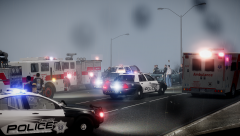
"Clean car" versions of the FIA Airport Police skin pack... Just an experiment/concept. Yay or nay? Removed all caution-striping, trunk numbers, hood insignia, rear quarter-panel designation, and limited side lettering to a single door. Added "CHP" style B/W version to substitute the half-and-half. Model by Lt.Caine -
It's getting there. SLI support is kinda spotty, and it's easy to tell it's a console-first-PC-later title, but there are some graphical features that are non-existent in console versions. I've compared PC-High settings to PS4 Watch Dogs and it already is better, when I switch to PC-Ultra, it blew PS4 out of the water. Hopefully with updates, it will get even better.
-
Looks great, very accurate.
-
It's only $50 for double the VRAM, which if the OP plans on playing GTAV, might be needed since the current de-facto open-world title (Watch Dogs) requires 3GB for the highest textures. And that's the minimum requirement.
-
$400? Overclocked GTX 770 4GB
-
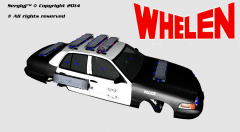 Lol, you should release this! It looks fun =D I was thinking about doing something similar, just attaching a shit ton of lights for giggles hahaha
 -
-
From the album: sixium's WIP
Released =D -
-
-
C V P I I even went as far as buying a used CVPI and owned/driven it for a couple years before I had to donate it for a number of reasons. 2004 P71 former San Rafael, CA PD car. May you rest in peace.


![FIA Police [Traditional Pack Experiment]](http://s3-gallery.int-cdn.lcpdfrusercontent.com/gallery/album_3066/sml_gallery_29300_3066_904546.png)
![FIA Airport Police [Clean Version]](http://s3-gallery.int-cdn.lcpdfrusercontent.com/gallery/album_3066/sml_gallery_29300_3066_4613345.png)
