




sixium
Friends of LSPDFR
-
Joined
Everything posted by sixium
-
-
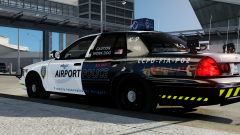
FIA Airport Police Texture Packs for the Ford Crown Victoria Police Interceptor Based on Bxbugs123 CVPI Template Fictional FIA Airport Police vehicle skins for vehicles used by the Airport Police division of the LCPD, under the supervision of the Liberty/Alderney Port Authority based at Francis International. Everything made from scratch by me, including the FIA logo, and is based loosely on my FIA Airport Operations skins. As I said previously, I have a fascination for Airports, and this naturally follows the Air Ops skins I made before. If you were following my WIP content, you'd know that I'm including two different flavors of skins. The primary design is the all-black design. The alternate design is a half-and-half black/white design that loosely follows that of the bonus FIA Ops Fire & Rescue skins I made before. These are provided as two separate packs. The BLACK template pack includes two sets of four (4) textures with different unit numbers so you can use them on livery vehicles, four standard units and four K-9 units. Standard Unit numbers included are: P02, P08, P11, and P25. K-9 Unit numbers included are: P90, P91, P92, and P93. K-9 skins are best when used with K-9 models. The HALF/HALF template pack also includes two sets of four (4) textures with different unit numbers than the BLACK pack. Again, four standard and four K-9. Standard Unit numbers included are: P01, P07, P10, and P24. K-9 Unit numbers included are: P94, P95, P96, and P97. K-9 skins are best when used with K-9 models. You can have a combination of up to 8 unique units at once, or 16 if you go with both designs. Here is a video of some of the skins in-action =) http://www.youtube.com/watch?v=kh3QGI4vYD4 You can grab the models I used here: Whelen Delta, by Lt.Caine - http://gtapolicemods.com/downloads.php?do=file&id=506 Slicktop K-9, by Bxbugs123 - http://gtapolicemods.com/downloads.php?do=file&id=972 The screenshots below all show the same unit number (except the last one) but don't worry, they are not representative of the unit numbers in the packs. Enjoy! And please let me know what you think =)
- 8 comments
- 4 reviews
-
From the album: sixium's WIP
Final versions of my FIA Airport Police skins, both the all-black and the half-and-half. All that's left is alternate unit numbers, then release =) Models by Bxbugs123 and Lt.Caine -
-
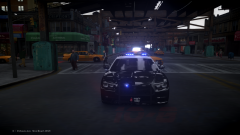 What does OBCDPS stand for?
 -
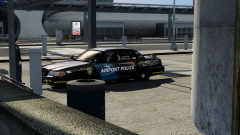 Haha, yes, I'm releasing the half-&-half too (just for you lol =D, j/k). Just have to apply all the changes I made to the black one to the half-&-half and releasing both under one pack.
 -
Thanks =) Yes, I will be releasing (skin only, though). Please see the WIP thread if you have any feedback =)
-
Hey again! So, due to a somewhat sizeable demand for the FIA Airport Police skin I've posted in my WIP gallery, I've decided to fast track this for release. I've made a few changes since my last revision, and it's about 95% done pending a few tweaks, and the creation of alternate unit numbers. In addition, there is also an alternate paint-job, half-white-half-black that I'm also preparing. Here's what I've got so far: I'm also including a K-9 unit skin in this pack, here's what I've got so far for that: The alternate paint-job was detailed in the gallery, here's a pic with it (the bottom two images of the collage): What's left to do: - change the phone number and icon to full red (made is slightly lighter hoping it would look brighter in game, but looks kinda pinkish in-game instead) - make alternate unit numbers - flesh out the half-and-half with all recent modifications and experiment with the door stripe What do you think? Is it too busy? Probably not for the "clean-car" enthusiasts lol =D // EDIT: Credit for the models go to, of course, Lt.Caine and Bxbugs123. =) // EDIT2: Released.
-
From the album: FIA Operations
Was walking out of the garage, and what do I see?? An elusive K-9 unit of the FIA Police. -
Oops, haha, what I meant was, can you show us an example of the kind of channel art that you're trying to achieve? Perhaps someone else's channel art that's inspiring yours?
-
Can you at least give us an example of what you're looking for?
-
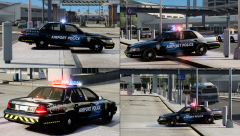 Haha, I'll probably release them both, then =)
 -
Thanks =D I like working on them, it's fun.
-
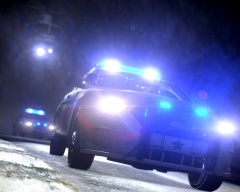 How do you "stage" a shot like this? Is there a script to essentially... freeze time? So you can position and frame the shot? Or did you really grab this shot while in action, lol. Skillz.
 -
From the album: sixium's WIP
Here I go again... extreme-beta version, like before, of my FIA Airpot Police skin for CVPI, revision... All black. I'm actually digging this... I think this looks the best, no? lol =) Model by Lt.Caine -
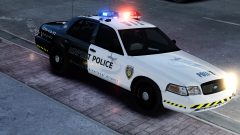 Posted new version, standard black&white. Please let me know your thoughts =) '?do=embed' frameborder='0' data-embedContent>>
 -
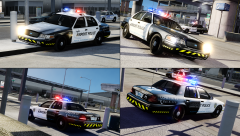
From the album: sixium's WIP
Again, extreme-beta version of my FIA Airpot Police skin for CVPI, revision... How about standard black&white (top two images)? Bottom two images are a couple more views of the half-&-half. Now that I see how the standard one looks, I'm actually leaning towards the half-&-half now lol =) Model by Lt.Caine -
The caution-striping is supposed to be larger in the front and back, and skinny on the sides. It's identical to my FIA Ops skins. This is made in the same overall theme, but without the door stripe, which I'm still experimenting with.
-
-
From the album: sixium's WIP
This is a definite WIP, extreme-beta version of my FIA Airport Police skin. I lightly modeled it after my FIA Fire skin, but I am not too sure I am liking the half-white-half-black motif... What do you think?? Model by Lt.Caine -
Yes, and yes.
-
I used to use Savior ENB V3.5, but I now run the ENB that's in my signature, Nutt's ENB. It's a combination of all the best lighting mods, iCE, Photorealistic 8, and ENB, with tweaks. If your PC can handle it, it's looks amazing. '?do=embed' frameborder='0' data-embedContent>> But of course, arguably the best ENB of the moment is CryENB V1. If it works for you, it'll blow your mind. '?do=embed' frameborder='0' data-embedContent>>
-
^^ +1 I've been using Realistic Timecycle V4 for the longest time until I've just recently upgraded my PC, so I can actually run a decent ENB now.
-
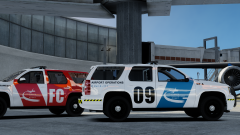
From the album: sixium's WIP
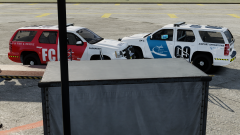
In-progress version of my FIA Ops Tahoe skin, based on the Suburban skins. Closer view. -
From the album: sixium's WIP
In-progress version of my FIA Ops Tahoe skin, based on the Suburban skins.


