




sixium
Friends of LSPDFR
-
Joined
Everything posted by sixium
-
From the album: sixium's WIP
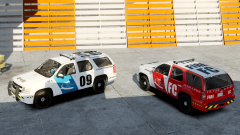
In-progress version of my FIA Ops Tahoe skin, based on the Suburban skins. -
Done with FIA Fire & Rescue Suburban skin: ----- In-progress version of the Tahoe skins. Based on the Suburban skins. Pretty close, some alignment issues and color bleed, plus if you look closely, no license plates. (Model by 1ian20) Once I finish these up, I'll probably release them as a Tahoe/Suburban utility skin pack.
-
Do game devs collaborate now or something. We've got essentially Battlefield: SWAT and Rainbow Six: SWAT both coming out? How is that a coincidence?
-
Actually, if you're running an ENB, just pressing PrtSc (print-screen) takes screenshots and saves them to the GTAIV folder.
- 28 comments
- 3 reviews
-
-

- 1
-
-
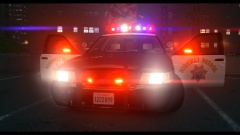 Awesome!!!
 -
From the album: sixium's WIP
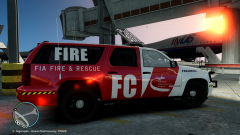
Model by Bxbugs -
From the album: FIA Operations
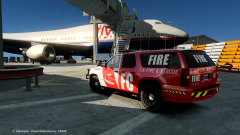
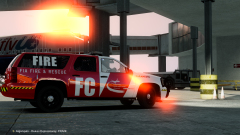
FIA Ops Fire & Rescue Utility Unit F-Charlie on routine patrol at FIA's international terminal. -
From the album: FIA Operations
FIA Ops Fire & Rescue Unit F-Charlie on early morning standby for the rush of incoming red-eye flights. -
-
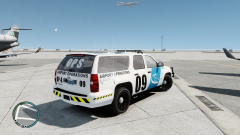
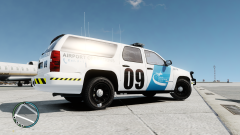
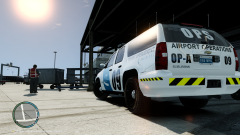
Further progress on the Suburban skin. Only thing left for me to decide is whether to put "OPS" on the rear side windows or not. What you do think? After the decision is made, all that's left is for alternate unit numbers, then on to the Tahoe skin which should be almost as simple as copy/paste. =)
-
From the album: sixium's WIP
In-progress version of my FIA OPS skin for the Chevrolet Suburban. Model by Bxbugs -
From the album: sixium's WIP
In-progress version of my FIA OPS skin for the Chevrolet Suburban. Model by Bxbugs -
From the album: sixium's WIP
In-progress version of my FIA OPS skin for the Chevrolet Suburban. Model by Bxbugs -
Just a quick question... can I use the config file (LCPDFR.ini) from 1.0b in 1.0c? As in, can I not overwrite the config file? Or is there a bunch of new settings in the 1.0c .ini?
-
-
Oh well, it's a start Looks good, by the way. And the lightness of the cover, I don't know why it did that. It looked okay in Photoshop when I modified it, but when I saved it, it made it lighter.
-
-
Sorry, here's the link to the models - Whelen Delta: http://gtapolicemods.com/downloads.php?do=file&id=506 Slicktop: http://gtapolicemods.com/downloads.php?do=file&id=7
- 10 comments
- 5 reviews
-
*** I will be working on the pack for the DriverSF CVPI very soon, as I just now have the template for it.*** Meanwhile, since all the "elements" of the skin exists already, it looks like it's much easier to make other skins. So, here is a quick mock up of how the skin looks on a Chevrolet Suburban =) There are some alignment issues, especially on the tailgate, and of course, the windows which still have K9 markings on it (Bxbugs model, of course, I love his models), but have a look: I should have the DSF CVPI pack uploaded in a couple days.
-
-
-
FIA Airport Operations Texture Pack for the Ford Crown Victoria Police Interceptor For both Non-DriverSF and DriverSF based CVPIs Fictional FIA Airport Operations vehicle skins for vehicles used in the day-to-day operations of the airport and surrounding areas. Everything made from scratch by me, including the FIA logo. I have a fascination for Airports, and have been wanting an Air Ops vehicle made for a long time, but never found one. So, I decided on trying my hand at creating one myself. This is my first mod/skin for LCPDFR =) The Bxbugs template pack (non-DriverSF) includes four (4) textures with different unit numbers so you can use them on livery vehicles. Unit numbers included are: OP-A 09, OP-B 52, OP-R 24, and OPS Supervisor. Also included is a bonus fictional FIA Fire & Rescue vehicle skin, unit F3. The DriverSF template pack also includes four (4) textures with different unit numbers than the Bxbugs pack. Unit numbers included are: OP-A 07, OP-B 43, OP-R 18, and another OPS Supervisor. Also included is a bonus FIA Fire skin, unit F1. Now you can have a combination of up to 7 unique units at once (or 8 if you have two sups). You can have up to 10 if you add a third model, or have 5 liveries per model with LCPDFR 1.0c. Here is a video of the skins in-action =) http://www.youtube.com/watch?v=_dSKo80fwjw The last three screenshots below show the Fire skin, the orange roof, and the DriverSF versions, respectively. Enjoy! And let me know what you think.
- 10 comments
- 5 reviews
-
Mouse - CM Storm Inferno Keyboard - Creative Fatal1ty backlit Controller - Xbox360 Wired
-
-
Hey again. So, the pack is finished! I've made the last finishing touches (just little alignment shifts, text tweaks, etc, no modifications), and also tried out the orange roofs as Lt Phill suggested. I'll include a second pack with orange roofs since I think it looks pretty good. Same pack of skins, just with an orange roof. The roofs are actually closer to yellow in-game, though. Here is a video of all skins in the pack, in-action =) Here are the screenshots I will include in the release page, all final skins (the last two is the bonus Fire skin and an orange roof): I will package it all together and upload to LCPDFR tomorrow night or Tuesday, since I currently do not have access to my PC where all the finals reside. Thanks again for all the feedback and comments =) //EDIT: Just a quick question: this skin pack is based on the BxBugs template. Does this also work on the Cj24/Driver SF CVPI? //EDIT2: Credit where credit is due: Whelen Delta model, same as before, is by Lt.Caine. The slicktop model is by BxBugs. Light colors were modified by me.

