



Narobic on YouTube
Insiders
-
Joined
-
Last visited
Everything posted by Narobic on YouTube
-
That's just it though. On the previous GTA version everything worked fine, but when I tried to add them back, it doesn't work :/ And I have tried adding it where another vehicle I have downloaded is (Police Fugitive which is tested and working) but yet the game gives the same issue... (update/x64/dlcpacks/mpchristmas2)
-
A copy of the RPH log would be helpful as well
-
I appreciate the gesture, but in the post linked it specifically states "Any police car that does not replace one of those slots is considered an add-on and needs specific manipulations that WILL NOT BE EXPLAINED HERE. We're here to talk about original police car slots." and my specific case is about add-on vehicles. Thanks though.
-
If you followed the instructions to the mod proper then I can't help you too much. All I can give to contribute is some detailed instructions: For the Explorer (I'm guessing it's the one by PimDSLR) For the Charger (Again, guessing it's Bxbugs123) This should work, if it doesn't then there is an issue with your GTAV. I would consider verifying the integrity of the game cache.
-
Since the new GTA title update I've been unable to add custom vehicles to x64e... This may get complicated but if you think you can help me please read along :) Since GTAV's title update (1.0.791.2) I haven't been able to re-enable any vehicle addons mods that used x64e or update.rpf (for the vehicles.meta). As many may already know, R* changes the update.rpf and vehicles.meta each update. I thought going into the update that I could simply add the lines of code to the vehicles.meta and add the models back into x64e but that's not the case. No matter how many vehicles I add (I have a total of 6 and I've tried each one individually) it constantly crashes on startup and gives the last line of code to "Loading and Populating Game World" on the crash report. The game works fine without the vehicles and vehicles.meta and everything worked on the previous version of the game. I'm going to include the addon vehicles.meta code so that hopefully someone is able to find the discrepancy. Thank you in advance and don't hesitate to ask for more information. Vehicles.meta addon: RPH Crash Log: /!\UPDATE/!\ I found the issue. The issue was that my game was at its limit for addon cars. I downloaded a mod that changes the gameconfig.xml and now it works You can find the mod if you're having the same issue here: https://www.gta5-mods.com/misc/gameconfig-xml-add-more-addons
-
Does anyone know of a good place to put vehicle model, vehicle.meta and carvariation.meta files where they won't be interrupted by updates? Right now I have my files in x64e, vehicle.meta in update.rpf, and my carvariations.meta in mpluxe2. I wanted to know if there's a better place to place the files where it won't make me reinstall the models and .metas for each update.
-
2 things that would make this mod more convenient: 1) The default LSPDFR backup menu activates only when the right thumbstick is pressed and released quickly. I absolutely love this because I only use the right thumbstick to look behind me and for the backup. However, if I set the custom controller toggle for custom backup to RightThumb it activates when I press down and not when I release. This means that I can't use the RightThumb to look behind me. It would be awesome if it only activated when it was pressed and released quickly. (Sorry if this was confusing, I tried to explain it best I could) 2) It would be nice if the UI acted more like the default backup UI in regards to positioning, size, and that it ONLY showed the available units instead of graying them out (sometimes when I'm scrolling I want to quickly get to a unit but I have to scroll through 4 others first. In a pursuit that can make all the difference)
-
I meant to send coroner only if a body was deceased.
-
Thanks for letting me know. Hopefully this changes in the future.
-
Does anyone know the ped code to get s_m_y_cop_01 to wear the vest? (e.g. accessories="2")
-
I figured out the NorthYankton zones. I was right initially but I forgot an "o" and it messed the whole thing up. LoL I set the "LocalSWAT" category to 'mainmenu="false"' But it still shows up on the main menu. Any help? Update: It started working out of nowhere
-
Would be nice to allow North Yankton customizations :/
-
No, sadly. I used the bank (from the prologue) as the fire station because it looked somewhat like a fire station and a random warehouse in the city part for the medical center. They're miles apart but it allows quick response from wherever you are in NY.
-
If anyone wanted a North Yankton dispatch: (This is made for my game so you'll have to change the code) North Yankton Fire Station North Yankton Medical Center:
-
A neat feature would be to integrate with Police Radio and have a coroner automatically dispatch when the scene is code 4.
-
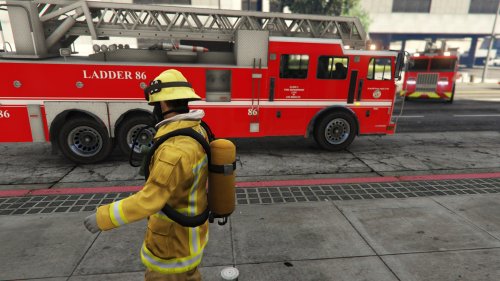 I love this file and want to make it its own file! Does anyone know which vehicles.meta and carvariation.meta have the "firetruk"?
- 28 comments
- 4 reviews
-
 For the ambient event "pullover" the 1st ped model should be next to the window of the car being pulled over. Just to add a bit of realism
- 270 comments
- 19 reviews
-
.thumb.png.e436e916367dd5b950520057d9057b55.png) In the description it says "make it more authentic" a a future update. The only thing to make it more authentic would be to change the motto to "service and respect" and to take away the number on the roof.
In the description it says "make it more authentic" a a future update. The only thing to make it more authentic would be to change the motto to "service and respect" and to take away the number on the roof.- 50 comments
- 23 reviews
-
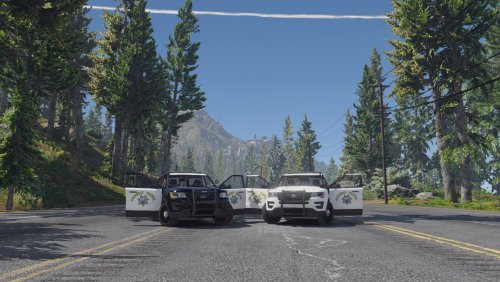 Just as an FYI. The Polar Bear CHP vehicles don't say HIGHWAY PATROL on the back and have no numbers. The only markings are the HIGHWAY PATROL on the doors and their motto in black behind the back door. 👌
- 11 comments
- 4 reviews
-
 Can you add an "arrest subject" and "arrest and seize vehicle" option to the traffic stop UI?
- 1,178 comments
- 137 reviews
-
-
 I recently created a SAHP texture for this vehicle and was wondering if I could have your permission to post the texture. Thank you!
- 221 comments
- 34 reviews
-
I completely missed that! Thank you!
-
 Can you please let us choose what ambulance livery to use for the bank heist? I have multiple liveries and would like to choose which ones. Thanks!
- 1,081 comments
- 166 reviews
-
Is there a mod out there that automatically loads custom maps when your game starts? If not that would be absolutely amazing!

.thumb.png.e436e916367dd5b950520057d9057b55.png)
