



PieRGud
Members
-
Joined
-
Last visited
Everything posted by PieRGud
-
 @Officer Zambrano @DunsparthGaming I just tested it and it works fine on RPH 0.49.
- 1,743 comments
- 172 reviews
-
@antiboy6 Currently, EUP is only for the player. Maybe sometime in the future we'll figure out a seamless way to implement it for NPCs. @billiarboy You have an incorrectly setup dlclist.xml, most likely because your update.rpf is outdated. Every time GTA updates, you need to copy over your clean, unmodded update.rpf into the mods folder. Then, you can install all your mods. I'll release an update that checks for all the required DLCs because quite a bit of people forget to do this. @Hip Please read the mod page's description carefully. The menu is a separate download. Here's a link to it. You also don't need to worry about the banner. It was merged into the EUP dlc.rpf and is no longer needed in update.rpf.
-
 When you run out of title ideas
 -
I think what he meant was a script that gives you the first-person scope when you aim in third-person. This is probably what you're looking for: https://www.gta5-mods.com/scripts/forced-first-person-aim
-
-
 @Kilyin @Spitfire7 Huh. I'll look into it. @gamerzone88 Do you have a crash log?
- 138 comments
- 34 reviews
-
-
Which RPH version are you using?
-
Actually, it would be MenuToggleKeyModifier=LShiftKey .Here's a list of keys you can use. The member name column is what you should be looking at.
- 138 comments
- 34 reviews
-
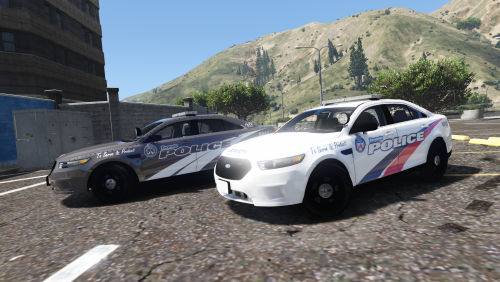 These are some Toronto Police liveries for Captain14's 2013 FPIS. I have tried to make these as accurate as possible. You can find the FPIS in his LSPD pack: This file contains two versions of the TPS livery: the original one the new grey and white one I have also included the PSDs in the download. You can use them to do whatever you'd like. Installation - Choose a style (grey or regular). - Replace taurus_sign_1 in /update/x64/dlcpacks/lspdpack/dlc.rpf/x64/levels/gta5/vehicles/lspdpack.rpf/police4.ytd. Enjoy.
- 2 comments
- 1 review
-
-

- 2
-
-
-
-
-
You must type LoadPlugin EUPMenu.dll into the console, not LoadPlugin eup. This is explained in the readme file.
-
@tmiller Your log does not indicate a crash. It does however note that the ComputerPlus folder is not in Plugins\LSPDFR\. Please take that from the download and place it there. Additionally, please edit your post so that your log is enclosed in a spoiler tag. It makes it much easier to scroll through the thread. @Fouke, if you could also edit your post with a spoiler tag that would be great.
-
-
-
Are you able to load other plugins or does this only happen with EUP Menu?
-
Delete the EUP folder and the EUPMenu.dll in the Plugins folder. Once you reinstall, load up the game and type ListPlugins in the RPH console (default F4). EUP Menu should show up. If it doesn't, you need to type LoadPlugin EUPMenu.dll. Also, please take a look at the EUP support thread in the future. It contains answers to a lot of frequently asked questions.
-
Try making sure the car is not moving when you hold E. Otherwise, if you car is stationary it should work fine. Can you provide the error message given in your log file? Do you get that crash when you try to open Computer+ or when you try to go on duty?
-
The LSPDFR computer is binded to the content key which is why I chose to do this for Computer+. It makes things easy to remember. You hold the context key to open Computer+ and you can just tap it to open the LSPDFR computer.
- 1,743 comments
- 172 reviews
-
@boomer2840 I'll look into making it bigger for the next update. @franklinyeah @takablecobra230 @BEATIPACIFICI Your questions can be answered by taking a look at the FAQ.
- 1,743 comments
- 172 reviews
-
Callout Manager gives you the ability to select LSPDFR-compatible callouts individually. Please note that this plugin scans through each callout plugin installed and finds any and all callouts in that plugin. Some callout authors may have left callouts that aren't intended to be triggered in their code. Thus, you may encounter some weird callout names or callouts that don't trigger at all. Also note that this mod uses a part of LSPDFR that isn't intended to be used. The LSPDFR developers can update their modification at any time and effectively patch the method used, rendering this plugin obsolete. Installation Place CalloutManager.dll and CalloutManager.ini in /Plugins/LSPDFR/. Then while on duty, press F12 on your keyboard or RB and the Left DPad button on your controller. These toggles can be changed in the CalloutManager.ini. FAQ Q: There is only one default LSPDFR callout. What's up with that? A: LSPDFR defines every callout as a "Robbery" which is the only thing that will show up in the Callout Manager. When this callout is triggered in Callout Manager, it will randomly trigger one of the three default callouts LSPDFR has to offer. Q: Does this work for ____ callout plugin? A: Yes. This plugin will fetch the callouts from every callout plugin installed. Support If you have an issue with this plugin or have a question/suggestion, simply post a comment below.
- 138 comments
- 34 reviews
-
-
-

- 56
-
-
This will happen in a future update. Make sure the .dll is in your plugins folder. You should then be able to type LoadPlugin EUPMenu.dll in the RPH console.
-

