


Joe C Wilson
Members
-
Joined
Everything posted by Joe C Wilson
-
 Firstly, thank you for the support! I am glad you have found it useful! Secondly, to change the settings you would have to remove the park ranger's jurisdiction from Custom Regions XML. I believe you are referring to the San Chianski Mountain Range area (correct me if I am wrong). The line in the Custom Regions XML file you would have to remove is "<Zone>SANCHIA</Zone>" without quotations. If you need further help feel free to look at Zones Reference included in the original Ultimate Backup downloads folder. Hope this helps! In the next update 2.2, I will adjust the jurisdiction settings for the park rangers, so others won't have to.
- 944 comments
- 23 reviews
-
Thank you for the reply, I'll get back to you to let you know if it works once I play LSPDFR soon!
-
Hello, I'm Joe. I was wondering about the custom maps that are included with this modification. Are there any tips to fix the maps while loading GTA 5? The map in Paleto Bay does not load, as well as some vehicles that are supposed to spawn that those locations. I tried to install this mod via LML, and also the manual way, but nonetheless both ways do not work for me. The vehicles load in fine when I spawn them, but half of the map does not load properly. The Los Santos helicopter pad location seems to work properly, however some vehicles do not spawn. I have tried to use the LML gameconfig with this as well, but I can not get this to work. There are no crashes or anything, however the Paleto Bay map addon itself can't load. If anyone has any tips or has dealt with the map loading issue before, please let me know. Thank you!
-
I myself have tried that method too, but the units still spawn on land. Seems only helicopters can respond out on the ocean / water areas (as far as I know). Thanks for reaching out though, I'll do some more digging with Ultimate Backup and see if anything comes to mind.
-
Hello, everyone! My name is Joe, and I have a question about setting up backup support for boat units. Is it possible to add boat units to the default LSPDFR backup menu, or external plugins such as Ultimate Backup? I remember from the GTA IV days calling for boat units were possible to do with LCPDFR. I also recall the LSPD having a boat unit from the story mode, but I can not figure out how to add them as a backup unit. Does anyone know if it is possible to do this? I am creating San Andreas Ultimate Backup [EUP], and the next part of the expansion to do list is to add the Coast Guard, and boat units such as the LSPD. Thank you in advanced for the help!
-
It has been brought to my attention that the LSPD Class C Male Officer III+1 Uniform does not work when spawned as ambient e.g traffic stops. I will take a look at the LSPDFR data folder tonight, and see what's wrong. I will also update the entire LSPDFR data folder so EUP units can spawn with the rain, and snow uniforms. This issue does not effect Ultimate Backup, however the data folder needs to be fixed. I will update once I have fixed this issue!
- 944 comments
- 23 reviews
-
Hello, everyone! I have corrected an oversight regarding "No More Addon Vehicles On Default In The .Ini e.g. Lifeguard & Coroner". Please be sure to download the latest version. Thank you!
- 944 comments
- 23 reviews
-
Hello, everyone! This is a quick update announcement for San Andreas Ultimate Backup [EUP] 2.1! Everything I have wanted to update has been done! For the next update expansion, I would love to add the USCG (United States Coast Guard), USAF (United States Air Force), as well as the National Guard for Military type patrols. This next update will come late 2020. There is no set date yet. Anyway, I hope you all enjoy the new long awaited update for San Andreas Ultimate Backup [EUP], and I thank you for your patience!
- 944 comments
- 23 reviews
-
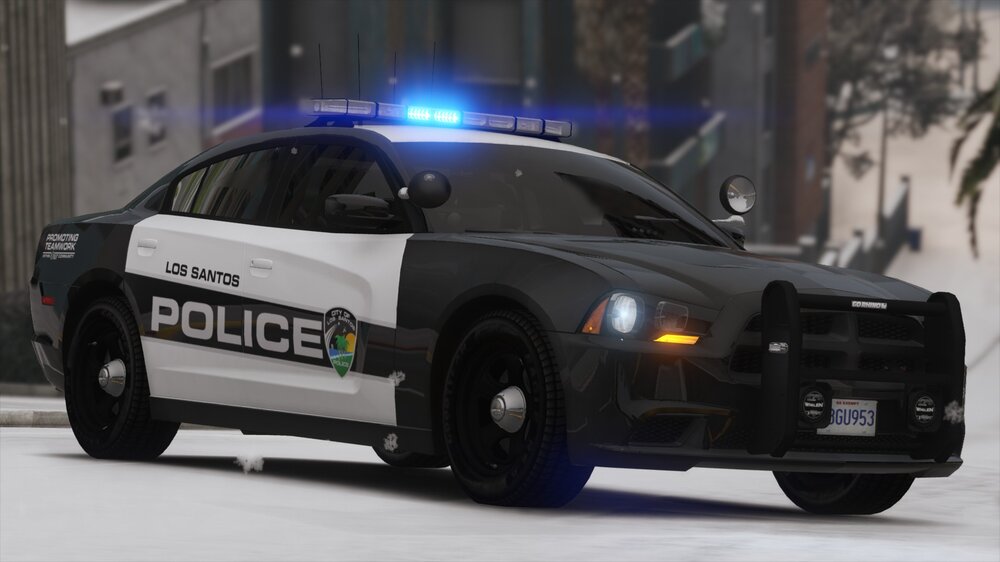
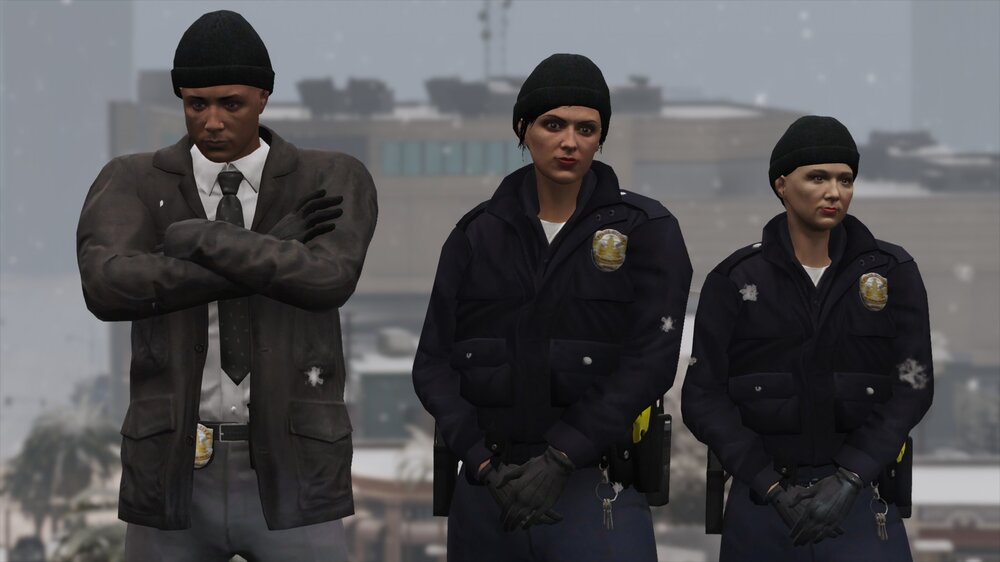
San Andreas Ultimate Backup [EUP] 2.1 is officially done! Here's a little preview!
-
Hello, everyone! This is a quick update announcement for San Andreas Ultimate Backup [EUP] 2.1! The rain version of this modification is 90% done! All I have to do is finish editing Gang Units, and Gruppe Sechs Units. I did fix a lot of things within the original version for 2.1 as well! This will be the second to last major update for San Andreas Ultimate Backup [EUP]! I am thinking about adding USCG (United States Coast Guard), USAF (United States Air Force), as well as the National Guard for Military type patrols. How many of you would like to have the Military and USCG included in a future update? I have recently came across Coastal Callouts and would love to make my modification work with it, but I have not played Coastal Callouts yet. Once I get my game to work with Coastal Callouts, I would love to add USCG as backup! Let me know what you think about the ideas for the USCG and Military updates for San Andreas Ultimate Backup [EUP]! I will update once I am done adding the snow version of this modification! It should be done by Friday night! Thank you everyone, and I hope you look forward to the next big updates!
- 944 comments
- 23 reviews
-
N/A
-
Hello, everyone! This is a quick update announcement for San Andreas Ultimate Backup [EUP] 2.1! The new update is going to be postponed for another few days. I had some trouble fixing a few errors while editing presetoutfits.ini and had to take a few long hours trying to fix it. I did make some progress so far, however! I have added motorcycle uniforms for LSPD, LSSD, BCSO, and PAP! The SAHP motorcycle uniforms were already added prior to update 2.1 All I have to do now is finally add rain and snow uniforms!
- 944 comments
- 23 reviews
San Andreas Ultimate Backup [EUP] 2.1 is almost done! 2.1 will include snow and rain versions within the main download folder. So please be careful which version you are going to be using! ETA 24-48 hours What's New In Update 2.1? Redone All Uniforms To Preset.ini Redone All Uniforms To Wardrobe.ini Reorganized Special Units Menu Reorganized Vehicle Units Menu No More Addon Vehicles On Default In The .Ini e.g. Lifeguard & Coroner Added Motorcycle Units For All Departments Added Rain Uniforms Added Snow Uniforms- 944 comments
- 23 reviews
N/A
Those were config files I had in my game, if people were going to be using the same car slots as me. For example, police explorer in the Police3 slot, or Crown Victoria in the FBI slot. They are not required, but just suggested if people did not want to rename all of those files themselves. In the ini, its stated as suggested, but again, just easier to use my files, instead of renaming everything yourself.- 944 comments
- 23 reviews
N/AThank you for the help!Hello, I'm Joe. I am wondering if anyone knows how you can change the uniform ambient spawn settings for Grand Theft Auto V and LSPDFR, please let me know down below! I would like to change the uniforms to only spawn with long sleeves, instead of short sleeves. I am referring to the default peds (AI) by the way. From what I can remember right now, it is the LSPD, LSSD, and maybe SAHP officers that spawn at or around police stations. I am working on creating EUP rain and snow ped uniforms configurations for my San Andreas Ultimate Backup mod, and would love to change the ambient spawn settings. Furthermore, I would like to change the settings for the AI that can be found walking and driving around the map too! If anyone knows about this, and would love to help, give me a shout! Thank you!
Hello, everyone! I have been busy lately, but good news! I am going to be starting to edit San Andreas Ultimate Backup [EUP] 2.1 soon! My first goal is to add rain uniforms to AI backup and edit them to spawn ambiently. Secondly I hope to be able to do the same for the snow version. I hope I can have the rain version of this modification done by October, and then the snow version complete by November. Anyway, I hope everyone is excited for the new update! There is a lot of work that needs to be done, to change the entire game around, but it will be worth it. Again, I hope you look forward to the updates, soon to come, and I hope you enjoy them!- 944 comments
- 23 reviews





Account
Navigation
Search
Configure browser push notifications
Chrome (Android)
- Tap the lock icon next to the address bar.
- Tap Permissions → Notifications.
- Adjust your preference.
Chrome (Desktop)
- Click the padlock icon in the address bar.
- Select Site settings.
- Find Notifications and adjust your preference.
Safari (iOS 16.4+)
- Ensure the site is installed via Add to Home Screen.
- Open Settings App → Notifications.
- Find your app name and adjust your preference.
Safari (macOS)
- Go to Safari → Preferences.
- Click the Websites tab.
- Select Notifications in the sidebar.
- Find this website and adjust your preference.
Edge (Android)
- Tap the lock icon next to the address bar.
- Tap Permissions.
- Find Notifications and adjust your preference.
Edge (Desktop)
- Click the padlock icon in the address bar.
- Click Permissions for this site.
- Find Notifications and adjust your preference.
Firefox (Android)
- Go to Settings → Site permissions.
- Tap Notifications.
- Find this site in the list and adjust your preference.
Firefox (Desktop)
- Open Firefox Settings.
- Search for Notifications.
- Find this site in the list and adjust your preference.