


Joe C Wilson
Members
-
Joined
Everything posted by Joe C Wilson
-
GTA 5 LSPDFR 0.4.8 #84 - Spike Strip Successful | LSPD '18 Slicktop Dodge Charger via @YouTube
-
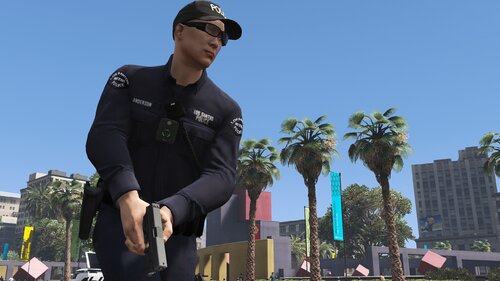 No, I'm pretty much done with this mod, unless something needs to be fixed or changed.
- 944 comments
- 23 reviews
-
GTA 5 LSPDFR 0.4.8 #83 - Chaos In The Canyons | LSSD '11 Crown Victoria via @YouTube
-
I am curious to how to do this as well. I am not sure if it is possible since they are custom departments, but I'll do some testing and see if I can get them to spawn ambiently. If I do get this to work, I'll release an update for the ambient spawn settings.
- 944 comments
- 23 reviews
-
-

- 1
-
More than likely you've installed EUP wrong, or you're possibly missing one of the prerequisites.- 944 comments
- 23 reviews
Yes, you would have to rename the vehicle names in the files to do so. In the agency file in the data folder and of course the ultimate backup files.- 944 comments
- 23 reviews
-
-

- 1
-
You can change this by changing "ped chance". Also, non-promoted officers are more likely to respond than others.- 944 comments
- 23 reviews
N/A
Custom Regions, Default Regions and Special Units all have them. <Vehicle livery="2" pax="1" pax_chance="100">POLICE3</Vehicle> - this is an example. You can press control+f while viewing the document to quickly search for police 3 and police 4.- 944 comments
- 23 reviews
I do not use custom EUP packs, so I can't help you there, but for vehicles, you have to change the vehicle name in the XML files, I use the highway patrol for the Police 3 slot along with Police 4 and of course the Police Bike.- 944 comments
- 23 reviews
According to BejoIjo yes, CompuLite is listed as one of the prerequisites for the mod. This might be due to the ambient spawn system from 4.0 with LSPDFR. What folder are you using? Are you using a custom EUP pack or anything? Also where exactly did you see LSPD in Paleto? I need details to help fix your issue.- 944 comments
- 23 reviews
What's New In Update 2.3 Hot-Fix? Fixed SAHP Winter Uniform In The LSPDFR Data Folder (Parachute/Hand-Bug)- 944 comments
- 23 reviews
I am not sure if you ever got it, but I replied to your topic in the support forum, a few weeks ago (I never heard back), it's made by Toy.- 944 comments
- 23 reviews
That's normal, some are the same so when they spawn ambiently or as backup, they wear those uniforms instead of the original class b ones from the normal folder.- 944 comments
- 23 reviews
-
-
- 1
-
This is likely due to the North Yankton vehicle configurations in the duty_selection file. Try spawning them with a trainer instead. This is most likely due to you using different vehicle slots than me. I use police 3 and police 4 for state patrol vehicles. You would have to rename everything to your vehicle slots that you setup for openiv. As for vests, I am not sure. I do not use any custom EUP packs or anything, so I can not help you out there. Your best bet is to change comp_accessories="x" and tex_accessories="x" since this line is what determines your vest options. Hope this helps!- 944 comments
- 23 reviews
-
-
- 1
-
GTA 5 LSPDFR 0.4.8 #81 - Snow Is Here! | LSPD '13 Slicktop Interceptor Sedan via @YouTube
They shouldn't be since they are supposed to be wearing beanie hats and long sleeves, long sleeves with vests, and suits. Also, they're setup to respond with the FBI 1 and 2 slots, so I don't know why it's not working for you. Do they at least have gloves on? They're supposed to be wearing gloves as well. I just looked in my files and don't see anything matching that could look like it's causing an issue. Maybe you have installed something wrong on your end. Or possibly you're using a custom EUP pack.- 944 comments
- 23 reviews
This modification isn't meant to be using the "doctor" file since Stop the Ped reads the Ultimate Backup configurations like you've mentioned. However, I have set it up to be used with the MP ped, and EUP, so it should not be loading the "s_m_m_doctor_01" file. I have not encountered this issue, and I always use the context menu or GrammarPolice to call for coroner. There was another person having an issue with coroner, but for him, the female ped's legs were missing. If you use any custom EUP packs or uniforms, this may cause an issue.- 944 comments
- 23 reviews
That's odd, what menu are you using to call coroner? This modification changes all existing peds to EUP ones, so this modification should not be loading the normal replacement peds.- 944 comments
- 23 reviews
Hello, everyone! The final update for San Andreas Ultimate Backup [EUP] 2.3 is here! What's New In Final Update 2.3? Added EUP Rain Uniforms To Default LSPDFR Backup Added EUP Snow Uniforms To Default LSPDFR Backup Added EUP Detectives (Suit, Collared Shirt, w/Vest) Adjusted Jurisdiction Settings Updated EUP Wardrobe.ini Updated EUP PresetOutfits.ini Updated The Entire LSPDFR Data Folder For All Versions - Have Fun!- 944 comments
- 23 reviews
Hello, everyone! I am still editing San Andreas Ultimate Backup [EUP] 2.3. I am almost done with the rain version! All I have to do now is finish editing the EMS rain uniforms and then begin to work on the snow versions. Remember you can only use one folder at a time! So you can pick between the normal folder, rain, and snow! If you have enjoyed the modification, please be sure to leave a review, and always report any bugs or issues you may come across, thank you!- 944 comments
- 23 reviews


Account
Navigation
Search
Configure browser push notifications
Chrome (Android)
- Tap the lock icon next to the address bar.
- Tap Permissions → Notifications.
- Adjust your preference.
Chrome (Desktop)
- Click the padlock icon in the address bar.
- Select Site settings.
- Find Notifications and adjust your preference.
Safari (iOS 16.4+)
- Ensure the site is installed via Add to Home Screen.
- Open Settings App → Notifications.
- Find your app name and adjust your preference.
Safari (macOS)
- Go to Safari → Preferences.
- Click the Websites tab.
- Select Notifications in the sidebar.
- Find this website and adjust your preference.
Edge (Android)
- Tap the lock icon next to the address bar.
- Tap Permissions.
- Find Notifications and adjust your preference.
Edge (Desktop)
- Click the padlock icon in the address bar.
- Click Permissions for this site.
- Find Notifications and adjust your preference.
Firefox (Android)
- Go to Settings → Site permissions.
- Tap Notifications.
- Find this site in the list and adjust your preference.
Firefox (Desktop)
- Open Firefox Settings.
- Search for Notifications.
- Find this site in the list and adjust your preference.