


Joe C Wilson
Members
-
Joined
Everything posted by Joe C Wilson
-
N/A
-
 I honestly have no idea. Please do a clean reinstall of your LSPDFR data folder, and Ultimate Backup and replace those files with the ones from my mod. (Backup your files first) I do not know what causes this since I do not experience this issue on my side. Also be sure to not use any other backup configuration mod along with this one.
- 944 comments
- 23 reviews
Your last issue you reported was fixed when I changed the clothing number in the XMLs. Now the rain/snow uniforms should not be spawning unless playing in the rain or snow weather types. So I don't know exactly what the issue is? Edit - did you replace ALL files in from the folder you're using into your game?- 944 comments
- 23 reviews
N/A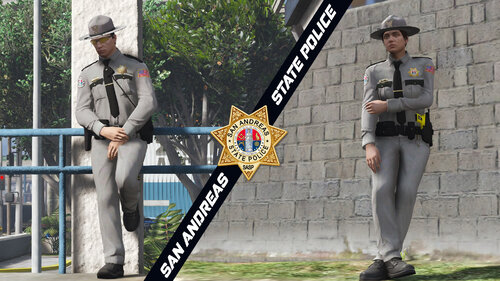 Just as an FYI you do not need both EUPFR and SA UB EUP. Both of these conflict with one another.
- 10 comments
- 5 reviews
-
-

- 1
-
Also did you update to 3.8 yet? I just looked in all my files and I know for sure I changed the SAHP female class c shirt for the patrol and motor unit. So with 3.8 they should not be reappearing now.- 944 comments
- 23 reviews
What's New In 3.8? Fixed BCSO Motor Units in outfits_bcso_eup (Custom Data Folder) Fixed the SASPA Armed Officer Units in outfits_saspa_eup file (Custom Data Folder) Fixed backup file (In Data Folders) Removed Custom Jurisdictions Sandy Shores, Grapeseed, & Paleto Bay Jurisdictions (BCSO) If installing for the first time or updating to 3.8 please install all files from the San Andreas Ultimate Backup [EUP] Complete Edition folder Sorry everyone, but I had to take out the custom jurisdictions Sandy Shores, Grapeseed, & Paleto Bay jurisdictions for the (BCSO). I put the original jurisdiction settings back in, but unfortunately I could not get the BCSO motor unit to spawn in those regions - instead the LSPD was showing up in their place. I gave up trying to figure out the cause and decided to remove the custom jurisdictions. I apologize for the inconvenience of having to reinstall the mod again, but this will be the last update for the next while. Hopefully no more issues to fix for the meantime. Thank you.- 944 comments
- 23 reviews
Did you try going to a station and going on duty by using the duty selection menu? I don't see any crashes in your log file.- 944 comments
- 23 reviews
3.7 hot-fix Corrected A Typo For The SASPA Armed Officer Vest In File outfits_saspa_eup- 944 comments
- 23 reviews
What's New In 3.7? Added BCSO Vintage Units (Separate Folder) Added Compatibility With EUP VEST&EARPIECE By HANAKO (Separate Folder) Added Departments To Duty Selection Menu (LSPP) Added Motor Units To Default Backup Menu (LSSD, BCSO, LSPP) Added Sandy Shores, Grapeseed, & Paleto Bay Jurisdictions (BCSO) Fixed LSPP Motor Unit Uniform + Officer III+1 Insignia Rank Uniforms Class A,B,C (Boots/Helmet/Insignia) Fixed SAHP Rain Jackets Fixed North Yankton K9 Setting When Selecting A Folder - You Must Only Use One At A Time! (Normal, Rain, and Snow) You do not need to replace all files in each folder when switching between them except for the agency EUP file when changing between normal, rain, and snow weather variations for ambient and default backup menu units (excluding the separate Vintage BCSO & EUP VEST&EARPIECE folders).- 944 comments
- 23 reviews
All reported issues have been fixed. Time to add in traffic vests for the motor units, and configurations for HANAKO's EUP VEST&EARPIECE mod. Patch Notes For 3.7 (so far) Added BCSO Vintage Units (Separate Folder) Added Compatibility With EUP VEST&EARPIECE By HANAKO (Separate Folder) Added Departments To Duty Selection Menu (LSPP) Added Motor Units To Default Backup Menu (LSSD, BCSO, LSPP) Added Sandy Shores, Grapeseed, & Paleto Bay Jurisdictions (BCSO) Fixed LSPP Motor Unit Uniform + Officer III+1 Insignia Rank Uniforms Class A,B,C (Boots/Helmet/Insignia) Fixed North Yankton K9 Setting +more- 944 comments
- 23 reviews
Did you replace all files into your game? The BCSO patrols all of Blaine County including Sandy Shores. LSSD only patrols Los Santos County. Make sure you replace all existing files into your game including all of the data folder files (and custom folder), and Ultimate Backup. The agency EUP file is what controls the patrol settings for ambient and default backup. I located the source of this issue. It turns out I put 191 instead of 193 for the class c shirts in the XML. I'll be uploading a fix soon. Not sure when, but hopefully by next week or two. I'm currently trying to fix an issue with the LSPP insignia Officer III+1 from spawning.- 944 comments
- 23 reviews
Vintage BCSO is coming soon to San Andreas Ultimate Backup [EUP] Complete Edition 3.7- 944 comments
- 23 reviews
Vintage BCSO is coming soon to San Andreas Ultimate Backup [EUP] Complete Edition 3.7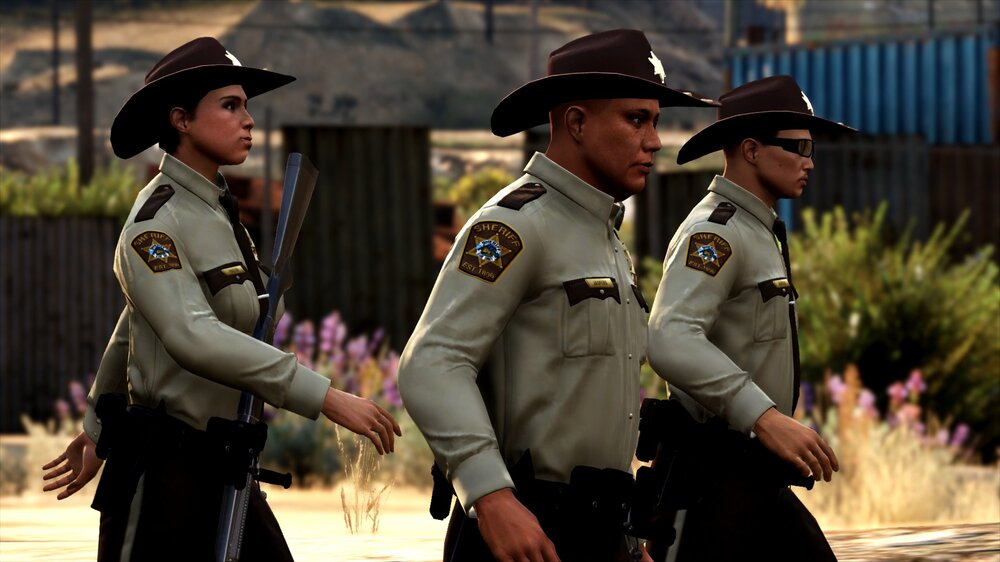 GTA 4 LCPDFR 1.1 #02 - Bohan Pursuits | LCPD '13 FPIS via @YouTube
Vintage BCSO, Motor Units in the default backup menu (LSSD, BCSO, LSPP), and added compatibility with EUP vests and earpiece mod by HANAKO are coming in a new update for the mod. New jurisdictions (Sandy Shores, Grapeseed, and Paleto Bay) will also be added for those with addon car packs (Sheriff slot is default). There will be separate folders for both the Vintage BCSO, and the EUP vests and earpiece mod by HANAKO. The original folders will obviously have the new updates as well if you wish to not use the new optional folders. If anything needs to be fixed or changed please let me know. ETA 1-2 weeks.
GTA 4 LCPDFR 1.1 #02 - Bohan Pursuits | LCPD '13 FPIS via @YouTube
Vintage BCSO, Motor Units in the default backup menu (LSSD, BCSO, LSPP), and added compatibility with EUP vests and earpiece mod by HANAKO are coming in a new update for the mod. New jurisdictions (Sandy Shores, Grapeseed, and Paleto Bay) will also be added for those with addon car packs (Sheriff slot is default). There will be separate folders for both the Vintage BCSO, and the EUP vests and earpiece mod by HANAKO. The original folders will obviously have the new updates as well if you wish to not use the new optional folders. If anything needs to be fixed or changed please let me know. ETA 1-2 weeks.- 944 comments
- 23 reviews
Oh my apologies I thought you meant GTA 4 with LCPDFR. Good to know you found what you were looking for!His tutorial does not include the 1911.dll and launchgtaiv.exe file which you need to downgrade GTA IV to patch 7. I recently made a tutorial covering both of these. Also I apologize for bumping this topic. I didn't realize how old it originally was, but hopefully this tutorial will help point you in the right direction to fix your game. Click the spoiler tag below for the tutorial video. Hope this helps.




.jpg.2a7debe2bc9d68f228e864f94627add8.jpg)


.png.6529ca51f802c64329d2c9f80df53594.png)
Account
Navigation
Search
Configure browser push notifications
Chrome (Android)
- Tap the lock icon next to the address bar.
- Tap Permissions → Notifications.
- Adjust your preference.
Chrome (Desktop)
- Click the padlock icon in the address bar.
- Select Site settings.
- Find Notifications and adjust your preference.
Safari (iOS 16.4+)
- Ensure the site is installed via Add to Home Screen.
- Open Settings App → Notifications.
- Find your app name and adjust your preference.
Safari (macOS)
- Go to Safari → Preferences.
- Click the Websites tab.
- Select Notifications in the sidebar.
- Find this website and adjust your preference.
Edge (Android)
- Tap the lock icon next to the address bar.
- Tap Permissions.
- Find Notifications and adjust your preference.
Edge (Desktop)
- Click the padlock icon in the address bar.
- Click Permissions for this site.
- Find Notifications and adjust your preference.
Firefox (Android)
- Go to Settings → Site permissions.
- Tap Notifications.
- Find this site in the list and adjust your preference.
Firefox (Desktop)
- Open Firefox Settings.
- Search for Notifications.
- Find this site in the list and adjust your preference.