


Joe C Wilson
Members
-
Joined
Everything posted by Joe C Wilson
-
 Not specifically. It changes what departments spawn in specific patrol zones, but nothing beyond that.
- 937 comments
- 23 reviews
-
-

- 1
-
-
From the album: 2024
-
From the album: 2024
-
GTA 5 LSPDFR #56 - Reckless Pursuits | LSPD Metro '16 Charger via @YouTube
-
LCPDFR utilizes significant memory resources to achieve its functionality. It's important to note that even popular anti-virus software, such as McAfee, can produce numerous false positives.
-
Before the re-release of GTA IV on PC, Traffic Flow was put in my game to prevent the influx of the taxi bug. In 2024, this script causes ENB to have severe input lag during loading screens and indoors and eventually causes texture loss. If anyone else can't narrow down the cause of texture loss, this script may be why. Sadly, I can not use this script anymore, but in hindsight, this enables me to patrol in LCPDFR with 10 ELS cars, ENB, HD Roads, and max graphic settings. Edit - Uncapped FPS causes ENB input lag, however, Traffic Flow is still responsible for introducing memory leaks to GTA IV. Edit 2 - Downgrading GTA IV with Andre's tool and adding the patch 7 files (found on G T A A L L - without spaces) to the downgrade resolves most of the additional memory leaks. Perhaps Andre's downgrader tool is missing something the original patch does not have, but all is working now. Additionally, installing IV Tweaker seems to help stabilize the game even further.
- 97 comments
- 67 reviews
-
Sorry guys, but I won't be adding the new DLC police vehicles to this modification. The liveries do not work properly with Ultimate Backup, and lots of users on the forums are reporting issues with the spawning of said models. In the future, I do want to create LSPD Bomb Squad and K9 backup and add more garages to the modification as well.
- 937 comments
- 23 reviews
-
-
- 1
-
-
 'Essential For Traffic Stops' This modification alters the outcomes of traffic stops and enhances the realism when encountering different types of drivers. I love the uniqueness of this modification and it has given LSPDFR a never-before-seen feel and is a must-have when patrolling as a cop. One thing I suggest is to implement a littering outcome on a traffic stop. It may be hard to find the animation, but I am sure it would be a nice idea if could figure out how to randomize the props found in the game files. These might include soda cans or weed bricks etc. Great job! Looking forward to more updates!
- 231 comments
- 31 reviews
-
-

- 1
-
-
GTA 5 LSPDFR #55 - Sandy Shores Stabbing Spree | BCSO '16 Sedan via @YouTube
-
-
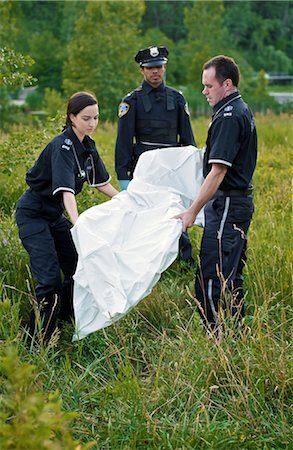
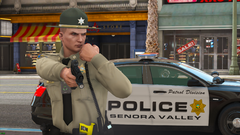
Hello, all. I was wondering if there was a plugin that spawns a prop over a deceased ped to provide cover for their privacy. This would be used before I request the coroner until they arrive with the body bag. Please let me know if anyone knows a plugin that provides the functionality I am describing! A photo is attached for reference of what I am referring to. Thanks!
-
From the album: 2024
-
From the album: 2024
-
RDE uses models directly found from the base game e.g. s_m_y_cop_01 or s_m_y_sheriff_01. My modification uses mp_m_freemode_01 and mp_f_freemode_01 models that read what's installed in OpenIV for EUP. It sounds like you want default models with EUP-based uniforms which you can find here. I do not plan to create non-EUP backup within this modification as that will lead to confusion in the name, but perhaps I could make it for a separate modification with the same features. Although, that is unlikely to happen since I never used PEDS Overhaul... yet.
- 937 comments
- 23 reviews
-
This mod uses MP Ped functionality and is only to be used with EUP. It includes all available departments and agencies within 9.3 Law and Order and 1.5 Serve and Rescue.
- 937 comments
- 23 reviews
-
That's not possible sadly. RDE changes backup for when you have a wanted level in story mode. EUP Backup Configurations changes backup for when you patrol in LSPDFR with EUP installed.
- 937 comments
- 23 reviews
-
I'm beginning to add the new DLC vehicles to the EUP Config, but I wonder if it's worth setting up new jurisdiction in Richman, Davis, and HIghway areas for the new vehicles. Richman is extremely small, and probably wouldn't be used that much. Davis was recently set up for LSSD and I don't feel like changing the entire mod back to LSPD. And I don't see the purpose of "LS State Trooper" when SAHP already exists and patrols all roads that are considered highways. I am considering adding the new "Modern" livery to the LSPD Metro and keeping the original liveries in all other LSPD jurisdictions. As for the Grapeseed Police and Paleto Bay Police liveries, I am stuck on what department to put them under. Grapeseed and Paleto are county areas patrolled by the sheriff's office and it wouldn't fit the lore of EUP Backup Configurations putting a police department in a sheriff's office jurisdiction.
- 937 comments
- 23 reviews
-
-
- 2
-
-
Hello, all. I am stuck trying to figure out how to stream the police equipment from the Chop Shop DLC. This includes spotlights, ram bars, and ALPRs. I want to make the equipment spawn permanently on the vehicle, but I am unsure how. I know it is a tuner shop category item, but no data exists in the wiki for me to know how to stream the category name. I know you must use vehiclemodelsets.meta or Carcols.ymt, to create the item data, but I am unsure what the category name is. For example; if you want to stream a plaque on a vehicle in Benny's mod menu it would be VMT_PLAQUE with the number of the component. This is the same area where the police equipment is located, but no information exists regarding the category name for the police equipment table. I know the name of the equipment and where the RPF file is for Police 5 and Police Gauntlet, but I do not know where it pulls the vehicle items on Benny's menu. For the Police 5 vehicle, a spotlight item is called police5_ant with the letter a for its first one, B for the second one, and so on. If anyone knows how to stream the police equipment to have them permanently attached to the vehicle, please let me know, thanks!
-
-
-
Update - getting the emergency lights working is almost impossible and there's no way to access the YTDs. I tried installing SirenSetting Limit Adjuster, but it did not work even when I disabled compatibility mode for ENB. I thought about putting the livery onto an existing model, but I couldn't find the liveries anywhere. I also read that if people try to replace Police 5 and Police Gauntlet there could be issues with the model or livery. I think you're better off using custom models since the light bars do not light up properly, even with Radiance. I would hate to put these vehicles in considering how difficult it is to replace them and sadly I think it would only lead to confusion about how to fix it as it seems impossible. Edit - I increased the ENB vehicle emitter reflection to 10.00 and the lights are seemingly bright enough to work with. A user in my Discord also suggested increasing day and night emissive settings in your visual data file to 1500 and 1100. I am not sure when the next update will be, but since I got the vehicles working I can continue to implement them into the mod. I also plan to update the uniforms for Coroner and to add Bomb Squad/K9, and more.
- 937 comments
- 23 reviews
-
-
- 1
-
-
I haven't updated my game yet, but that is a great idea. I will do that soon, but I do not know exactly when.
- 937 comments
- 23 reviews
-
No. If that was available in the official EUP download, it would be included, however.
- 937 comments
- 23 reviews
-
-
Never mind, you don't need to edit anything in Agency EUP. You need to delete the tags in custom regions and it would make the LSPD patrol automatically since LSPD is already set up in default regions.
- 937 comments
- 23 reviews


.png.05e8ad70fb3deebd7bab51ffc0aa3742.png)

