


Reddington
Members
-
Joined
Everything posted by Reddington
-
Put them in the very latest/newest patchday.
-
I'm actually not sure if you can choose a specific pattern to always start with. Maybe I missed it, but I've read over the ELS user docs a few times and haven't seen anything about this. One thing you could try, and I have no idea if this will work, if you're using a trainer like Simple Trainer, you can save your vehicle so that if you customized the car at all, or just want a faster way to get it, you can go into the trainer's menu and have it right there.
-
MODERATOR NOTICE: I have split your post into its own thread, as the one you replied to is two years old. Please don't bump topics that have been inactive for 30 days.
-
This. I use ENBs, NaturalVision, all of Albo's mods...my game is fully modded out. I even use speedometer and a fuel mod.
-
Do you have ScriptHookV? Do you have advancedhookv.dll in the main directory? This topic has been moved to the appropriate forum. Please post in the correct location in the future.
-
Make sure the texture is for the same year CVPI. For example, if your CVPI is 2011, make sure the texture is for 2011. As long as the year is the same, one CVPI texture will work on all other CVPIs. There isn't really a best, though CVPI seems to be quite favorable with textures. The only way to resize textures is to edit them yourself. They do, but 99% of all CVPI textures will work on other CVPIs if the years are the same.
-
When you installed this car, did you also install a custom carvariations?
-
Either the mod hasn't been updated to work with recent GTA versions, or you installed it incorrectly. Check the comments for this mod and see what other users say. This topic has been moved to the appropriate forum. Please post in the correct location in the future.
-
A guy was in a police transport, in handcuffs, and had his neck broken. What other facts do we need to know? What else matters? You cannot honestly tell me you get your neck broken accidentally while in custody and in a vehicle. There's no defending them. It is plain as day what happened. A lot of people have families, doesn't stop them from doing wrong. Seriously, think about this. A neck somehow got broken during transport? Really, folks, please Google neck breaking causes. Necks don't accidentally break. That's not a thing.
-
I'm not entirely sure. I thought you could change it, but I never have needed to.I don't believe you can change the RPH console key. Not sure why they give you the option to.When you launch Rage and the splash screen opens, click the gear icon in the lower left. When Rage's settings open, what does it show for the console key? Your topic has been moved to GTA V Support, this is not LSPDFR related. Please post in the correct location in the future.No, it's not. RadianceV just helps with brightness if your lights aren't bright. Though, honestly, it's for people who either can't be bothered or struggle with editing the files themselves. RadianceV is just a visualsettings.dat file. You could easily edit it yourself and get the same result. Also, locking this thread due to bumping. Kareem, if you have another question, please feel free to make your own topic. :) If you feel this topic has been closed in error, please report this post.There are a lot of essential mods that, in my opinion, are a must have. However, it really comes down to personal preference and what you want your game to be like. You could make your game similar to mine in terms of the plugins, but you may not like it. The best advice I have is to browse the mods section here and on http://gta5-mods.com/ to look and see what mods are available to use. :)Your best bet would be to go to the FiveM forums and ask. We really don't offer support for FiveM.
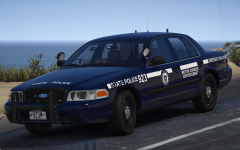 I knew you were cheating on me. Freakin hussy! This skin is just so good!Not some extent, the full extent. Once you are arrested, you are now in the custody of the arresting officer. HE/SHE is is your guardian and have to make sure you're taken care of. A neck doesn't magically get broken. I'm almost positive in every single one of these cases where the officers get off Scott free, the DA did it because he/she doesn't want to face backlash from the department. If this had been any other regular person, they'd already be behind bars. More and more we are seeing cops are not held to the same standards as everyone else. They can do as they please and get a slap on the wrist. Get "time off" work, but not fired when they should've been. It's hard to respect the profession anymore when they don't even have respect for themselves or integrity.You're welcome! Glad you got it sorted.This crash report is unreadable. Please attach the "RagePluginHook" text document. :)You're welcome. :)This means it's a plugin or script you have. The best and really only ay to figure out which one is to start removing some of your plugins/scripts. I'd start with whatever you most recently added.Definitely, It's hard to find a mod that suits your preferences. Maybe the dismemberment mod is not compatible with the recent GTA, not entirely sure. You could check the file comments on the mod download page.
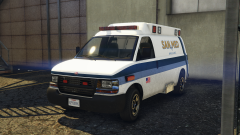 Okay, not a router. XD It almost looks like mini storage.
It looks like a router.
Okay, not a router. XD It almost looks like mini storage.
It looks like a router.




