




unitedOrange66
Community Team
-
Joined
Everything posted by unitedOrange66
-
Since this is an English-only forum, our forum rule requires users to post in English regardless of whether anyone can translate it by other means. I've gone ahead and translated your post for you. In response to your support request, unfortunately we do not support older versions of GTA V, LSPDFR, or RPH. Thus you are unable to obtain older builds of the modifications (LSPDFR/RPH) you are seeking.
-
You are posting in an English-only forum, please edit the title and content of your post and translate them into English.
-
This topic has been moved to the appropriate forum. Please post in the correct location in the future.
-
There is a .LUA script that could be served as an alternative to SimpleCTRL, it displays helicopter information as well: CarHud and HeliHud. If you decide to install it, you'll need to install this dependency as well.
-
Manually add the FHP vehicles under "San Andreas Highway Patrol" vehicles section in "Agency.xml;" if you are using EUP with a custom agnecy.xml, do the same. And make sure the "SpanwsAmbiently" flag is attached to that section, usually right below the vehicles list. Please note that some may still spawn elsewhere outside of highways, since "highway" isn't clearly defined in GTA V or LSPDFR.
-
This topic has been moved to the appropriate forum. Please post in the correct location in the future.
-
This topic has been moved to the appropriate forum. Please post in the correct location in the future.
-
This topic has been moved to the appropriate forum. Please post in the correct location in the future.
-
Your topic has been moved to GTA V Support, this is not LSPDFR related. Please post in the correct location in the future.
-
This topic has been moved to the appropriate forum. Please post in the correct location in the future.
-
EUP 9.7, textured by @AstroBurgers
-
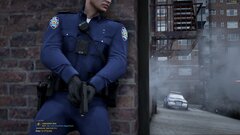
From the album: NYPD
-
-

From the album: NYPD
-
-
This topic has been moved to the appropriate forum. Please post in the correct location in the future.
-
Please don't create duplicated topics. Continue this discussion on your original topic please:
-
This topic has been moved to the appropriate forum. Please post in the correct location in the future.
-
This topic has been moved to the appropriate forum. Please post in the correct location in the future.
-
Personally I always advise against buying pre-build PCs from Amazon(look at the reviews), also that laptop you're looking at isn't a gaming laptop. I don't want to disappoint you nor do I want to kill the caterpillar before it becomes a butterfly, but I feel it's more "ethical" to give you some honest advice. I've been in your shoes before. A $400 Dell laptop was all I had, and I played GTA IV LCPDFR on it through high school at 5-10 FPS. The summer before college, I got a summer job, saved some money and I was able to build a PC that can run modern games at 60 FPS. So a $600 budget PC in 2025 may be able to run some games but you may not get the best gaming performance with GTA V, I'm talking about below 30 FPS on medium settings. Let alone running LSPDFR with GTAV alongside other mods. Even a mid-power GPU plus CPU would easily exceed your budget. If this isn't what you're expecting, I'd save that $600, and build a decent gaming PC later.
-
This topic has been moved to the appropriate forum. Please post in the correct location in the future.
-
Your topic has been moved to GTA V Support, this is not LSPDFR related. Please post in the correct location in the future.
-
This topic has been moved to the appropriate forum. Please post in the correct location in the future.
-
Update "AdvancedHook.dll" from ELS download page. Your topic has been moved to GTA V Support, this is not LSPDFR related. Please post in the correct location in the future.
-
Your topic has been moved to GTA V Support, this is not LSPDFR related. Please post in the correct location in the future.




