Brazilty
Members
-
Joined
-
Last visited
Everything posted by Brazilty
-
-
-
-
Aww man :(
-
-
If you got Lcpdfr running I would disregard that authentication error
-
Okay so lets say you downloaded a car pack you will have the files for police , police2 ,and ect the file named police goes for the cruiser the one that says police2 goes for the patrol you may use it how ever you like lets say you wanna put the police2 as youre police cruiser that will also work lets say you wanna put police2 as youre noose cruiser and ect just when it comes to the big vehicles like polpatriot you wanna make sure you download a vehicle meant for that slot you know like a suv or truck w.e .... hope I helped explain a little better if you have a specific vehicle you downloaded and you don't know what to replace it with or as where it goes just let me know .
-
-
I love the LCPD v8 Ford Explorer made by kinsta100 He did a hell of a job but I am disappointed that it only works correctly as police and police2 I wanted to see if possible to make a polpatriot version that will work correctly with els v8 I really don't like the concept of having an suv on a normal patrol cruiser slot . I hope yall developers take my request into consideration as I love the work done to this vehicle. Thanks,
-
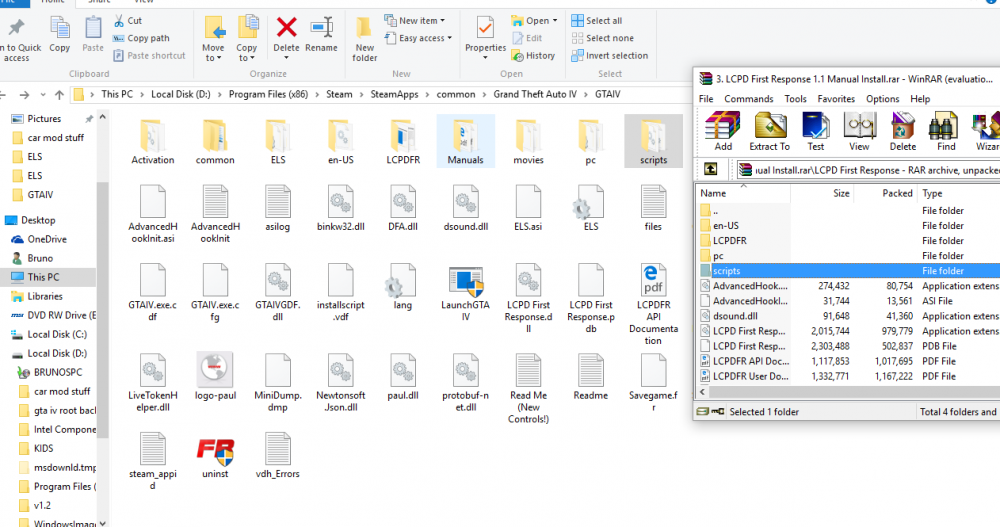
IF you installed LCPDFR 1.1 Manually you should have a Script folder and all that good stuff in the archive that you downloaded LCPDFR 1.1 just drag everything into youre GTA IV Directory . Now if you are getting that loader.loader error message make sure you Install Microsoft .Net Framework 4.5 and Visual C++ Redistributable 2010 ( x86) and 2012 (x86) and DirectX runtimes when I had same problem I also had to get C++ 2005 download it from Microsoft website I had same issue while ago I had to get the x86 and x64 both versions at least for me I had to do it that way make sure you also got the C++ 2008 same thing both versions and C++ 2010 same both versions. Then make sure you also got Frame work 3.5 and 3.0 as well... It will come handy with other Mods and everything is straight from Microsoft website https://www.microsoft.com/en-us/search/result.aspx?q=C%2B%2B+2005&form=MSHOME You might solve you're problem by just downloading Microsoft .Net Framework 4.5 and Visual C++ Redistributable 2010 ( x86) and 2012 (x86) and DirectX runtimes but in case you don't just follow the other steps I mentioned ... And here is a useful link talking about LCPDFR and installation requirements
-
I understand you are new to this so welcome aboard bud here is a helpful tool to make you're life way easier I posted a link for ya at the bottom. Now there are many ways to do this you could use open IV or spark IV which you will have to manually go to game contents and edit models - cd images - vehicles - then find vehicle you want to replace and just drag files there or you can just use this tool that makes everything much easier. http://www.gtainside.com/en/gta4/tools/50777-vehicle-mod-installer-v1-5/ With vehicle mod installer You can select a folder with vehicle files to auto install vehicle mod or you could also just upload win rar archive I like this tool a lot because if you happen to mess up you can select an option to restore vehicle back to its original state and it pretty much does everything for you :)
-
Hey guys a lot of folks having issues installing LCPDFR 1.1 - ELS 8.5- and Scripts such as vdh Police Helper - vdh Towing 2.0 - and Trainer I found a good youtube video that pretty much explains it all better then myself having to write step by step . So here it is hope it helps you guys!!!
-
-
wasn't able to use police helper with lcpdfr 1.1 could we have a update on this please?
- 316 comments
- 152 reviews
-
-
-
Hey man to be able to further help you we need some more info Use the Diagnoses tool that came with the Lcpdfr program . after you run the program post youre error log here so we can see whats going on. FYI check this link as well I would recommend doing youre installation of LCPDFR Manually.
-
I had a lot of issues as well so here is what I did in order to get everything working properly on my windows 10 First I tried everything and nothing seem to work so I deleted my game from steam re downloaded it by doing that so you will have a fresh root folder and everything will make more sense. instead of having all these files that you don't know what to remove... then I downloaded DirectX and all of these C++ 2005 from Microsoft you will need 86x version and 64x as well. do same with C++ 2008 and C++ 2010 like I said make sure you download both versions 86x and 64x. next steps make sure you download net frame 4.5 . if you already have that great you will also need Net frame 3.5 and 3.0 download all of that straight from Microsoft website. you might also need C++ 2012 and C++ 2013 ( that's how I got mine to work with ELS) that's for LCPDFR 1.1 to work properly incase you had the same issue as myself and it also helps enhance the game . now when you download LCPDFR 1.1 do it manually for some reason it wouldn't work for me whenever I did it with the auto installer . Make sure when you do it manually all you doing is copying and dragging all the files and folders into your gta iv main root folder. There are a lot of videos on youtube that can help you out as well but for myself this is what I did so hopefully it will do it for you guys having same issues. Good luck, Here guys this should help yall as well
-
For anybody having same issues with windows 10 I got my working correctly with LCPDFR 1.1 I deleted my game reinstalled it downloaded C++ 2005 x86 and 64 bit gotta have both!! as well as C++ 2008 x86 and 64 plus C++ 2010 x86 and 64 As well as Netframe 3.5 already had 4.5 downloaded Manually installed LCPDFR 1.1 and bingo everything running smooth now.
-
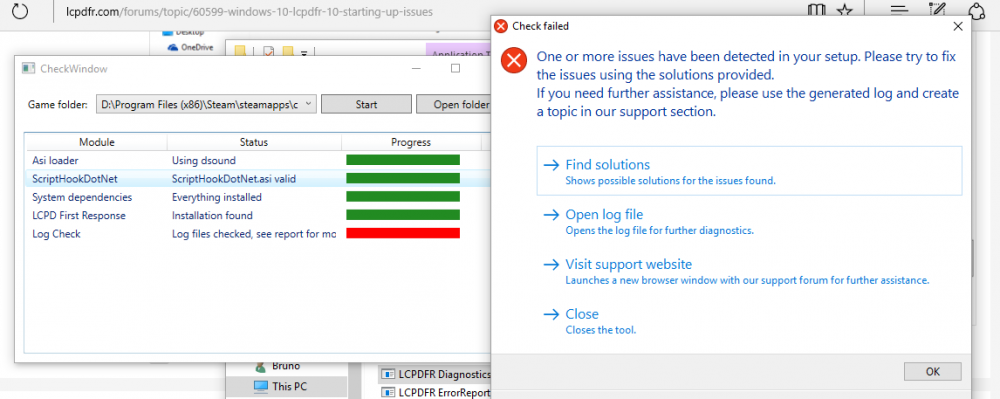
error log
-
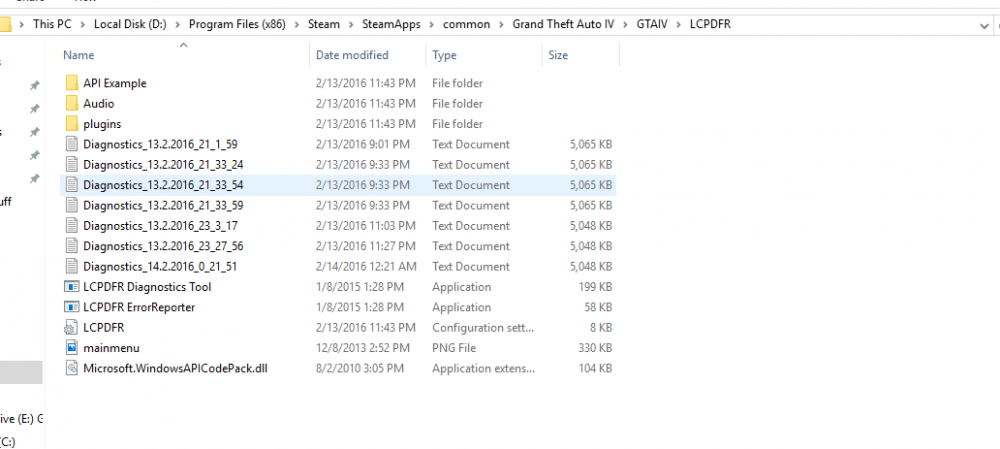
I am having issues myself with Lcpdfr 1.0 use the diagnoses tool that came with the program here is a screen shot to help you locate it since you have steam as myself. good luck man,
-
Been Trying to get Lcpdfr 1.0 to work with windows 10 for about a week now cant seem to find a solution, hope someone can help . So okay quick brief I had windows 7 with lcpdfr 0.95 awhile ago and everything worked fine updated windows and also updated to the new lcpdfr 1.0 version. Installed it as described on forums . Now whenever I startup my game I get a loader error and when I Press alt+ P nothing happens. I checked the diagnoses tool that came with the program and it states I have an error log that red everything else is fine. I have also downloaded all the programs as C++ and direct X as mentioned in other threads i read of people with same problem so you guys are my last resort i don't know whats wrong at this point. Here is the log [Asi loader] Using dsound [ScriptHookDotNet] Found [ScriptHookDotNet] Valid [System dependencies] Verifying dependencies integrity [System dependencies] Checking MSVCR110.DLL [System dependencies] Checking dependencies (32-bit required: True) [System dependencies] Resolved KERNEL32.dll to C:\WINDOWS\SysWOW64\KERNEL32.dll [System dependencies] Check passed [System dependencies] Checking MSVCP110.DLL [System dependencies] Checking dependencies (32-bit required: True) [System dependencies] Resolved MSVCR110.dll to C:\WINDOWS\SysWOW64\MSVCR110.dll [System dependencies] Resolved KERNEL32.dll to C:\WINDOWS\SysWOW64\KERNEL32.dll [System dependencies] Check passed [System dependencies] Checking MSCOREE.DLL [System dependencies] Checking dependencies (32-bit required: True) [System dependencies] Resolved KERNEL32.dll to C:\WINDOWS\SysWOW64\KERNEL32.dll [System dependencies] Check passed [System dependencies] Checking SCRIPTHOOK.DLL [System dependencies] Checking dependencies (32-bit required: True) [System dependencies] Resolved KERNEL32.dll to C:\WINDOWS\SysWOW64\KERNEL32.dll [System dependencies] Resolved USER32.dll to C:\WINDOWS\SysWOW64\USER32.dll [System dependencies] Check passed [System dependencies] Checking MSVCR100.DLL [System dependencies] Checking dependencies (32-bit required: True) [System dependencies] Resolved KERNEL32.dll to C:\WINDOWS\SysWOW64\KERNEL32.dll [System dependencies] Check passed [System dependencies] Checking D3DX9_43.DLL [System dependencies] Checking dependencies (32-bit required: True) [System dependencies] Resolved msvcrt.dll to C:\WINDOWS\SysWOW64\msvcrt.dll [System dependencies] Resolved GDI32.dll to C:\WINDOWS\SysWOW64\GDI32.dll [System dependencies] Resolved KERNEL32.dll to C:\WINDOWS\SysWOW64\KERNEL32.dll [System dependencies] Resolved ADVAPI32.dll to C:\WINDOWS\SysWOW64\ADVAPI32.dll [System dependencies] Check passed [System dependencies] Checking ScriptHookDotNet.asi [System dependencies] Checking dependencies (32-bit required: True) [System dependencies] Resolved KERNEL32.dll to C:\WINDOWS\SysWOW64\KERNEL32.dll [System dependencies] Resolved ScriptHook.dll to D:\Program Files (x86)\Steam\steamapps\common\Grand Theft Auto IV\GTAIV\ScriptHook.dll [System dependencies] Resolved MSVCR100.dll to C:\WINDOWS\SysWOW64\MSVCR100.dll [System dependencies] Resolved USER32.dll to C:\WINDOWS\SysWOW64\USER32.dll [System dependencies] Resolved d3dx9_43.dll to C:\WINDOWS\SysWOW64\d3dx9_43.dll [System dependencies] Resolved mscoree.dll to C:\WINDOWS\SysWOW64\mscoree.dll [System dependencies] Check passed [System dependencies] v2.0.50727 2.0.50727.4927 SP2 v3.0 3.0.30729.4926 SP2 v3.5 3.5.30729.4926 SP1 v4 Client 4.6.01038 Full 4.6.01038 v4.0 Client 4.0.0.0 [System dependencies] The .NET Framework is installed in an unknown version (> 4.5.1) [System dependencies] Checking ADVANCEDHOOK.DLL [System dependencies] Checking dependencies (32-bit required: True) [System dependencies] Resolved ScriptHook.dll to D:\Program Files (x86)\Steam\steamapps\common\Grand Theft Auto IV\GTAIV\ScriptHook.dll [System dependencies] Resolved VERSION.dll to C:\WINDOWS\SysWOW64\VERSION.dll [System dependencies] Resolved PSAPI.DLL to C:\WINDOWS\SysWOW64\PSAPI.DLL [System dependencies] Resolved dbghelp.dll to C:\WINDOWS\SysWOW64\dbghelp.dll [System dependencies] Resolved KERNEL32.dll to C:\WINDOWS\SysWOW64\KERNEL32.dll [System dependencies] Resolved USER32.dll to C:\WINDOWS\SysWOW64\USER32.dll [System dependencies] Resolved SHELL32.dll to C:\WINDOWS\SysWOW64\SHELL32.dll [System dependencies] Resolved MSVCR110.dll to C:\WINDOWS\SysWOW64\MSVCR110.dll [System dependencies] Resolved MSVCP110.dll to C:\WINDOWS\SysWOW64\MSVCP110.dll [System dependencies] Resolved mscoree.dll to C:\WINDOWS\SysWOW64\mscoree.dll [System dependencies] Check passed [System dependencies] Checking ADVANCEDHOOKINIT.ASI [System dependencies] Checking dependencies (32-bit required: True) [System dependencies] Resolved VERSION.dll to C:\WINDOWS\SysWOW64\VERSION.dll [System dependencies] Resolved KERNEL32.dll to C:\WINDOWS\SysWOW64\KERNEL32.dll [System dependencies] Resolved USER32.dll to C:\WINDOWS\SysWOW64\USER32.dll [System dependencies] Resolved MSVCR110.dll to C:\WINDOWS\SysWOW64\MSVCR110.dll [System dependencies] Resolved MSVCP110.dll to C:\WINDOWS\SysWOW64\MSVCP110.dll [System dependencies] Check passed [System dependencies] Checking SLIMDX.DLL [System dependencies] Checking dependencies (32-bit required: True) [System dependencies] Resolved MSVCR100.dll to C:\WINDOWS\SysWOW64\MSVCR100.dll [System dependencies] Resolved KERNEL32.dll to C:\WINDOWS\SysWOW64\KERNEL32.dll [System dependencies] Resolved ole32.dll to C:\WINDOWS\SysWOW64\ole32.dll [System dependencies] Resolved USER32.dll to C:\WINDOWS\SysWOW64\USER32.dll [System dependencies] Resolved GDI32.dll to C:\WINDOWS\SysWOW64\GDI32.dll [System dependencies] Resolved WINMM.dll to C:\WINDOWS\SysWOW64\WINMM.dll [System dependencies] Resolved ADVAPI32.dll to C:\WINDOWS\SysWOW64\ADVAPI32.dll [System dependencies] Resolved MSVCP100.dll to C:\WINDOWS\SysWOW64\MSVCP100.dll [System dependencies] Resolved mscoree.dll to C:\WINDOWS\SysWOW64\mscoree.dll [System dependencies] Check passed [System dependencies] No problems found [LCPD First Response] Checking LCPDFR installation [LCPD First Response] No problems found [Log Check] Checking log files [Log Check] asilog.txt seems okay [Log Check] ScriptHookDotNet.log lists one or more errors [Log Check] 2016-02-13 22:54:29 - Initializing ScriptHookDotNet v1.7.1.7 BETA (on GTA IV version 1.0.7.0 with C++ Hook version 0.5.1) 2016-02-13 22:56:21 - Direct3D device created! 2016-02-13 22:56:21 - SEARCHING FOR SCRIPTS... 2016-02-13 22:56:21 - Loading scripts in Assembly 'scripts\LCPDFR Loader.net.dll' ... 2016-02-13 22:56:21 - ...found script 'LCPDFR_Loader.Loader'! 2016-02-13 22:56:21 - ...found script 'LCPDFR_Loader.PublicScript'! 2016-02-13 22:56:21 - DONE! 2 valid scripts found! 2016-02-13 22:56:21 - STARTING SCRIPTS... 2016-02-13 22:56:21 - INFO: Phone number checks are not available! 2016-02-13 22:56:21 - ...successfully started script 'LCPDFR_Loader.PublicScript'! 2016-02-13 22:56:21 - ...successfully started script 'LCPDFR_Loader.Loader'! 2016-02-13 22:56:21 - Error during Tick in script 'LCPDFR_Loader.Loader': System.InvalidCastException: [A]LCPDFR_Loader.Test cannot be cast to LCPDFR_Loader.Test. Type A originates from 'LCPDFR Loader.net, Version=1.0.0.0, Culture=neutral, PublicKeyToken=null' in the context 'Default' at location 'D:\Program Files (x86)\Steam\SteamApps\common\Grand Theft Auto IV\GTAIV\LCPDFR Loader.net.dll'. Type B originates from 'LCPDFR Loader.net, Version=1.0.0.0, Culture=neutral, PublicKeyToken=null' in the context 'LoadNeither' in a byte array. at LCPDFR_Loader.Loader.Load() at LCPDFR_Loader.Loader.Loader_Tick(Object sender, EventArgs e) at GTA.Script.TryTick() at GTA.Script.DoTick() at GTA.ScriptThread.OnTick() 2016-02-13 22:59:36 - Direct3D device lost! 2016-02-13 22:59:36 - SCRIPTS TERMINATED! [Log Check] ScriptHook.log doesn't start AdvancedHook thread [Log Check] Log start: Sat Feb 13 22:54:29 2016 ------------------------------------------------------------------------------------- FYI to further explain ELS and Trainer mods are working perfectly but LCPDFR 1.0 *Screen shot updated*