


Aquamenti
Members
-
Joined
-
Last visited
Everything posted by Aquamenti
-
Did you add a sirensetting 15 to carcols?
-
Check your model files, vehicles.meta and if those are good then you might have reached the limit for added cars. You can confirm it by removing a vehicle you've previously added and adding whatever crashed the game instead.
-
Umm, no. Sirensettings are defined by carcols, so as long as the sirensetting you refer to in your carvariations (for example: 13) exists in carcols.ymt then it should work fine. I suggest you carefully read over the readme that comes with Lundy's download and make sure you followed the steps through. You can start by checking your carvariations lines, what is the sirensetting value there.
-
The second path is correct, yes. It always has been, nothing has changed. Care to elaborate what's wrong, exactly?
-
Have you tried it after adding the audionamehash? That's what gives you a working siren in the first place so without it there would be no siren, no lights, no nothing.
-
In that case it's got to be a problem with the model itself. If you can't see the emergency lights through tinted windows, the modeler has likely left the materials in the wrong order in ZM3. There's nothing you can do about it, I'm afraid.
-
I'm curious. Why the LE if you don't like the carbon fiber trim?
-
Hey, thanks for your feedback. I'll consider your suggestions, especially should there become a bigger demand. I'll keep it in the back of my head.
-
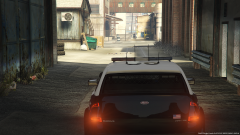
From the album: Aquamenti Police Workshop & Museum
Some new content: the Vapid Radius patrol car. You can get it right here on LCPDFR.com -
The Brute Pony is now also available in halogen rotator lightbar configuration - no more LEDs for your authentic retro experience. Fresh out of the garage is the brand new Vapid Radius police car! Grab it while it's hot here:
-
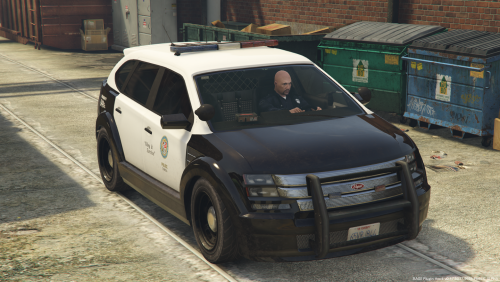 She may not look like much, but will get the job done regardless. The Vapid Radius is ready to join your fleet. This model is a standalone (add-on) model. Recommended vehicles and carvariations meta lines included Windows, lights, dials and collisions work as they should The vehicle is fully mapped. This lore-friendly model is unlocked. Also, for texture editing, you can find a template, .psd and the original textures in the optional separate download. Share/request liveries or keep up to date with my other content in my showroom thread:
- 6 comments
- 3 reviews
-
-

- 16
-
-
It seems the glass on the lightbar is weirdly opaque, doesn't let light through. If you haven't tampered with the .ytd files it might be a problem with the model itself, I'm unsure. ... aaand it's becoming evident that since I only use lore-friendly cars myself, my expertise in vehicle mods is limited to cars modeled by Rockstar. With the Charger, did the author include a carvariations data? If not, which slot was it intended to replace? I'm interested to know what lightSetting does it use. Try changing it to 2 for example, I think that should remove the taillight corona.
-
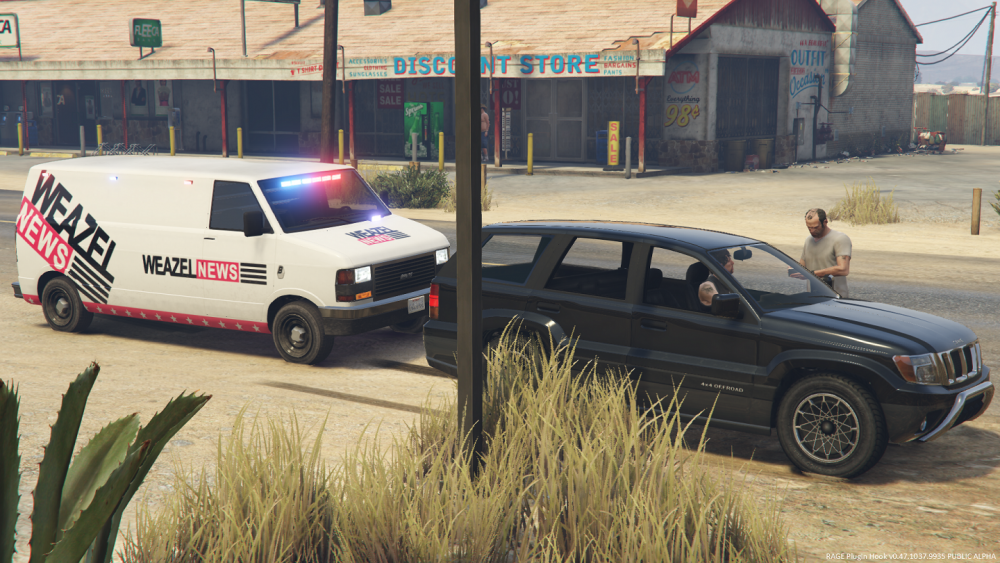
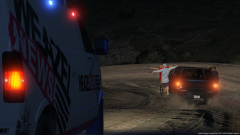
I'm back for a short while and, believe me, the workshop is busy. As per a friend's request, I've released an unmarked version of the Brute Pony van. It's fully mapped as its cousin (so, possible slicktop? you decide!), and as a satirical touch I added an optional Weazel News livery for anyone interested. The old van's driver misplacement problem has also been fixed with a proper vehicles.meta update. But, a picture says more than a thousand words, so see for yourselves: I've removed texture and mapping resources from the pack to significantly reduce download size. Both these optional files as well as the new unmarked model have been added as separate downloads on the same page. In the coming few days I will seek to release a version with a halogen rotator bar for the historical authenticity enthusiast. Stay tuned! What's next? I've already begun work on the Vapid Radius police vehicle. The base model is complete and tested, and looks marvelous, but I've yet to map it, which is arguably the most time consuming part of default-style police car mods. I hope to release it before the week is over.
-
From the album: Aquamenti Police Workshop & Museum
-
You can create and privately use whatever textures you like, but as long as you can't get in touch with the author, I don't think you should distribute it, just to be on the safe side.
-
Ah. Well the one corona thing kind of puts me off. Thank you for answering the question, though
-
What is the modelName of the vehicle?
-
There's Blender, which is free, but if you eventually want to pick up with ZM3 anyway then I also suggest starting with ZM3 because learning to use yet another software is complicated.
-
Hello there. When exporting a model from Zmodeler3, the author has the option to "lock" it. This prevents other modders from making modifications from that model. It is generally discouraged, but some authors do it to protect their work from unauthorized use.
-
We've all seen it done and I wonder, how can I seemingly add more than 20 lights on a vehicle. Thanks.
-
Actually, it got me thinking. Can you post screenshots of the vehicles and their problems? If the taillight coronas are the problem then if I remember correctly, there was a lightsetting value which would remove coronas from the taillights...
-
Hello there! The reason nobody has answered so far is probably because the thread should be in the GTA V modding support forum instead. As for the problem itself, to my knowledge it isn't possible to make individual lights emit more or less light outside appropriate modelling software. Do you use any visual mods like Radiance V?
-
Good luck with that. You can make the most out of carcols if you can tamper with the actual models, if you're ever interested.
-
It's more complicated than you think. First of all, the original police4 carvariations are encrypted and you can't read or edit them. Which slot was the vehicle originally intended to replace, let's start with that. Fbi2? The handling is a serious issue because unfit handling data will render your car basically uncontrollable. And as for the sirensettings, it doesn't matter how many lights the car has, each emergency light is assigned a siren id (siren1, siren2, etc) and the sirensetting value determines all lighting pattern information for each of these lights (duration, order and frequency of the flashes, color of the corona, environmental lighting etc). If the original model is fbi2, I think the sirensetting is supposed to be either 1 or 12, not sure. So, what you need to do, is get the carvariations lines from another vehicle. For example, these are the lines to my Pinnacle police car: And this overall setup is pretty typical for police vehicles. There are three points of interest for anyone who has to edit carvariations data: 1. in the beginning, make sure the <modelName> value matches the file name of your vehicle 2. throughout the lines you can see five groups of four numbers (in this case, 0, 120, 1 and 156). These are the five color variations that the car will spawn in. The first two numbers are important to you because they determine the primary and secondary colors of your vehicle. In this example, all of my pinnacle2 models will spawn in black primary color with a chrome secondary color. Unmarked cars typically do not use a secondary color, so you can for example leave it at 0 (black). If you don't change the primary color value, all your cars will spawn in black. You would probably want different cars of the same model to be of different colors, like the original police4 in the game. So change the primary color value of each of the five variations to be different from each other. You can find lists of the color values on the internet. 3. near the end of the lines, you have the sirensetting value. As I said before, this determines the properties of all emergency lights on your vehicle. The author of the model always has a specific sirensetting value in mind, even if he hasn't included the carvariations. In that case you should use whatever id the original model would use. So, to sum it up, here's another example that you can use. In these lines, the cars will spawn in five different colors, and use the sirensetting value 1. It might work for your vehicle. You will have to change the modelname value. You're going to have to get your own vehicles.meta lines though. The FBI2 ones should be accessible somewhere in the game files.
-
You need to use the carvariations lines that the author included with the download, otherwise the default police4 lines are used. The sirensetting and lightsetting values may be different than what the author intended. More importantly, doesn't the download include a vehicles.meta? Police4 is originally a sedan, its handling data will not look good on an SUV.


