
MattBravo
Members
-
Joined
-
Last visited
Everything posted by MattBravo
-
-
-
 do you know what exactly needs to be changed? Or should i just copy over the police one and rename it.
- 81 comments
- 25 reviews
-
The policeold2 slot causes the vehicle to sound the same and have the same yellowed front and rear lights as the original policeold2 car. Dont know if there has been a fix or if i should just replace the policeold2 carvariation with a police one.
- 81 comments
- 25 reviews
-
 @ThisIsntMyNameHe Usually gives himself 5 star rating on his own stuff. Guess he messed up this time.
- 9 comments
- 3 reviews
-
-
 I dont know if there is a problem because i didnt download nor do i intend to. Remove the 5 star rating you gave yourself or ill put a 1 star rating to cancel it out.
- 8 comments
- 3 reviews
-
-

- 1
-
-
you need to remove your 5/5 rating on your OWN file. It doesnt work that way.
- 8 comments
- 3 reviews
-
-
- 2
-
-
-
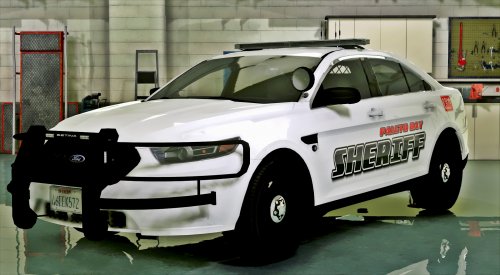 Looks great! Only thing Is that the warning white lights in the lightbar kinda erase the red and blue in the lightbar. Some patterns the red and blue cannot be seen at all.
- 51 comments
- 17 reviews
-
-
- 1
-
-
-
-
-
-
-
-
Anyone know whats causing this crash? Its completely random. Yesterday it wasn't crashing, today it did one time 5 mins after I went on duty and another time as soon as the game loaded in.
-
 Also do you know if the vehicles.awc still has the 15.75mb limit or not? Nvm it still does.
- 221 comments
- 40 reviews
-
-
Is there any way to change the alternate 2 siren that ELS has? If so, which siren in Open iV corresponds with it that i should change?
- 221 comments
- 40 reviews
-
 What sound do you change in Open iV that corresponds with the alternate 2 siren? Right now it is the default one and I dont know what to change to make it a different one.
- 2,661 comments
- 234 reviews
-
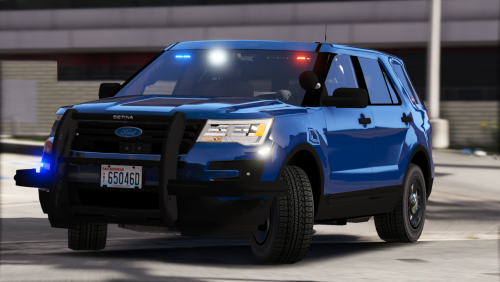 For me on the 2015 Explorer 2nd light stage only the red lights light up on the front and back. Is that how its supposed to be?
- 15 comments
- 10 reviews
-
-
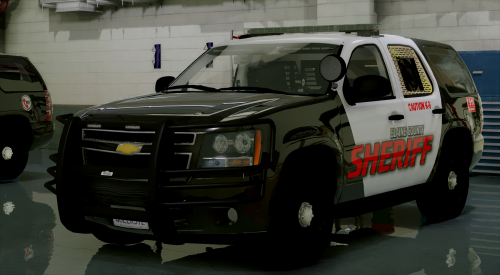 A little feedback after using the vehicle for a while: Overall love using this Tahoe for my sheriff2. 1. The LEDs in the rear left and right windows are very dull and when the vehicle gets dirty, can not be see at all. The LEDs on the front push bumper are also very dull. If it were me id replace them with different ones but its your vehicle. 2. The light patterns in general.... they feel really messy to me. Its hard to combine some patterns to make it seem more realistic and less all over the place. For example the TA in the back window, when you have it on the left to right patterns there are only 2 lit up on the left and 4 on the right. Thats really it for now. Really love the vehicle though and am looking forward to future updates.
- 32 comments
- 16 reviews
-
-
- 1
-
-

.thumb.png.04a1687a445e54a18a959b7926b87d7b.png)
.thumb.jpg.53e6566fc11617e23f7fb13f2792cbbe.jpg)