




PNWParksFan
Insiders
-
Joined
-
Last visited
Everything posted by PNWParksFan
-
Sometimes AI boats will just sit there if they are not close enough to you, it's some bug in the game with how it loads water navigation. You can go closer to them and they'll start moving. How do you have the victim grabbed? Make sure you are using Coastal Callouts to grab them, not some other mod like STP.
-
Are you sure you updated the LML Mod Loader files in your GTA V folder? It looks like you still have an old version installed. Make sure you copy over modmanager.core.dll, vfs.dll, and all the other files included in the "mod loader" folder of the LML download.
-
 You can post in the support thread if you are having trouble installing the mod. Make sure to fill out the support template. You do not need NativeUI and ScriptHookV to use LSPDFR mods. Many LSPDFR mods (including mine) require RageNativeUI though, which is included in the download.
- 496 comments
- 33 reviews
-
The mod works fine and does not need to be updated, you probably installed it incorrectly. You can post in the support thread if you need help installing it. See the links above.
- 496 comments
- 33 reviews
-
No shame in asking for help! In the future please fill out the full support template though. You're using an old version of LML, get the latest here: You have three folders, they're all listed in the log, you should keep only one of these - probably the last one: "Coastal Callouts", version Unknown: LML\downloader\Coastal_Callouts_1.2c_PLUGIN "Coastal Callouts", version Unknown: LML\downloader\Coastal_Callouts_1.2c_LML_PACKAGE\LML Package\Coastal Callouts "Coastal Callouts", version Unknown: LML\LML Package\Coastal Callouts
-
I cannot help you until you upload your RagePluginHook.log file from immediately after the crash occurs.
-
Please fill out the support template from the first page of this thread.
-
You can use the LSPDFR API to change how a ped in a pursuit will behave.
-
This will be fixed in the next release.
-
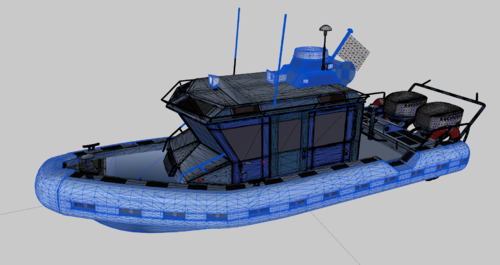 The metas should be functional. You can look at the main Coastal Callouts FiveM package to see how the resource.lua is configured.
 -
This has nothing whatsoever to do with Coastal Callouts. The issue appears to be caused by "Chill Callouts". I suggest you remove or update that mod. [06/30/2020 12:06:01 AM.786] LSPD First Response: ============================== [06/30/2020 12:06:01 AM.786] LSPD First Response: UNHANDLED EXCEPTION DURING GAME FIBER TICK [06/30/2020 12:06:01 AM.786] LSPD First Response: ------------------------------ [06/30/2020 12:06:01 AM.786] LSPD First Response: Origin: Game fiber "LoadingSpinner". [06/30/2020 12:06:01 AM.786] LSPD First Response: ------------------------------ [06/30/2020 12:06:01 AM.786] LSPD First Response: Exception type: System.TypeInitializationException [06/30/2020 12:06:01 AM.786] LSPD First Response: Exception message: The type initializer for 'Chill_Callouts.UI.TrainUI' threw an exception. [06/30/2020 12:06:01 AM.786] LSPD First Response: ------------------------------ [06/30/2020 12:06:01 AM.786] LSPD First Response: Inner exceptions: [06/30/2020 12:06:01 AM.786] LSPD First Response: Exception type: System.IO.FileNotFoundException [06/30/2020 12:06:01 AM.786] LSPD First Response: Exception message: Could not load file or assembly 'Koma.Extensions, Version=1.0.2.6, Culture=neutral, PublicKeyToken=null' or one of its dependencies. The system cannot find the file specified. [06/30/2020 12:06:01 AM.786] LSPD First Response: ------------------------------ [06/30/2020 12:06:01 AM.786] LSPD First Response: Stack trace: [06/30/2020 12:06:01 AM.786] LSPD First Response: at Chill_Callouts.UI.TrainUI..cctor() [06/30/2020 12:06:01 AM.786] LSPD First Response: ============================== [06/30/2020 12:06:01 AM.786] LSPD First Response: [06/30/2020 12:06:01 AM.786] LSPD First Response: ------------------------------ [06/30/2020 12:06:01 AM.786] LSPD First Response: Stack trace: [06/30/2020 12:06:01 AM.786] LSPD First Response: at Chill_Callouts.UI.TrainUI.MainBuildMenu() in C:\Users\toddy\Desktop\Chill Callouts\UI\TrainUI.cs:line 38 [06/30/2020 12:06:01 AM.786] at Chill_Callouts.Main.OnOnDutyStateChangedHandler(Boolean OnDuty) in C:\Users\toddy\Desktop\Chill Callouts\Main.cs:line 40 [06/30/2020 12:06:01 AM.786] at LSPD_First_Response.Mod.API.Functions.OnDutyStateChangedEventHandler.Invoke(Boolean onDuty) [06/30/2020 12:06:01 AM.786] at e'oj\\Q43o?=\*Nk)!_;^6$7}f@.(D=eLf-=7lO:Q<,5v0h_uWk!(Boolean ) in E:\GTA V\LSPD First Response\LSPD First Response\Mod\PlayerDutyController.cs:line 69 [06/30/2020 12:06:01 AM.786] at e'oj\\Q43o?=\*Nk)!_;^6$7}f@.]YZLRC3bUL\TO"SaG{g/ur4O(Boolean , Boolean ) in E:\GTA V\LSPD First Response\LSPD First Response\Mod\PlayerDutyController.cs:line 371 [06/30/2020 12:06:01 AM.786] at Iddb`%wT<|:JM$ibB|TVkw(%".huXw"`4kr-E "4v ;UD~E_4$'() in E:\GTA V\LSPD First Response\LSPD First Response\Mod\Menus\DutyMenu.cs:line 235 [06/30/2020 12:06:01 AM.786] at FTLQdb9McB4'2F^\,6<EF50Mw)./}lr8sR\8K&Zf!wztK{:+U<1"() in E:\GTA V\LSPD First Response\LSPD First Response\Engine\UI\LoadingSpinner.cs:line 30 [06/30/2020 12:06:01 AM.786] at Rage.GameFiber.Main() [06/30/2020 12:06:01 AM.786] LSPD First Response: ==============================
-
 Yes, you can add new stations to the XML. Just make sure you've formatted it correctly.
- 781 comments
- 85 reviews
-
Have you done the heli rescue training callout? It walks you through all the steps. You need to press * to get on the basket/hook.
- 496 comments
- 33 reviews
-
People keep asking me to do more beach related callouts. Now I don't have to!
-
-
Open the Coastal Callouts menu, scroll down to the Callouts Config, then uncheck the box for all coastal callouts.
- 496 comments
- 33 reviews
-
You may need to go into your graphics settings in the game and set texture quality to high, if your PC can handle it. This is done for performance reasons.
-
Fill out the support template on the first page. You probably neglected to install the heap adjuster. When you pull up to the coast guard station in your boat, if you park your boat right on the jail icon, then the screen should fade out and the arrested ped should be taken away. Do this instead of ordering them out of the vehicle. Looks like you need to add the custom EUP outfits to wardrobe.ini.
-
Hah, that's clever. Fire Callouts by Panos has a tripod-mounted rescue winch feature in development, which could also be used similarly.
-
-
@Cruuuz I have just deployed an update to the server which should fix this issue. Can you please try again now and see if it is fixed?
-
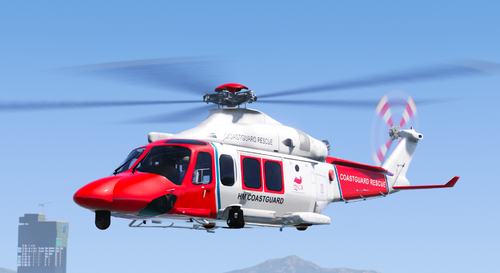 Both should be included. Spawn the LGUARD model in game to get the lifeguard truck.
- 17 comments
- 9 reviews
-
OK, I was able to reproduce this crash by exiting the helicopter while near the landing area with a dropoff active. I could not reproduce it when landing on the marked area without exiting the helicopter. Is it possible you are somehow switching vehicles or exiting the vehicle? I just put in a fix for this which would prevent it from crashing, but if it's not detecting you as being in the vehicle then it may not detect the dropoff as being successful. That fix will be included in the next beta version sometime this weekend, and will be included in the next public release after the beta. Based on where the log is showing the crash, I believe this may be caused by a corrupted model. Or, it could be a conflict with one of the other mods you installed. If you remove the other new mods you added recently does the issue go away?
-
FILL OUT THE SUPPORT TEMPLATE ON THE FIRST PAGE OF THIS FORUM THREAD Does this happen for you with any helicopter at any hospital?
-
What you have done wrong is you have not followed my directions: Do that, then I might be able to help you.


