




BlueLine Vibes
Members
-
Joined
-
Last visited
Everything posted by BlueLine Vibes
-
 It already shows with a white dot by default from LSPDFR
 -
 Interesting script - no way to change the keybind as it conflicts with other keys?
- 19 comments
- 2 reviews
-
 Nah, I wouldn't worry about it to be honest. I don't mind the feature you already have in there for skip ads. No reason to add more to the plugin and it would ultimately confuse certain people.
- 637 comments
- 51 reviews
-
 Question: Since no one has posted this yet, on the new update for the "Zombie" callout. I am noticing it not stimulating the call. I am using a Callout Manager, I have teleported to about 5 different locations around San Andreas to make sure it's not a AOP type of thing. Might be on my end though since not one person mentioned it.
- 237 comments
- 20 reviews
-
- lspdfr callout
- rph
- translation
- legacy
-
Tagged with:
-
 Can you make this bigger? I would like this highlighted in yellow as well and have sparkly lights.
- 35 comments
- 3 reviews
-
-

- 2
-
-
I wonder if it will still play the ad for those of us that have actual subscriptions on Broadcastify and logged in. I guess I will be the "tester"
- 637 comments
- 51 reviews
-
 @Tom3k. Thanks for your hard work on this. I know those regions had to get very tedious. I did notice one small thing, that you might need to correct in the future. Forgive me if I am incorrect on this. I downloaded the default vehicle EUP 9.7 version. In the Default Regions under Blaine County Sheriff's Office Air Unit. You have the BCSOMAV - which makes sense for that division. However, would that cause game crashing if we do not have the BCSOMAV installed? I didn't want to chance it or test it out, so just changed it universally to POLMAV to be on the safe side. I can always create a BCSO Livery for it and pick the second livery is what I am thinking? If the Default Regions will accept a BCSOMAV then I can always change it back, just have not seen it named that before in game. <BlaineCounty> <!--Blaine County Sheriff's Office Air Unit--> <VehicleSet spawn_distance="200"> <Vehicles> <Vehicle livery="1" pax="1" pax_chance="100">BCSOMAV</Vehicle> </Vehicles>
- 358 comments
- 17 reviews
-
I appreciate the amount of work that you put into this Khorio. Looking Great!
- 637 comments
- 51 reviews
-
-
- 1
-
-
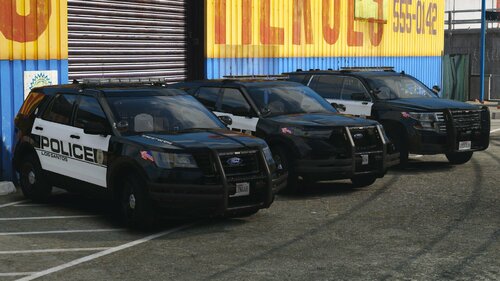 This pack is underrated - Definitely deserves 5 / 5 Looks great and loving the 2016 light bar as well
 -
 Question: I do not see a presetoutfits in your download, I am running EUP 9.7 - Are we supposed to go through the menu and find all of the elements of the actual uniform??
 -
 I like this mod. Would be good to add a feature that if you tap your brakes, it removes the cruise control and places it back in the hands of the user. On occasion I found myself wanting to slow down and when the brake was released it was wanting to ramp back to the previous cruise control speed. In real life, most cruise controls deactivate after the brake is touched. Overall it's a decent mod and I can see how it could be useful setting this cruise control when pacing a car at certain speeds on the freeway and even slower speeds in the neighborhoods.
- 7 comments
- 2 reviews
-
-

- 2
-
-
- scripthookvdotnet
- ru
- us
- legacy
-
Tagged with:
-
 @Venoxity Would there be a future update for a menu system to align the text a bit better on the screen? I literally spent 3 hours and needed ducktape around my head so it didn't explode to get the alignment correct - It's those damn negative Y coords that my brain kept fighting 😆
- 540 comments
- 26 reviews
-
-
-
- 4
-
-
 I appreciate your upload and yes I can see how it could be useful for those that do not have Callout Interface installed. I do have two suggestions. I am not a coder, but I do know a lot about preferences for the player. 1. I am unsure why you included LSPDFR itself in your upload. Although the experienced player, would know not to install this if they are playing on an older version (Yes, there are many of us out there that play on older stable versions of GTA 5) there will be some that accidently just drag the plugins folder into the game directory thinking that it will be an easy drag and drop and now .... you just completely updated their LSPDFR to a possible different version. Your plugin works fine on version 3028, by the way. 2. I would recommend that you add a delay that the user can set in the config. When I use the Callout Interface Callout manager built in, I like to add a delay up to 12 seconds, this allows seamless edits for those that like to produce content, and it also allows the player to take those extra few seconds to have a small bit of immersion of actually getting the call instead of a instant forced call. Just my suggestions
- 22 comments
- 1 review
-
-
- 3
-
-
An Endless tutorial ...
-
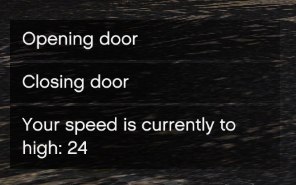 Ya saw the folders. Would be a welcome feature for the driver door and even the back doors to be able to open the door and speak with the subject in the back etc. Yes, sometimes you can get lucky and open the door, but more often than not, you are asking them to leave the car. Also by opening the door first and then asking the subject to step out would look better. The other way the subject in the backseat is a magician opening the car door while handcuffed 😉
 -
Fairly old topic, but would love to see this added into the lspdfr config at least. I think after 10 years, help messages should be a on / off type of setting in the config. Please don't respond with "Well you can turn off notifications in the .... " nah, not an option.
-
Sounds interesting, but I think I will hold off for a config
-
 I tried it out and I must say, things are quite different. For some reason, the gangs will tolerate me driving through. Don't bump them for any reason or all hell breaks loose. Oh and if you have any patrolling units that casually drive through ...... the gangs immediately open fire on them without instigation 😅 Weird part is, some of the gangs on grove will protect me by shooting back at other hostiles .... weird right? Definitely feels different patrolling. Through most streets, even the traffic acts differently, some drivers are flat out more aggressive and they tend to act more agitated the closer I get without lights on. I'll try and get a demo out soon. Just be careful near Grove street out there 😙
 -
 Few things: If the Silverado is an addon vehicle and not replacement, you might have a harder time adjusting the location of the spotlight as I have experienced the same issues with Addon vehicles. Replacement vehicles, it should work fine and you can adjust the parameters and xyz coordinates with the in game menu system. CVPI's might be a bit easier as most models are relatively the same year models for the most part. However, the FPIUs can range in year model and coming up with a distinct preset might not work all that well, unless anyone wants to share presets per year model here in this thread and maybe that would work better. Might be the type of vehicle you were in perhaps. Were you using an addon vehicle? I know Spotlight has issues with the menu system for addons
- 473 comments
- 73 reviews
-
-

- 1
-
-
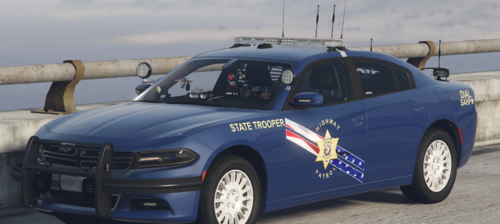 Great looking livery!
 -
Can you tell me the difference between Cruise Master and the below Scripts??
- 7 comments
- 2 reviews
-
- scripthookvdotnet
- ru
- us
- legacy
-
Tagged with:
-
Could it be because of the update that dropped today?? LSPDFR/RageHook is out of date
-
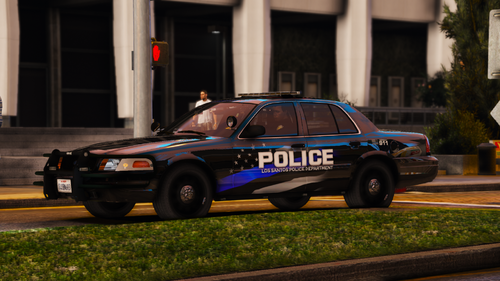 You say this is your first pack you have ever done? These liveries are quite good! I just replaced the livery for the boring polmav, now it looks 10x better. Thanks!
- 8 comments
- 1 review
-
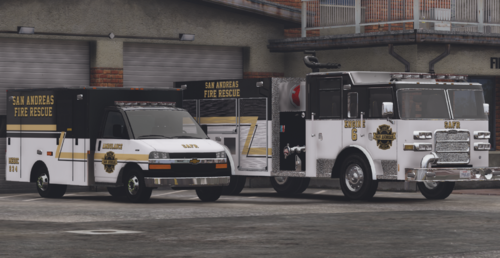 Very nice - Love the liveries as they are different than the typical red that we see.
 -
Yes. Just make sure you change the xml file as well. The police2 in the Frost88 pack is typically the charger for the model. If you want to rename this to sheriff, you potentially might need to change the handing ID as well in the vehicle.meta The sheriff slot should do fine, but taking sharp corners at a higher speed, you may notice the vehicle become unsteady on occasion and want to flip (not that bad with sheriff slot though). If you wanted to change the handling ID in the sheriff slot that now has the charger, you can rename the handling ID to police2 as it will be more stable. Just noticed your question was asked 3 years ago. Yikes .....
- 8 comments
- 1 review


