




BlueLine Vibes
Insiders
-
Joined
-
Last visited
Everything posted by BlueLine Vibes
-
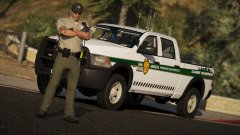 Looks great. Let me know if you want me to put this bad boy in an episode on my channel 😉
 -
I remember playing LCPDFR way back in they day. It was a love / hate relationship. Mainly with my PC 😉 Happy Birthday LCPDFR!
-
-
Do you mean while you are behind them in your car? If so its just SHIFT key again to cancel. Or you can call a Code 4 through Vocal dispatch if you have that.
-
Code 1 is a non emergency type of call. For example, the officer will head that way when they have the time. They usually will respond but its on the officers and the departments time. I have seen a Code 1 response as little as 5 minutes and as long as HOURS! Most officers will not go with lights and sirens, they usually obey all traffic and just get there when they can.
-
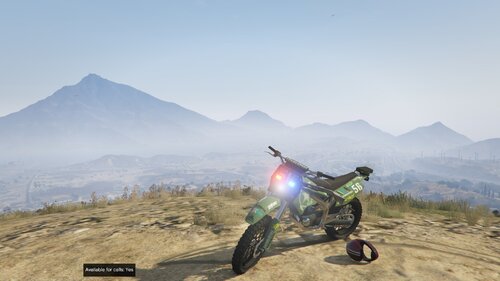 No reason to bash him on the upload. Just give constructive criticize guys. I am waiting to see what he does with it. We have dirt bike police uniforms with EUP, and I don't see any other bikes on the site. I will wait a bit to see if he modifies it more.
 -
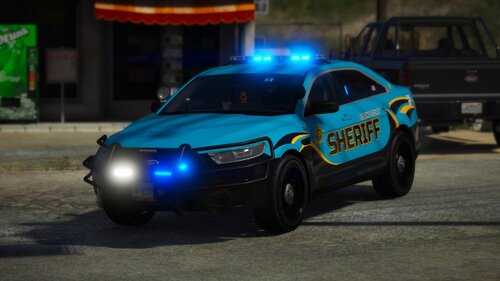 I think the livery looks fantastic! Kinda of getting tired of seeing the same colors all over lspdfr.com good to see some variation. Would love to see the traffic advisers Stage 1 a bit brighter, tad bit dim and a bit orange. The other lights look fantastic! The interior is in my opinion the best you have done. Really like the police computer here and the partition is super bad ass!
- 25 comments
- 9 reviews
-
-

- 2
-
-
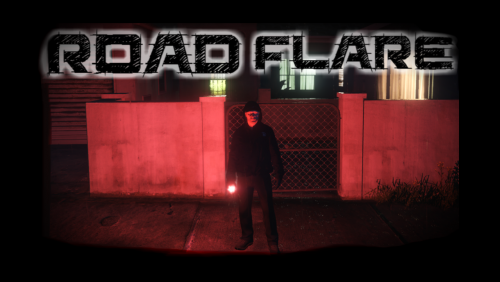 Looks good on a level 3 smoke it seems to me. However, I did notice the burn time seemed to be about 2-3 minutes under the 5 minute burn meta file. I will experiment more.
- 17 comments
- 5 reviews
-
Do you have a mods folder? Easiest way to check if your mods folder is out of date is to rename your mods folder to something like mods - copy. Now start RagePluginHook.exe see if you can get past the infinite loading lspdfr screen If it works now, you need to make a new mods folder as @J T mentioned to you above in his post. Also try disabling your Firewall and Antivirus software to see if it will launch.
-
There has always been a message about how it may not work for even the last patch. But currently it is working for me. I wonder if you have a plugin that your using that needs the police radio, that could be causing some issues. Can you do plate checks and ped checks for example?
-
Correct, using them in my current videos
-
Wrong pathway. Needs to be Grand Theft Auto V\mods\update\x64\dlcpacks\patchday20ng\dlc.rpf\x64\levels\gta5\vehicles.rpf\ Or patchday21ng but it needs to start with update folder first.
-
-
-
I do not have any problems with Traffic Policer or Police Radio.
-
That is pretty odd for the default to spawn instead of the newer one. Are you sure that you installed it to the correct pathway? Paste the pathway here so I can see if you can.
-
You need to create a new mods folder. Copy your update folder and place it into your mods folder. It is a big copy so it might take time.
-
 This callout pack has a several callouts and I love that. There is a few callouts that need to be worked on. Overall I really enjoyed them and I hope you continue making more!
- 200 comments
- 27 reviews
-
-
- 1
-
-
Are you talking about the mods folder? You need to probably create a new one. Copy over your update folder for starters into your mods folder. Then use Open IV to start loading in the goods 😉
-
 Love the work so far. I can tell you put a lot of effort into this. Fantastic 5/5 and can't wait to see more updates as well.
- 72 comments
- 12 reviews
-
-
- 1
-
-
Can you start GTA V through steam by itself without going through Rage? If so, look closely at the bottom right as it starts to load and observe the build number. If it says something like 1604 it is the wrong version. It could be reading off your mods folder if you have one installed as well, if that is the case, rename your mods folder to something like mods - copy and see if you can fire it up before going further.
-
Nah, I don't think it is that. That would be an easy fix. Try this, go to your plugins folder. Create a new folder inside and drag every thing you have inside EXCEPT lspdfr into your plugins folder. Can you get into the game now? If not, its something else. Probably an out of date update.rpf type of thing
-
Message me if you want, that way we can keep this thread clear
-
Actually yes. You can recover vehicles that way as well. I have not experimented with the update.rpf folder however. I have things I would like to salvage as well. I will report back if I can get this to work.
-
Hey there, From my experience you will need to go with non els or ELS itself if you want all vehicles to function accordingly. For example the stock or default police cars will work to a degree. Also yes there maybe a non els vehicle that it will work okay on. However, the majority of the ELS vehicles have components and it will cause flickering or the lights will be very akward. One of these days I think they will have a different type of ELS so that we can enjoy this better.



