


A Stranger
Members
-
Joined
-
Last visited
Everything posted by A Stranger
-
Please send your RagePluginHook.log. Also; delete ButtonSetup and then rego on duty.
-
Please show me commandline.txt.
-
You're welcome!
-
And RagePluginHook perfectly loads you into the game?
-
Change the plugin timeout threshold from 10000 to 60000 in the RagePluginHook.ini file and disable Main.PreloadAllModel in GTAV/LSPDFR -> LSPDFR.ini.
-
Try renaming mods to _mods if you have it. Change the plugin timeout threshold from 10000 to 60000 in the RagePluginHook.ini file and disable Main.PreloadAllModel in GTAV/LSPDFR -> LSPDFR.ini.
-
Launch GTA without RagePluginHook. Once you are ingame, tab out and launch RagePluginHook. If that doesn't work, disable any kind of Overlay Software, like GeForce Experience.
-
Drag & drop the RagePluginHook.log into this text box.
-
A tradition .log won't show anything if RPH is never launched. Like I said on the RPH discord. Send a RPHLauncher.log.
-
C opens the PSR, the LSPD:FR "radio" is M. Send a log if it crashes.
-
The PoliceSmartRadio Coroner option works just fine. Make sure you have the correct plugin installed for it. (STP works too, but I recommend Albo's.)
-
Did you restart your PC after? Any other Antivirus you got?
-
Delete Interaction+.
-
You mean that one brown line? is it moving when you move or stationary? Try renaming mods to _mods.
-
Please send a new log. 🙂
-
Make sure you have -windowed in commandline.txt. (Only that)
-
Rename mods to _mods.
-
The troubleshooter is made for LSPD:FR 0.3. Send your log.
-
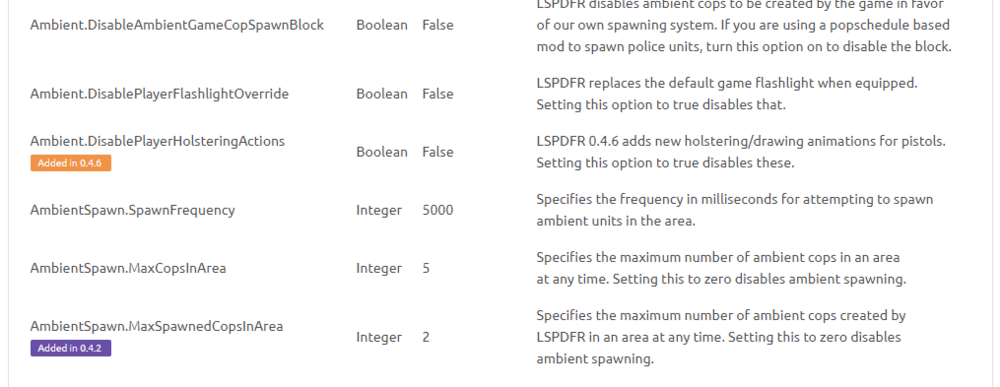
There are enough settings.
-
Go to GTAV/LSPDFR and open the keys.ini file. Locat "TRAFFICSTOP_INTERACT_Key" and set it to "none".
-
You have to update .NET 4.6.2 to .NET 4.7.2 to be exact.
-
Looks like you moved it. Remove Avast.
-
Did you install vehicles into your GTA V vanilla folder? Then verify.
-
You can easily google that. 🙂
-
Not according to your log. Show me your exceptions.

