


A Stranger
Members
-
Joined
-
Last visited
Everything posted by A Stranger
-
You need to press SHIFT to blip them, then turn on your Sirens. E for NON-ELS and 3x J for ELS.
-
Can you show me your Antivirus exceptions?
-
Only plugin that adds / changes the flashlight is StopThePed. Can you send a screenshot & a list of your Plugins? Also; does it happen without LSPD:FR too?
-
You seem to be playing on very low settings. PostFX and Shader should be on Very High / Ultra.
-
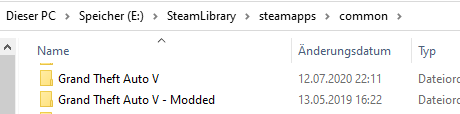
There's not much more to it. Simply create another folder in the same spot, name it Grand Theft Auto V Online and place the vanilla files into it. The folder you want to play has to have the original name.
-
You can make every add-on into a replace car. Simply rename the model files in the kyultrapack dlcpack to replace vehicles & change their .meta files (Vehicles.meta; carvariation & handling if existent) to the names you replaced.
-
You mean "Give All Weapons"? Because that is a known issue.
-
Verify your game files. Did you install a visual mod / enbseries recently?
-
Can you give an example? I assume you mean if you change a keybind it doesn't apply?
-
Remove in /Plugins: AutomaticSirenCutout; StickyWheels; Remove in /Plugins/LSPDFR: AttemptedCrimeCallouts; ComputerPlus; Pragmatic_Callouts; redCallouts.
-
You seem to be playing on very low settings. You should not be using Visual V or Realistic Radiance. You need PostFX and Shader on High / Ultra.
-
It's a simple replace pack. The cars go to Patchday22ng. Mods -> update -> x64 -> dlcpacks -> Patchday22ng -> dlc.rpf -> x64 -> Levels -> gta5 -> vehicles.rpf Do not replace the vehicles.meta; copy the needed sections and replace them. If you don't know how, read the RPH FAQ. ELS belongs to GTAV/ELS/Pack_default.
-
Rename your mods folder to _mods. Which weapon sound pack did you install? The site of these changes with every GTA Update. If you chose an old one, it may be too big.
-
Send your RagePluginHook.log.
-
If you remove ParkTools you also need to remove his plugins. (CoastalCallouts, etc.)
-
So after you double click nothing happens? Did you do your Antivirus exceptions?
-
You are still missing files for LSPD:FR though. Yes, but you need an LSPDFR folder in /Plugins. LSPDFR Plugins belong to /Plugins/LSPDFR. RagePluginHook plugins belong to /Plugins. Yours are LSPDFR Plugins.
-
It's /Plugins/LSPDFR. And you need that folder, that'S where your LSPD:FR plugins go into. And you are still missing files, so use the manual download and do it properly.
-
PoliceSmartRadio, BasicCallouts, StopThePed and Traffic Policer belong to /Plugins/LSPDFR. Then reinstall LSPD:FR 0.47 manual. You're missing files.
-
Please send your RagePluginHook.log.
-
In your GTA V folder.
-
And it also says -nodx. Which disables the console. Remove everything in it except for -widnowed.
-
Open commandline.txt; make sure it says -windowed. Save & close.
-
Rename mods to _mods.
-
What did you last add?

