
Nemesisx101
Members
-
Joined
Everything posted by Nemesisx101
-
-
-
-
 @EliteCO31 Hello there-- just like to inform you that I've introduced a LSSD (Sheriff) preset.
- 179 comments
- 4 reviews
-
-
-
 Thank you for implementing my idea! Fantastic. I would ask if you can have a mode to just hide suspects blips only when they have eluded (lostlonger) as some devs don’t account for this with their plugins and so ambient event/callout blips persist… Many thanks. I would also suggest having two distinct setting profiles to account for hardcore mode (separate config values for hint/makers/blip display frequency/clue detail when the suspect position is technically known by lspdfr and when in lostlonger state) as it might be near impossible to manage with pursuits.
- 38 comments
- 1 review
-
-

- 1
-
-
-
 Looking forward to planned features! I was planning a module for unit status/assigned patrol areas myself (just favour text for effect; keep things simple), but quite pressed for time unfortunately — interested to see what you’ll come up with.
- 90 comments
- 2 reviews
-
Understood, thank you for clearing that up. Would having escaped criminal encounter disabled in LSPDFR ini cause issues as I'm not sure how your continuing to track peds outside of a pursuit? Perhaps you'll consider a 'hardcore' mode whereby the suspect blip is hidden entirely during pursuits-- having to rely on Player visual and your hints throughout. You've come up with good ideas for plugins, keep it up m8.
- 38 comments
- 1 review
-
Hello there— just to clarify: when the suspect is lost during a pursuit or after the pursuit is actually concluded (suspect got away), both? Thanks.
- 38 comments
- 1 review
-
 Hello— have a relatively minor issue I’d like to raise again with you: would appreciate an option to turn off automatic display of MDT upon first entering a vehicle; having to press a button to take it off screen every time is rather annoying I must say. Many thanks.
- 447 comments
- 46 reviews
-
Hello there, AmbientDispatch is entirely self-contained and will operate in the background independent from anything else… simply place NAudio dependency files—that handles audio playback—in game’s root folder (Grand Theft Auto V) and AmbientDispatch staging folder in lspdfr/audio/scanner and you’re all set. Assuming you’re using ‘recommended’ setup. You can choose a volume scaling preset of you’re liking (I personally use 6%). Place files contained within a given preset folder at plugins/LSPDFR. Make sure to disable police vehicle scanner though— Enhanced Native Trainer and XScanner will do this for you. Best to install XScanner.
- 179 comments
- 4 reviews
-
 Noice
Noice -
@Officer Anthony T I couldn’t say— I’m not familiar with application. Pathing errors/issues with staging folders or absence of NAudio dependencies (regarding AmbientDispatch/PursuitMusic) could potentially cause outright crashes however. Sorry I can’t be of more help with this issue your facing.
- 179 comments
- 4 reviews
-
Thanks you for providing log. The crash—I assume— is happening on initial startup of LSPDFR… Unfortunately I’m not seeing any information pertaining to a crash in your log so I’m unable to make a definitive determination for you on this. I’ve not experienced or received any reports of crashes.
- 179 comments
- 4 reviews
-
-
 Great work, and appreciate the ini options. Please consider looking into muting drivers if the Player is within a given distance— really annoying when on a traffic-stop and their yelling in the background. Many thanks.
- 128 comments
- 14 reviews
-
Hey! Yes, I’ll certainly take a look at behaviour and get back to you— I’m rather busy this weekend I’m afraid. All sounds rather odd— this behaviour shouldn’t be happening as Player intimidation is disabled (with Professional) and I block engaging with peds in vehicles. Thank you for raising this with me.
- 179 comments
- 4 reviews
-
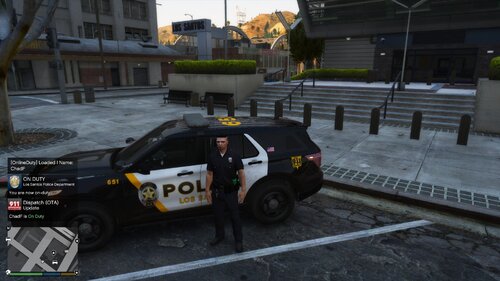 Hello again-- got an idea... how about having a offline version with randomly generated notifications of events/locations happening in the world using callsigns (representing other officers). You could also have both other users and cops (like bots in Player's game world) to populate activity feed. I'd expand feed items to include status changes (e.g. now 10-8, 10-41 starting shift, 10-23 on scene, code 4 etc.) for cops, potentially having developing scenarios by tracking cops and using branching logic/states for generated incidents: cop will show on-call/en-route and then you can follow-up after a period with 10-23 for instance--either wrapping up with code 4 or having escalation stuff like 10-8 pursuit and so on.
 -
 Great work, m8. Perhaps you’ll consider having both chance systems and dynamically switching (randomly) between the two methods with each new instance/traffic-stop to keep things unpredictable. Sometimes I like pure randomness.
- 231 comments
- 31 reviews
-
@Chadd Yeah blips, that’s what I was thinking.
-
Sweet. I only really wanted to download enhanced for this feature. Reminds me of Death Stranding too… maybe you could take inspiration from that. Mini-map icons for other users would be cool— whenever they are on a trafficstop/attending, etc.
-
@sushigirl No worries. Yeah, quite a lot of variables to consider… with the conditions you got things like player field of vision (player character vision cone— not screen-based), relative distance checks, game/LSPDFR flags (states/events), cooldowns, what the Player/suspect/cops are doing. Very much situation-driven and down to chance.
- 179 comments
- 4 reviews
-
Yes, that too. All dependent on actual game character voice sets… some have more voice lines than others.
- 179 comments
- 4 reviews