



MoreTextures
Members
-
Joined
-
Last visited
Everything posted by MoreTextures
-
Are you sure you're installing them in GTA V\Plugins\LSPDFR and not GTA V\Plugins\?
-
Do you have any motorcycle/bike mods installed? These are pretty notorious for causing GTA V to throw a memory error.
-
1 & 13 is used by police.
-
As Starmix has already mentioned, 2 cards does not mean twice the VRAM, please don't buy a new GPU for this reason, you will waste your money.
-
While it would be nice, we can't actually edit the ped models themselves yet sadly, just the textures.
-
While it isn't at max (About 65 Celsius for a 6300 I believe?), that is awfully high for what appears to be idle temps. You may want to check your tower, fans, GPU, and CPU heatsink for dust followed by disposing of it with compressed air if needed (Just in case you aren't aware, please do not use a vacuum not designed for contact with electronics, this can cause damage). If dust is not a factor you may need to remove your heatsink, clean the thermal paste off, then reapply the paste and then the heatsink, or buy a new cooler entirely (I would not try this solution until it's confirmed that temperatures are actually causing your shutdowns to avoid wasting money or time). Keep in mind that while FX CPUs are fairly notorious for inaccurate temp readings (I know mine was), because your motherboard is reporting the same temp (Or higher in this case) for your CPU this does not appear to be a false reading. If you were able to get a reading of your temps while playing GTA V it may shed some light on the situation, if you are hitting above 65C directly before a shutdown it could be related. You may also want to consult a forum such as Reddit or something like Tom's Hardware if you haven't already, as you'll likely find more knowledgeable help compared to what I can do.
-
I'd download HWmonitor and/or HWInfo just to rule out abnormal temps being the cause here.
-
-
 Please don't tell me the traffic advisor model got taken down because some random person thought you stole something, it was an excellent model.
- 221 comments
- 34 reviews
-
-

- 1
-
-
Just to avoid confusion here, dragging and dropping a carvariations.meta in will also overwrite it, you need to copy the text from one to the other manually. All though it was likely just a typo so no worries. Good luck modding!
-
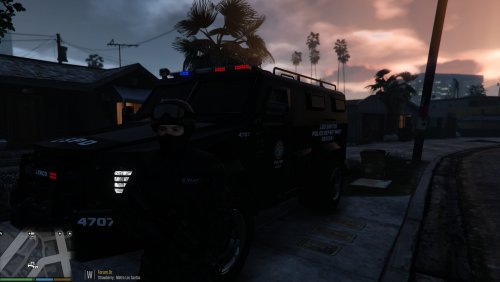 Looks like this one.
 -
Are you using an OpenIV installer/dragging and dropping the new mod's carvariations.meta? Because it sounds like it's being overwritten. You'll have to re-add the van entry in that case, likely 13 as usual. This definitely isn't normal .meta activity. Perhaps try a new dlc.rpf all together for certain vehicles if needed, I generally keep default car slot carvariations entries in mpluxe2, and additions in mpchristmas2 with their model and vehicles.meta entry (If that isn't what you're already doing that is).
-
That's extremely strange, I've never heard of that occuring. No, they do not have individual sirenSetting values, I have at least 10 with value 13 alone in mpchristmas2. Perhaps try adding a carvariations entry for the firetruck (firetruk) with a sirenSettings value of 7 (Note that is assuming your firetruck isn't modded, otherwise the value may be different obviously) in mpluxe2 or mpluxe (Or perhaps mpchristmas2 in this case...?).
-
I believe it might be 0x88000000, but it's been a while.
-
You likely need to add a carvariations.meta entry for police2 in mpluxe2's dlc.rpf. This is what you'd add specifically: This is most likely correct but it depends on the model, as it's hard to say with a Federal Signal lightbar as that's pretty generic, as it could also be sirenSettings 2 or 13 among others. If that doesn't work, you may want to link the vehicle mod you're trying to install and/or a screenshot of the issue.
-
The Gang Unit Crown Vic uses sirenSettings 13 rather than 2, that's why. Using the same carvariations.meta entry is perfectly fine for multiple vehicles (It'd be impossible not to), so long as the model name is different obviously.
-
I'm assuming you're using BxBugs' CVPIs as 2 of those 4 slots (Which are in the Sheriff/Unmarked slots I'm guessing), His Open IV Installer overwrote your carvariations.meta in mpchristmas2 sadly. You'll need to either remember what you added in the carvariations.meta for those 2 added vehicles, or tell me what 2 added vehicle mods you used. Or you could also guess as to what they use with this "template" if you can't remember what they used, just copy & paste this into your carvariations.meta of mpchristmas2 and replace addedvehiclename with the model name of the added vehicle, and change the sirenSettings value at the bottom to the most likely thing that it's using, which in most cases is sirenSettings 1, 2, or 13. For reference, BxBugs 2 CVPIs both use sirenSettings 2.
-
While I'm not very well educated on it, you can indeed add standalone peds, all you need is the (Obviously renamed) ped files, and then an entry in the peds.meta(s). I'm using mpheist as an example here, other RPFs likely work as well but I haven't bothered to look for them. Here's an example of an added Blaine County Sheriff ped .meta entry: I'm not aware of a template for this sadly. (Note that mpheist has 2 peds.metas, the first in common\data\ and the second in x64\models\cdimages\mpheist_componentpeds.rpf\, I believe the entry must be added to both.) There's also quite a few mod examples of added peds as well, such as Olanov's Added Detectives. Hopefully this helped at least somewhat, good luck!
-
Be sure that your PostFX & Shader Quality is at ultra. I'd also recommend installing either RadianceV or Improved LEDs alone rather than both at the same time.
-
In the vast majority of cases, yes, using the would be replaced vehicle's sirenSettings would work fine. But sometimes you'll unfortunately get a lazy/negligent author who replaces (For example police) with the sirenSettings of police3 being needed or something else, but the author fails to disclose it and doesn't include a carvariations entry with his mod, then it's time for guess work (However this is fairly rare, and it usually isn't hard to figure out what it's intended to use as not much outside of 1, 2, and 13 are typically seen).
-
I'm aware, but because the OP is asking about the lights not aligning I'd assume whatever he downloaded didn't include one. It's usually either 1 or 13 in most cases anyway though.
-
Sorry if I'm not understanding this correctly, and correct me if I'm wrong. So, you replaced the Unmarked (police4) and the Sheriff Cruiser (sheriff) with modded cars, and the lights on the modded cars work fine when replacing those 2 vehicles. But when using the original police4/sheriff the lights do not work properly, and when adding the 2 modded cars as stand alone vehicles the lights don't work properly on them either. Is that correct? If so, the carvariations.meta's sirenSettings needs to be changed depending on the vehicle you modded in, so I'd need to know that. While it's not always the case with modded vehicles, this might help you out with guessing the correct sirenSettings to use I believe the default police4 sirenSettings would be the same as the Sheriff Cruiser (13), but I'd have to verify that myself as it may be 1 instead.
-
 The one I'm using as an example is located in Grand Theft Auto V\update\x64\dlcpacks\mpchristmas2\dlc.rpf\common\data\, but wherever you installed the vehicle as an add-on, you'll want to put it in that same dlc.rpf's carvariations.meta (If it has one).
- 102 comments
- 28 reviews
-
I also started suffering from this recently, however mine do not disappear outright, they just go into a low quality state (Like a low LOD version), so far it seems to correlate with how many add on vehicles I have as removing some seems to have mostly stopped it. I'm not sure if spreading out the vehicles over multiple .rpfs helps but i may try as almost all of mine are located in mpchristmas2 alone. My RAM is not the issue either, GTA V rarely goes over 8 and I have another 8 after that to use. (SC ACX 2.0 970, i5-4690K, 16GBs of RAM)
-
I decided to install this over policeold2 myself just to verify it works with the .meta entry from my first post (And it did), it looks exactly like Prophet's showcase video. All you need to do is drop the 3 vehicle model files into patchday3ng's vehicles.rpf (Grand Theft Auto V\update\x64\dlcpacks\patchday3ng\dlc.rpf\x64\levels\gta5\vehicles.rpf\). Then add the following carvariations.meta entry into mpluxe2 (Grand Theft Auto V\update\x64\dlcpacks\mpluxe2\dlc.rpf\common\data\). The vehicles.meta doesn't need to be touched. Carvariations.meta Entry: Screenshots of the CVPI in game as proof: If you want I can provide a downloadable mpluxe2 carvariations.meta with just policeold2's entry added.

