


FirstResponder
Members
-
Joined
-
Last visited
Everything posted by FirstResponder
-
There are a number of tools that you can get for free and do it yourself. Sam's Speech Decoder, combined with Flitskikker's IV Audio Toolbox and OpenIV allow you to extract the speech files from IV, automatically rename the speech files from V and import them into your speech file for use in IV. I'm working on that right now, but as said above, there are a lot of lines used in IV that do not exist in V and vice versa.
-
I realise that you have to run the game through the launcher, however it is only the GTAIV.exe file that shows the installed version.
-
Without meaning to sound rude, this needs some work. I know you said that it's a beta but you should improve what you have here before adding extras on.
- 3 comments
- 3 reviews
-
-

- 2
-
-
I've seen this happen before. The 1.0.7.0 is the version shown when selecting the GTAIV.exe executable; the 1.0.0 is shown when selecting the LaunchGTAIV.exe executable. Be sure you're selecting the right file.
-
Yup, that's normal. You need to go into Online and back out of it using the character select 'SWITCH' wheel. Looks like I'd better get those Xbox Live codes ready to send to you, eh?
-
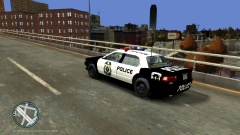 Great minds think alike; want me to send you the Undercover skin?
 -
Looks great, good job. Any chance of getting an ELS-enabled unmarked Stanier cruiser?
- 6 comments
- 1 review
-
No, no. According to the tutorial, it says you have to go into Online and back for the changes to take effect. I'm wondering if there is a way to do it WITHOUT going into Online at all.
-
Haven't really read through this stuff, but is there a way to do it without going into Online?
-
I'm working with a team to create a Police Scotland pack. It'll be exclusive to our clan for a little bit, but eventually it might be released to the public. Feel free to drop me a PM for more information.
-
Head into OpenIV, and set the Mipmaps for your liveries to 1. This will remove the blurriness of the textures.
-
It's a good start, but it could do with some refinement. For example, the blue colour used on the original background can still be seen inside the 'solid characters' (e.g. the O), so maybe take a look at the original textures in OpenIV. Also, I doubt that the LCPD would use capital letters. This is just my opinion though. However, it looks good, well done.
-
Why not, eh? My mate Rob was involved in a shootout with the Rozzers and I got some nice shots:
-
Take a look at the 'Using Textures' section (bottom right of the OpenIV window). It'll tell you where the relevant textures are.
-
It's a good start, may I make some suggestions...
-
The actual background image is exactly that - an image - and as such has no editable text. If you want to change it, you'll need to manually edit the texture.
-
1) There are a few of those around, I can't find you a link right now but I think there are a few on GTA4-Mods 2) That's hardcoded and can't be changed by scripts (as far as I know) 3) See above. Maybe you could use the Coroner mod to clear things up? Hope this helps!
-
You're best bet would be to find a model that suits your requirements then make your own textures.
-
No problem, glad I could help
-
Partly true, changing the mitmap levels in OpenIV should improve the appearance of textures. However, Ineseri is right - it is a feature, not a bug.
-
Hi all, I've been working on a little conversion project for GTA IV recently. I've managed to get the SRT Viper police model from Need for Speed: Rivals into a 3DS Max file and it's looking good. Trouble is, I don't have a clue how to optimise it for GTA IV or map for ELS/Non-ELS lights. The main thing I'm struggling on is the renaming of all the files. I've been using Lt. Caine's 2013 Vapid Interceptor as a kind of name saver, and copying all the names of the relevant files in 3DS Max to that - still to no avail. So I'm wondering if anyone can help me. I'm looking for, if possible, someone to work alongside me with this and any future projects (they will of course receive full credits) but any tips/suggestions would be greatly appreciated. I await your response, Sincerely, FirstResponder
-
Have you disabled the AI use of ELS? That would explain the lack of lights.
-
No problem, glad I could help.
-
You need to install the new cop model into the TBOGT componentpeds.img Other than this, there is no need to do anything differently - simply drag and drop into OpenIV when you have the correct image file open. Here is the path: EFLC > game > Episodes > TBoGT > pc > models > cdimages > componentpeds.img Make sure you're installing to that one and not the regular image file, where you will have installed the Traffic Cop & State Trooper.
-
Yeah, that's what I thought.

