


Creators: Due to background reprocessing of files, approvals and file security checks may be delayed. Thanks for your patience.

MrGhostman
Members
-
Joined
-
Last visited
Everything posted by MrGhostman
-
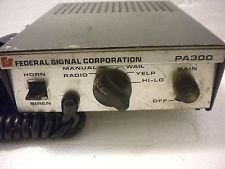 Thanks. I plan on sampling some more siren models later this week. For this week, I'll be making a Whelen 295hfsa6 siren sound mod (including the alternative wail and yelp) for either the Sheriff Granger (with the alternative wail/yelp) or the FIB vehicles (with the original wail/yelp).
- 5 comments
- 1 review
-
Here's the preview of the PA-300 siren for the Sheriff Granger. I've re-sampled the siren and I've also increased the pitch to match the tempo. http://www.lcpdfr.com/files/file/8411-federal-signal-pa-300-siren-dr-intimidator-version/ The siren sound mod is up and ready! Please enjoy. =)
-
This is a Federal Signial PA-300 D&R siren sound mod to replace the Sheriff Granger sirens in the game. Be sure to download the latest version of OpenIV and run it as administrator Preview: 1 – Run OpenIV, Select GTA V for Windows. However be sure to locate the folder where the game have been installed. 2 – Find audio file you want to edit by going into x64 folder 3 - Then click on audio folder where you should see one folder and two files. 4 - Click on the sfx folder and then select and click on the file: RESIDENT.rpf 5 - Upon opening the RESIDENT.rpf file, you should see 16 items shown. One of them is the vehicles.awc file. 6 - Right click on vehicles.awc and export to openFormats (.oac) to any folder you like (e.g downloads folder). 7 - Extract the vehicles folder (containing the four audio files of the siren) from the .rar file to the same folder that was exported in. 8 – Afterwards, go to edit mode in OpenIV. There will be a warning upon editing mode so be careful. 9 - Import the .oac file by either draging the file to OpenIV or go to new and click on Import openFormats to select the .oac file then click on open. 10 - Click on ok 11 - Click on edit mode again (if you are in edit mode already) to exit edit mode. 12 - To ensure everything works, click on the vehicles.oac file twice and click on either 0x0E0DA7BC or 0x16E74B3E to see if the files were successfully replaced. 13 - Exit OpenIV and play GTA V. If you have any questions regarding this siren mod please let me know in the comments below. I hope you all like this. =) Tools Used: AVS Audio Editor (for file conversion and sampling) Audacity (for audio editing and tweaking)
- 5 comments
- 1 review
-
-

- 1
-
-
Note: I've sampled the PA-5 siren from a youtube video and the quality is excellent. So all credits for the siren demo in the video goes to SP99 https://www.youtube.com/watch?v=JShL7o7oN1c This is a Federal Signal PA-5 siren sound mod to replace the Fire Truck sirens in the game. I honestly don't like the E-Q2B models that much mostly because its higher pitch variations and the more lengthy wails in which both sounds a bit grating in my personal opinion. However the Federal Signal PA-5 sounds decent for the fire trucks. Be sure to download the latest version of OpenIV and run it as administrator Preview: If you have any questions regarding this siren mod please let me know in the comments below. I hope you all like this. =) Tools Used: AVS Audio Editor (for file conversion and sampling) Audacity (for audio editing and tweaking)
- 2 comments
- 1 review
-
-
- 2
-
-
I'll see what I can do if I could add a hi-lo version of this siren sound mod. For now though I managed to tweak the pitch and tempo for the wail sounds and I'm currently working on the yelp.
-
Ouch. =(
-
Are some of the sirens' length longer than the original ones? If so then that'll explain on why they've been muted. :<
- 8 comments
- 2 reviews
-
I'm not too sure on what happened. Please tell on what exactly happened when you replaced the ambulance sirens.
- 8 comments
- 2 reviews
-
Thanks. Just let me know what you think about the D&R intimidator siren sound mod when you try it out tomorrow.
-
True that. I'll get started on the Whelen 295 in a few days. I've recently uploaded a D&R Intimidator siren sound mod for the Ambulance in GTA 5. =)
-
The siren sound mod is now up and ready!
-
Here's what I have so far regarding this siren sound mod.
-
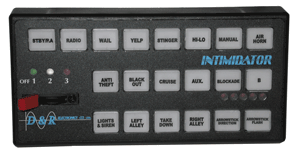 Warning There are reports that certain audio archives have been muted in game regardless of rather the sound mods were installed properly or not. To ensure that the audio archives for vehicles won't be muted in game make sure that the vehicle.oac file or the vehicle.awc file doesn't exceed over 15.7 MB in size (you can check the size of the vehicle.awc file in OpenIV under RESIDENT.rpf) and make sure that the siren sound audio files have the appropriate bitrate/sample-rate/etc (32000hz, 16bit mono, 512kbps) for the vehicles.awc file. Hopefully this will resolve the issues regarding muted sirens in game. If not then please let me know so I can farther troubleshoot this. Other than that, please enjoy this siren sound mod! This is a D&R Intimidator siren sound mod to replace the Ambulance sirens in the game. Be sure to download the latest version of OpenIV and run it as administrator Preview: 1 – Run OpenIV, Select GTA V for Windows. However be sure to locate the folder where the game have been installed. 2 – Find audio file you want to edit by going into x64 folder 3 - Then click on audio folder where you should see one folder and two files. 4 - Click on the sfx folder and then select and click on the file: RESIDENT.rpf 5 - Upon opening the RESIDENT.rpf file, you should see 16 items shown. One of them is the vehicles.awc file. 6 - Right click on vehicles.awc and export to openFormats (.oac) to any folder you like (e.g downloads folder). 7 - Extract the vehicles folder from the .rar file to the same folder that was exported in. 8 – Afterwards, go to edit mode in OpenIV. There will be a warning upon editing mode so be careful. 9 - Import the .oac file by either draging the file to OpenIV or go to new and click on Import openFormats to select the .oac file then click on open. 10 - Click on ok 11 - Click on edit mode again (if you are in edit mode already) to exit edit mode. 12 - To ensure everything works, click on the vehicles.oac file twice and click on either 0x159C9182 or 0x161768E7 to see if the files were successfully replaced. 13 - Exit OpenIV and play GTA V. If you have any questions regarding this siren mod please let me know in the comments below. I hope you all like this. =) Thanks to TheRealNBK71 (aka awesomeburodude on youtube) for giving me permission to edit and re-upload his GTA 4 D&R Intimidator siren mod. Credits: TheRealNBK71 Tools Used: AVS Audio Editor Audacity
 -
Here's the siren sound mod that's currently work-in-progress. This is the D&R intimidator siren for the ambulance. All I did was use Audacity and AVS Audio Editor to convert to .wav files and to change pitch, tempo, and so forth. 55d8b64eb3c6a_DR_Intimidator_Siren_Sound_Mod_(Ambulance_Version)_-_WIP.rar Please note that I do have TheRealNBK71's permission to edit and re-upload his GTA 4 D&R Intimidator siren sound mod so all credit goes to him. =)
-
Thanks for the feedback. I originally planned on sampling the Whelen 295slsa6 from a youtube video on the granger first. However the 295slsa6 will have to wait for another time while I'm working on the PA-300 siren sound mod for the granger.
-
Thank you. To be honest, I would've made the wail last a bit longer but if the siren length for the granger is longer than 4 seconds, the whole audio will be muted. Still though I'm impressed that the PA-300 works on the Sheriff Granger. =)
-
Hello everyone. As you know I have uploaded not only one but two siren sound mods today and recently I'm working on the Federal Signal PA-300 Sirens for the Sheriff Granger police vehicles. It's currently in a work of progress so I will be doing some major revisions before uploading this on Monday. I'm trying to make them sound like the faster-paced D&R intimidator sirens in Canada. This is the PA-300 And I'm trying to make it sound like this: https://www.youtube.com/watch?v=Gz7d3vQEJ0Y What are your thoughts on this siren sound mod so far? =) Federal Signal PA-300 Sheriff Granger Siren Mod WIP.rar
-
Thanks.
-
Be sure to download the latest version of OpenIV and run it as administrator 1 – Run OpenIV, Select GTA V for Windows. However be sure to locate the folder where the game have been installed. 2 – Find audio file you want to edit by going into x64 folder 3 - Then click on audio folder where you should see one folder and two files. 4 - Click on the sfx folder and then select and click on the file: RESIDENT.rpf 5 - Upon opening the RESIDENT.rpf file, you should see 16 items shown. One of them is the vehicles.awc file. 6 - Right click on vehicles.awc and export to openFormats (.oac) to any folder you like (e.g downloads folder). 7 - Extract the vehicles folder (containing the four audio files of the siren) from the .rar file to the same folder that was exported in. 8 – Afterwards, go to edit mode in OpenIV. There will be a warning upon editing mode so be careful. 9 - Import the .oac file by either draging the file to OpenIV or go to new and click on Import openFormats to select the .oac file then click on open. 10 - Click on ok 11 - Click on edit mode again (if you are in edit mode already) to exit edit mode. 12 - To ensure everything works, click on the vehicles.oac file twice and click on either 0x1C98C4D5 or 0x144C8602 to see if the files were successfully replaced. 13 - Exit OpenIV and play GTA V. Happy? Thank you. I'll try to record the gameplay video of the new ambulance siren later on. I'm surprised that my PC managed to record in GTA 5 without heavy performance issues. That shows you that this game is really well optimized for even systems like mine.
- 8 comments
- 2 reviews
-
-
- 1
-
-
This is a Federal PA-15A siren sound mod to replace the Ambulance sirens in the game. Preview: https://www.youtube.com/watch?v=xYpIhijJUB4 Be sure to download the latest version of OpenIV and run it as administrator. If you have any questions regarding this siren mod please let me know in the comments below. I hope you all like this. =) Credits Henry455 (Youtube Channel)
- 8 comments
- 2 reviews
-
-
- 1
-
-
Here's another siren sound mod this time the Code 3 RLS siren! What are your thoughts on the quality of the sirens? Please let me know in this thread. =)
-
-
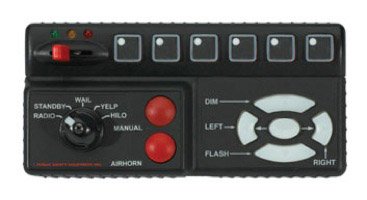 Also recommended with SirenMastery as well. Update (11/10/2016): All tones have been re-sampled and are now better quality and loudness. Update (08/15/2016): Resampled the yelp once again and included a hi-low tone in a separate .rar file. Update (08/10/2016): I did some minor fixes and resampled the wail from a new video. Update (07/19/2016): I've sampled the siren from a new video and have done some edits. This is a complete re-work on the siren sound mod. A Hi-Low version will be coming out soon this year. *Important Note: In order for the sirens to work successfully without the vehicles.awc to exceed over 15.75MB, please extract the fix included in the .rar folder to the folder where you are extracting to for this siren mod. This fix is made by GravelRoadCop on lcpdfr.com.* *Also Important: For those with the Rockstar version or non-steam version of GTA 5, you must create a mod folder to avoid having the game to auto-update and remove any mods or changes made to the game's data via OpenIV. For more information on how to create a mod folder successfully, visit openiv.com (http://openiv.com/?p=1132)* Be sure to download the latest version of OpenIV and run it as administrator 1 – Run OpenIV, Select GTA V for Windows. However be sure to locate the folder where the game have been installed. 2 – Find audio file you want to edit by going into x64 folder 3 - Then click on audio folder where you should see one folder and two files. 4 - Click on the sfx folder and then select and click on the file: RESIDENT.rpf 5 - Upon opening the RESIDENT.rpf file, you should see 16 items shown. One of them is the vehicles.awc file. 6 - Right click on vehicles.awc and export to openFormats (.oac) to any folder you like (e.g downloads folder). 7 - Extract the vehicles folder (containing the four audio files of the siren) from the .rar file to the same folder that was exported in. 8 – Afterwards, go to edit mode in OpenIV. There will be a warning upon editing mode so be careful. 9 - Import the .oac file by either draging the file to OpenIV or go to new and click on Import openFormats to select the .oac file then click on open. 10 - Click on ok 11 - Click on edit mode again (if you are in edit mode already) to exit edit mode. 12 - To ensure everything works, click on the vehicles.oac file twice and click on either 0x0D329446 or SIREN_2 to see if the files were successfully replaced. 13 - Exit OpenIV and play GTA V. Preview:
- 13 comments
- 3 reviews
-
-
- 4
-
-
Thank you for the recommendation. I'll make sure to download Audacity before I start sampling the Federal Signal PA-20 from a youtube video.
-
With the OpenIV actually opened, any modifications done with the vehicles folder with the same name as the .oac, the .oac file will actually be modified as well. The new FIB siren sound audio files that are added into the vehicles folder will carry over to the .oac file
- 23 comments
- 2 reviews

