


Creators: Due to background reprocessing of files, approvals and file security checks may be delayed. Thanks for your patience.

MrGhostman
Members
-
Joined
-
Last visited
Everything posted by MrGhostman
-
+1 The Whelen Alpha is looking good so far. In fact, I'll be releasing the siren mod in a few minutes since the looping of the wail and the yelp are perfect (although the sound quality isn't perfect). They sound a bit too loud but then again Whelen sirens in general are loud as hell. Edit: Now it's up and ready...after 4 hours ago. Sorry about that.
-
Ironically enough I already have the Whelen Alpha siren mod in progress for the Ambulance sirens in the game. http://www.lcpdfr.com/forums/topic/55189-work-in-progress-whelen-alpha-siren-mod-ambulance-version/
-
Here's my third siren sound mod for the Ambulances in the game. This time with the Whelen Alpha siren. However doing some audio tweaking along with the delicate editing to fix the wail loop and avoid clipping was a bit tricky. So as a result, the siren mod might have an usual larger audio file size (in KB). Make sure to make some backup of your vehicles folder and the vehicles.oac file before installing this siren mod. Also make sure to have the latest version of OpenIV and make sure to run the program as administrator. I will upload this siren mod tonight although if there are anything that need a bit more tweaking, I shall do so before releasing this. I hope you guys and gals enjoy this siren mod in progress. [WIP] Whelen Alpha Siren Mod (Ambulance Version).rar
-
Thanks. There's already a main police version of this siren. The fire truck version on the other hand will have to wait for another time. I currently have the Federal Signal PA-5 and the Code 3 V-Con as modded fire truck sirens at the moment.
-
You're welcome. There is already a rumbler siren (or at least the rumbler variants of the sirens like the Federal Signal SS2000) for GTA 5 and GTA 4.
-
This is a work in progress of the Federal Signal Touchmaster Delta siren mod for the FIB vehicles in GTA 5. Make sure to make some backup of your vehicles folder and the vehicles.oac file before installing this siren mod. Also make sure to have the latest version of OpenIV and make sure to run the program as administrator. There will be an actual sampled version of the Touchmaster Delta coming soon so version two of this siren mod will be available later this week (as of September 17, 2015). Siren Sound Effect Demo by WRB http://www.youtube.com/user/wisriverblue http://goo.gl/M0t2iC If you have any questions or thoughts on this so far, please let me know in this thread section. =) Federal Signal Touchmaster Delta Siren Sound Mod (FIB Version) - WIP.rar
-
 I don't understand your question. ^^; Are you asking about rather this siren sound mod only replaces the fire truck sirens or something else? You might want to ask a bit more clearly.
 -
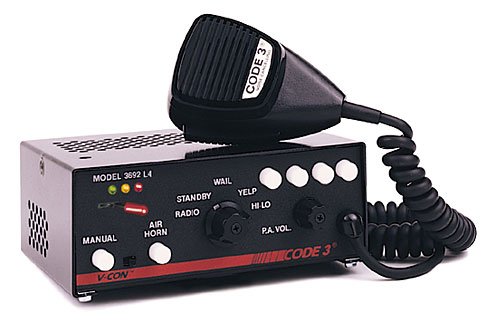
Since my federal signal PA-5 fire truck siren sound mod was quite successful, I decided to create another siren sound mod for the fire trucks but this time with a Code 3 V-Con siren instead. The wail and yelp are pretty good but I do think it could be done better. Still though what are your thoughts on this siren mod as of late?
-
I'll think about that. =P
-
Warning: There are reports that certain audio archives have been muted in game regardless of rather the sound mods were installed properly or not. To ensure that the audio archives for vehicles won't be muted in game make sure that the vehicle.oac file or the vehicle.awc file doesn't exceed over 15.75 MB in size (you can check the size of the vehicle.awc file in OpenIV under RESIDENT.rpf) and make sure that the siren sound audio files have the appropriate bitrate/sample-rate/etc (32000hz, 16bit mono, 512kbps) for the vehicles.awc file. Hopefully this will resolve the issues regarding muted sirens in game. If not then please let me know so I can farther troubleshoot this. Other than that, please enjoy this siren sound mod! This is a Code 3 V-Con siren sound mod to replace the fire truck sirens in the game. The Code 3 V-Con is an interesting siren and it sounds nearly similar to some of the new Federal Signal PA-300 models. It does fit emergency vehicles such as Fire Trucks and Fire Vans quite well in my personal opinion though I had to lower the pitch in this siren sound mod. Preview: Be sure to download the latest version of OpenIV and run it as administrator. Also be sure to backup your data before installing this siren mod. 1 – Run OpenIV, Select GTA V for Windows. However be sure to locate the folder where the game have been installed. 2 – Find audio file you want to edit by going into x64 folder 3 - Then click on audio folder where you should see one folder and two files. 4 - Click on the sfx folder and then select and click on the file: RESIDENT.rpf 5 - Upon opening the RESIDENT.rpf file, you should see 16 items shown. One of them is the vehicles.awc file. 6 - Right click on vehicles.awc and export to openFormats (.oac) to any folder you like (e.g downloads folder). 7 - Extract the vehicles folder from the .rar file to the same folder that was exported in. 8 – Afterwards, go to edit mode in OpenIV. There will be a warning upon editing mode so be careful. 9 - Import the .oac file by either draging the file to OpenIV or go to new and click on Import openFormats to select the .oac file then click on open. 10 - Click on ok 11 - Click on edit mode again (if you are in edit mode already) to exit edit mode. 12 - To ensure everything works, click on the vehicles.oac file twice and click on either 0x159C9182 or 0x161768E7 to see if the files were successfully replaced. 13 - Exit OpenIV and play GTA V. Just in case that you might need better understanding on how to install and/or replace sounds using OpenIV, here's a video that will definitely help a lot better: https://www.youtube.com/watch?v=ymLrNTjGBXA If you have any questions regarding this siren mod please let me know in the comments below. I hope you all like this. =) Tools Used: AVS Audio Editor (for file conversion and sampling) Audacity (for audio editing and tweaking)
-
.thumb.jpg.1c0694e0a203c20f1dbec33f8f03aa26.jpg) https://www.youtube.com/watch?v=ymLrNTjGBXA Hopefully this tutorial video will help.
https://www.youtube.com/watch?v=ymLrNTjGBXA Hopefully this tutorial video will help.- 7 comments
- 4 reviews
-
-

- 1
-
-
>Geforce GTX 660 https://www.youtube.com/watch?v=GvGf30oh_pM >runs GTA 5 at 1080p, normal settings, average 70fps >"low-end" Right.....>.> Honestly the Geforce GTX 660 will run just fine and even with high video settings with low anti-aliasing, it won't drop under 50-60 fps if you could do some tweaking.
-
Don't worry about that. Nothing wrong on asking questions about stuff you're new to. ^^
-
Yes.
-
Well actually 2GB of GDDR5 video memory will run just fine on medium-highish settings as long as you lower anti-aliasing a little bit. It just takes a few tweaking with the video settings is all. Remember GTA V has loads of video settings and it will even run on some low-end PCs depending what specs you have and what settings you have. I have an Intel Celeron G1840 paired up with the Radeon HD 7770 1GB of GDDR5 and the game runs on normal settings at 900p with 40-45 frames-per-second on average which is fine for me to be honest. Jim's specs at the moment will probably still run GTA V without much problems since the Geforce GTX 660 will still perform good even on games like Metal Gear Solid V The Phantom Pain around medium settings.
-
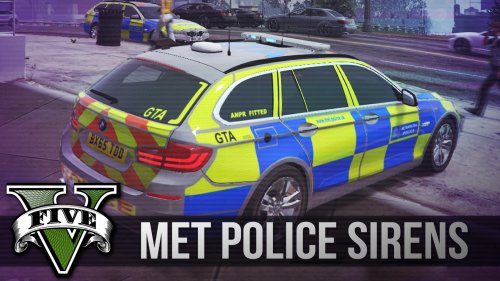 Sounds like our Whelen Alpha mixed with the modern federal signal PA-300 siren. =)
- 15 comments
- 2 reviews
-
Try contacting one of the moderators to see if they could move the file to the GTA 4's download section.
-
Are you sure you've uploaded the right audio files for GTA 5? When I downloaded this siren mod, it was a .ivaud file for GTA 4. O_O
-
Thank you.
-
 Nice looking undercover car there. =3
 -
This. Not every officer in Canada is a trigger-happy arsehole who'll shot someone without reason or a second thought depending on the situation. And also people who use the race-card have no bloody clue on what they are talking about.
-
I know right? >.<
-
That's freaking insane. And in Canada of all places! =O
-
Oh! I really like that sound of the siren you showed. Sounds like our D&R Intimidator sirens used in EMS SUVs. I'll see what I can do to sample the wail and the yelp for the FIB vehicles in GTA 5. =)
-
https://www.youtube.com/watch?v=Sdx1uj5IsfA https://www.youtube.com/watch?v=J8XU4XJ7vaE https://www.youtube.com/watch?v=BnNif9WE4LE Those are the videos of the Federal Signal PA-200 siren that I plan on re-sampling again for the FIB police SUV and police buffalo since my Federal Signal Vintage Siren pack wasn't well received. However before I start re-sampling again, do you think this will be a good idea or should I sample a different old federal signal siren model? Also the reason why some of the wail and/or yelp are shorter than usual is mainly due to GTA 5 restrictions on the audio archives in terms of length compared to the original one and should one of them go over any of the length needed even by a millisecond, the entire archive will be muted in game. I currently don't have the siren sound mod in progress at the moment but I would like to hear your thoughts on this. Please let me know. =)

.thumb.jpg.1c0694e0a203c20f1dbec33f8f03aa26.jpg)
