


wheelcipher
Members
-
Joined
-
Last visited
Everything posted by wheelcipher
-
 This. Is. AWESOME! Tried it out on Bxbugs123 CVPI. Mind blown! This makes so many other plugins here obsolete. I just sit here staring at the patterns.
- 2,700 comments
- 241 reviews
-
 Ok - Using this car: As you will see in the video below, the lights only reflect forward ... where the lights are pointing. This is *very* cool! The video is an "officer needs assistance" call gone wrong. Not only police cars, but we also have fire and EMS on-scene ... with a little police brutality thrown in for her pleasure. The awesomeness of this mod really shines! (no pun intended)
- 150 comments
- 33 reviews
-
-

- 1
-
-
-
Realism suggestion @thegreathah: As someone who has a lot of experience riding in police cars (the front seat) :) I would throw out that the lights don't necessarily have to reflect so high off of buildings ... If you could lower the height on those a little bit, it would increase realism. I am not sure if it's possible in the mod ... so just a suggestion. Thanks for the great work! This is awesome.
- 150 comments
- 33 reviews
-
-
I was looking for the same thing. I am using RADIANCE V 1.6 and I love it, but I would like to see more reflection off of street signs and buildings that are fairly close... Not sure how to accomplish that in the file. It's not an obvious thing. I have all of my settings (i.e. shaders, PostFX) set to maxed out already.
-
 @Bxbugs123 or anyone else ... can someone tell me which of the settings in visualsetting.dat will control (expand) the reflection distance of the lights off of walls, street signs, etc? This is a great mod. Just lacking some reflection. :) Thanks in advance.
- 337 comments
- 74 reviews
-
-
 Suggestion: Is there a way in the .ini file to assign a percentage of the time a traffic stop ends up in a pursuit? If so, I would love to see that feature. I am not keen on so many traffic stops where the driver speeds off and triggers a massive police response :) --Thanks!
- 1,081 comments
- 166 reviews
-
-
This is great! We've always needed a reporting tool! I have two suggestions: (1) Make the key to bring up the tool configurable in the .ini file if possible. (2) You can search Google for police report templates (if that helps) to find a lot of info. A tool like this can work well with a wide variety of callouts. (i.e. stolen vehicle report, assault report, burglary report, etc...) Lots of possibilities. I am very much looking forward to this. Thank you for the hard work!
-
 What would be a great feature addition is a pop-up window to write a report ... and have it save to a text file on the hard drive. I have some ideas on that if the author is interested. Thanks!
- 1,743 comments
- 172 reviews
-
Thanks, @festivalmatt I will try this out tonight using your instructions. If this works, it will be epic. I completely avoided using the in-car computer because of that "E" key turning off the lights. Thanks for the guidance on that.
- 1,743 comments
- 172 reviews
-
-

- 1
-
-
I see in the instructions that to activate, you "hold E" ... does this mean the overhead lights on the police car won't turn off like they do when the standard police computer is used? If so, this would be excellent. Maybe also give the user the ability to select activation key in the .ini file ... I'll try this out tonight. Thanks!!
- 1,743 comments
- 172 reviews
-
-
- 1
-
-
Might be nice if someone could write a script for that...
-
Hi! When I do a traffic stop, I like to activate my bright lights / high beams as this obviously makes the area brighter at night and activates my spotlight or takedown lights on applicable vehicles. When I exit my police car, they revert back to normal headlights. Is this normal behavior? Is there a way to prevent this from happening? Thanks in advance!
-
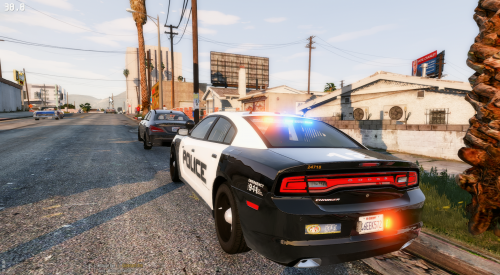 You always made some of the best cars (I still use them) ... I will be testing this Charger out soon!
- 4 comments
- 7 reviews
-
-
- 1
-
-
 Tested this out and it works great! I can certainly tell the difference with it installed. Keep up the good work! Don't let the trolls get you down. Keep updating this!
- 538 comments
- 42 reviews
-
-
- 1
-
-
.thumb.png.c2f2ad56bb49a1ba5758ce212af01492.png) Tried these out on multiple cars - They all look awesome! 5/5 Keep up the great work! I'll keep throwing ideas at you as they come to me.
Tried these out on multiple cars - They all look awesome! 5/5 Keep up the great work! I'll keep throwing ideas at you as they come to me.- 22 comments
- 3 reviews
-
-
- 1
-
-
Great screen shots! I will finally get around to installing these tonight and give you what I anticipate will be a 5/5 since I can't give you a 10/5 I hope these skins will work on my cars of choice. My primary vehicles include Would be nice to put a skin on that ^^^^ Thanks!!
- 22 comments
- 3 reviews
-
-
- 1
-
-
-
The top two are awesome! Exactly what I was thinking!! Not a fan of the bottom one ... but your mileage may vary! Keep up the great work!
- 22 comments
- 3 reviews
-
Suggestion: Make the "City of Los Santos" part of the liveries a little thicker, maybe a little more creative. These things look great! Good work. Do you have install instructions? I know that's a newbie question ... but I'll be installing these tonight! Thanks!
- 22 comments
- 3 reviews
-
-
- 1
-
-
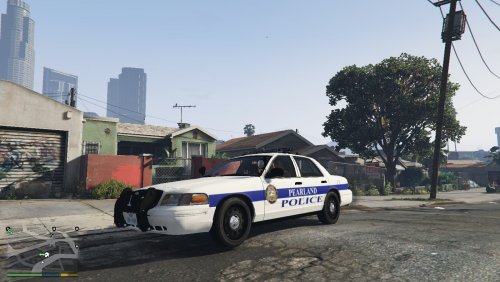 Outstanding! Thank you! We should have lunch next time I am at the Pearland house ... I work in Austin and travel back and forth often.
 -
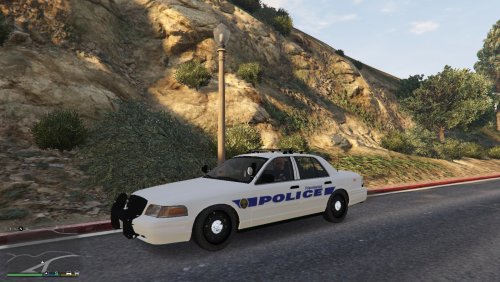 Haha! I live in Pearland. Nice to see a "local" skin. I'll try this one out.


.thumb.png.c2f2ad56bb49a1ba5758ce212af01492.png)
