




Albo1125
Insiders
-
Joined
Everything posted by Albo1125
-
-
 You aren't meant to see the plugin, it loads automatically when going on duty. This is explained in the readme, please read the bundled documentation.
- 1,915 comments
- 242 reviews
-
Next 'developer diary' stream together with Fiskey can now be found here: Let us know your thoughts/suggestions!You can rest assured that there will be some indepth documentation including a table of default controlsThis plugin by @Darkmyre includes a clown scenario:They will work on the player vehicle as long as you can perform a pullover with LSPDFR with that specific vehicle.
 Try this: If that doesn't help take screenshots of your GTA V folders please.
- 1,081 comments
- 166 reviews
Hey, Check these pages out! It has a lot of useful stuff for what you want: http://bfy.tw/8cjF I don't think there's any for EUP tho. Regs.Reading some documentation tends to help you set up Siren Mastery the way you like it. Check out the config files to hide/resize the UI. Alternatively you can just set the UI to not open in the General Config.ini file. Long overdue review, but a massively great job on the plugin! I really like how you've added your own unique style to each and every callout included, every one of them being sufficiently interactive and detailed. The recent updates have also added a lot of interesting new things for officers to do. Overall, very original and well-written callouts. 5/5!
- 546 comments
- 103 reviews
-
-

- 7
-
 Unfortunately I am currently in no position to release any updates for this as I am not the file uploader but merely do the coding. Regs.
- 270 comments
- 19 reviews
Delete NAudio.dll, Plugins/SirenMastery.dll and the Plugins/SirenMastery folder. Sad to see you go rip
You may have just not posted a log in which the crash occurred by accident then.- 1,915 comments
- 242 reviews
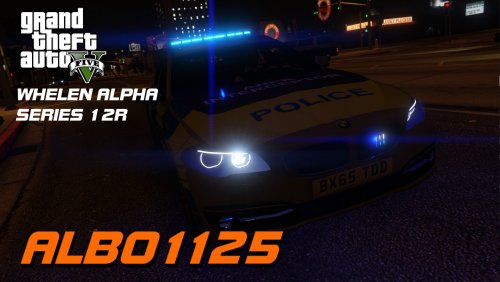 Whelen Alpha Series 12R Includes Wail, Yelp and Priority tones. Also includes @Double Doppler's Bullhorn. These sirens are used in Great Britain. There are two versions included: one for normal installation and one for Siren Mastery. Enjoy! Please do not reupload or redistribute this without my explicit permission. Thank you.
- 8 comments
- 3 reviews
-
-
- 5
-
 Apologies. You'll have to copy your VehicleSirenSetup and have one DefaultFor attribute per vehiclesirensetup, ie one with PoliceCar and one with PoliceBike (you can't have two the same attributes). My mistake for adding this to the examples, I will correct it in the next update!
- 851 comments
- 108 reviews
Looks like the entire game is crashing meaning the colour is probably not supported by that vehicle model, or the crash didn't occur in the log you posted.- 1,915 comments
- 242 reviews
-
-
- 1
-



Account
Navigation
Search
Configure browser push notifications
Chrome (Android)
- Tap the lock icon next to the address bar.
- Tap Permissions → Notifications.
- Adjust your preference.
Chrome (Desktop)
- Click the padlock icon in the address bar.
- Select Site settings.
- Find Notifications and adjust your preference.
Safari (iOS 16.4+)
- Ensure the site is installed via Add to Home Screen.
- Open Settings App → Notifications.
- Find your app name and adjust your preference.
Safari (macOS)
- Go to Safari → Preferences.
- Click the Websites tab.
- Select Notifications in the sidebar.
- Find this website and adjust your preference.
Edge (Android)
- Tap the lock icon next to the address bar.
- Tap Permissions.
- Find Notifications and adjust your preference.
Edge (Desktop)
- Click the padlock icon in the address bar.
- Click Permissions for this site.
- Find Notifications and adjust your preference.
Firefox (Android)
- Go to Settings → Site permissions.
- Tap Notifications.
- Find this site in the list and adjust your preference.
Firefox (Desktop)
- Open Firefox Settings.
- Search for Notifications.
- Find this site in the list and adjust your preference.