


Creators: Due to background reprocessing of files, approvals and file security checks may be delayed. Thanks for your patience.


Alex_Ashfold
Insiders
-
Joined
-
Last visited
Everything posted by Alex_Ashfold
-
-

From the album: Emergency Uniforms Pack WIPs
-
-
 You need to install the models (police2) in the rde DLC. mods/update/x64/dlcpacks/rde/dlc.rpf/x64/levels/gta5/rdevehicles.rpf All the models you install goes in there, despite what the original car mod's page said.
- 19 comments
- 10 reviews
-
Hi sir, This mod was made for one reason and especially because of the over 9000!! texture mods for LAPD, CHP, LASD and other real life agencies. While all the in game agencies such as LSPD and LSSD are lacking, just browse the vehicles textures you'll be more than served, compare to us who likes our game to stay lore friendly.
- 19 comments
- 10 reviews
-
-

- 3
-
-
This texture mod offers you the liveries found in Realism Dispatch Enhanced converted to popular car mods. This mod purpose is to enhance RDE experience to those who wish to use Real world cars without breaking game lore and still enjoy RDE like it. If you know what you are doing these textures can be use without RDE. Recommended vehicles Our team selected from the current vehicle mods available based on the quality, realism and immersion added to the game. These vehicles are Recommended and not mandatory. Important: You must install the models in the following location if you are using RDE update/x64/dlcpacks/rde/dlc.rpf/x64/levels/gta5/rdevehicles.rpf (and replace/add the vehicles) LSPD LSSD/Sheriff depts SAHP FOR BCSO liveries, download [P4] NON-DLC VEHS TEXTURES included in: more updates as the time goes, this currently the first release. Next updates: - Noose liveries and Park rangers - RDE next cars additions (FIB, Correctional vehicles, Port authority, etc.) - Including more vehicles liveries for the freedom of choice I will include more screenshots eventually, but right now. I'm in a rush, stay safe!
- 19 comments
- 10 reviews
-
-
- 11
-
-
-
have just simply retry? sometimes the install fail for no reasons with OIV packages , you just need to give a retry. Try that if it failed again. Let us know.
-
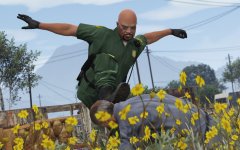 GTA V is highly based on stereotypes, so deal with it.
 -
Actually, we are 3 Alex reading in your mind : Alex Ashfold, Alex Von Shep, Alex Braun. It's something with our name, don't ask.
-
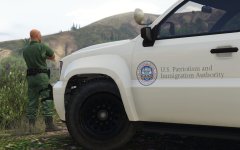 Border patrol
 -
From the album: Emergency Uniforms Pack WIPs
© EUP Team
-
From the album: Emergency Uniforms Pack WIPs
© EUP Team
-
-
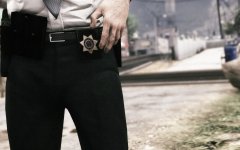 Looks pretty damn accurate to me already...
 -
No, not really customize regular your duty belts, but add more options for undercover style, other than a neck badge and a gun holster, you will be able to customize your gear on your regular civilian belt, with badges, holsters, cuffs, mag pouches etc.
-
 he only showed a picture of hi dlclist..we don't even know what it means..like did he just edited it like we said or he's is showing us his dlclist.xml like it was when he opened it Guy needs to add some meat in his comments if he wants proper support
- 2,346 comments
- 236 reviews
-
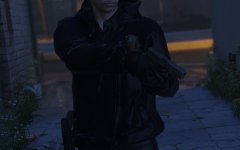 no
no -
https://www.gta5-mods.com/weapons/glock-17
-
-
Still a work in progress, we'll try make it as immersive as possible In GTA IV holstered gun never bother anyone
-
From the album: Emergency Uniforms Pack WIPs
© EUP Team
-
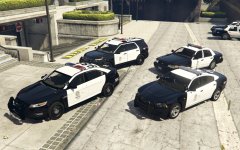
From the album: RDE Screenshots
© Realism Team
-
Add these lines in your dlclist.xml <Item>dlcpacks:\eup\</Item> <Item>dlcpacks:\eupwinter\</Item> ---> (only if you installed them) <Item>dlcpacks:\euptactical\</Item> ---> (only if you installed them) dlclist.xml is located here: mods\update\update.rpf\common\data\dlclist.xml
- 2,346 comments
- 236 reviews
-
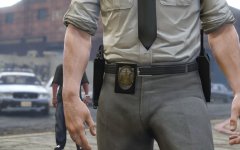 the ''object', spawned is the actual weapon in the game so let's say you replaced the combat pistol with the Sig Sauer P226, in your game you will see this weapon instead of the vanilla combat pistol (as a prop) and yeah we will try heavily script everything so you get the last pistol equipped in your holster when it's holstered.



