


zach016
Members
-
Joined
-
Last visited
Everything posted by zach016
-
The reason you can not choose it, is it is not set to any of the agency related loadouts in Agency.xml In the Agency.xml, you can either add it to an existing loadout, or create a new loadout in an existing agency (depending on how you want it to show up naturally in your game), and it will become select-able as a vehicle in the garage as well. Just note custom agency vehicles have an extra step or two to make them selectable in the garage
-
Your next step is to use openiv, and a program like paint.net, and reduce the size of the textures contained in the custom vehicle files. Good targets are the vehicles skin (Typically these tend to be 4k, but unless the skin is overly complicated it will look just as good in 1k to 2k), as well as pieces of the interior that are never really looked at, yet have ridiculous sized textures (For example, a racked patrol carbine doesn't need a 4k texture)
-
Between the thread im about to link, and the thread linked inside it, it should be enough to get you started. Just go as far as you can, and then come back with any questions you have. As for the custom ped's with airport uniforms, are you using basic models with airport police style clothing (I.E. those in RDE, as well as some re-texture packs), or EUP peds?
-
LSPDFR only makes use of vanilla assets, and a sheriff outfit compatible with the multiplayer ped is not in the base game. You do need to download EUP clothing packs (The menu is not required however)
-
The LSPD characters are set to use the freemode models. The sheriff (and others) are not, and instead use the old premade models. You can either create a custom character, and use that in conjunction with an EUP pack to get the combination you're looking for. or Download an EUP pack, and set the preset characters up to use it.
-
Basic Lighting, Non-ELS emergency lighting, as well as liveries. Don't think ELS vehicles need an entry (spent the last few weeks working with vanilla styled non-ELS vehicles due to texture loss issues, can't recall the way I set the ELS ones up), however non-ELS vehicles certainly do.
-
I popped open the vehicles.meta you provided, and checked lssheriff. One thing that stood out to me, was the audiohash line. While this works fine for the default vehicles, with custom vehicles they end up with no sound whatsoever. Could be a part of the issue. Should look something like: That issue aside, I presume you created the relevant entries in carvariations.meta as well?
-
I would think it's a vehicle issue, more specifically I would suspect an issue in the vehicles.meta. (I've used plenty of custom vehicles with 0.4, with completely custom names, both ELS and non-ELS, so while it doesn't eliminate LSPDFR as a possible cause, it certainly isn't designed in such a way that they cannot work.) My current guess, as mentioned in the previous post, is that the custom vehicles are missing a flag denoting them as law enforcement vehicles. Check the vehicles.meta entries for the bolded flag below.
-
mods -> update -> update.rpf -> x64 -> data -> carvariations.ymt Just checked, it's in there.
-
I believe the carvariations.meta for each vehicle also has a section related to liveries. Havn't played with it myself, but could be the source of the issue.
-
What you're describing is not an lcpdfr issue. You need to add new entries in an appropriate vehicles.meta and carvariations.meta for the vehicle files you added. Albo's Modding DLC Pack V provides a singular location for you to create add-on vehicles, and also includes an instruction manual on how to add the vehicles into the game.
-
Sounds like you are using a configuration file for ultimate backup, set up to use EUP models. You can either check your installation of Ultimate Backup, to see if it has swap-able files for EUP/Non-EUP models, or just download an EUP compatible pack. I gander the linked pack would fix your issue.
-
Have you placed the config files for the added vehicles to ELS -> pack_default
-
I would suggest checking the setting, and giving it a try regardless. It's an easily reversible, and quick change to make. We need to eliminate a known cause, before we start taking guesses at the issue. My only other guess, is that in the vehicles.meta, the vehicle is missing the flag as law enforcement. However, I don't know if that would cause the issue you're describing.
-
Negative on outfits.xml, but you have the right idea. The preset characters are (mostly) handled by cop_presets.xml and cop_presets_outfits.xml In cop_presets.xml, you need to change the model that each preset lspd choose-able character references, to s_m_y_cop_01. Example edit below: You'll also notice that each Preset references two outfits, example bolded below. Note these. Next, pop open cop_presets_outfits.xml, and something should look immediately familiar from the last step. Bolded below. Those <Outfits></Outfits> referenced in cop_presets.xml, are the scriptnames of the applicable outfits that you will need to edit in cop_presets_outfits.xml, therefore you can find each outfit you need to edit by searching those names. Note: The LSPD officers include a number of small variations to the main uniform, however if you decide you wish to change the uniform up, you can always visit a police station and access the locker to change components around. For simplicities sake, I would recommend deleting the extra variations. So, for example, we would remove the bolded below: and then any further edits, will only require us to deal with looking at this instead: Note: I use a non-vanilla cop model, and my examples are pulled from my edited .xml's, so don't be thrown off if my examples reference a component that doesn't exist on your cop model. Here comes the annoying part, determining the proper components our model will use. Pop open the model.ydd you intend to use in openiv (So for example s_m_y_cop_01) Once open, you'll see a number of components, all labeled as something like: uppr_000_r; uppr_001_u; accs_000_u; accs_001_u etc. The initial four letter tag (accs; head;lowr;task;etc) are what determine the relevant component id #. The second set of numbers (_000;_001;002; etc.) are what determine the drawable number. The texture number will always be 0, unless the particular drawable of the component has multiple possible textures. For further explanation (as well as how to determine each component id #), reference this Technical Document by Sam Note: If you do not define a particular component ID number, it will default to drawable #0/Texture #0. Therefore, you do not need to actually define every single component. So, once we have our Component ID's and Drawable numbers figured out, pop open cop_presets_outfits.xml, and start editing the bolded area, to match the particular set-up you want your pre-set to spawn in with. As per the example, <Component id="0" drawable="0" texture="0"/> is unnecessary, however it denotes that head_000 will be used. <Component id="1" drawable="1" texture="0"/> denotes that berd_001 will be used. <Component id="7" drawable="1" texture="0"/> denotes that teef_001 will be used. etc. Repeat the process for each preset character/variation that you wish to change.
-
This mod attempts to address the issue. Havn't tried it myself, so I can't comment on it's effectiveness.
-
Your best bet for performance friendly vehicles, is to extract the vehicles from Realism Dispatch Enhanced, and add them to your game. They are pretty much in line with vanilla vehicles. I don't think many of the custom cars on this website are truly performance friendly, as they all have significantly higher poly's then the vanilla vehicles, and tend to have more separate texture surfaces to boot. That said, through the use of openiv, and a simple program like paint.net, you can reduce the size of the texture packs on this website (and the additional textures packed with the vehicle) to meet your needs.
-
Not sure I fully understand your issue. Are you looking to have AI spawn in with your added uniforms, or to return to vanilla models? What about the uniforms is overlapping? Are you getting "regular" models when LSPD is replaced, and the changed models when other agencies are replaced, or is it some other issue?
-
A link to the specific post that describes how to fix the issue I was referencing.
-
Sounds like an issue with the ELS config's for the vehicles. I'll try to track down a topic with the correct information on what needs to be changed. Edit: Specific post that describes how to fix the issue, if it is what I suspect.
-
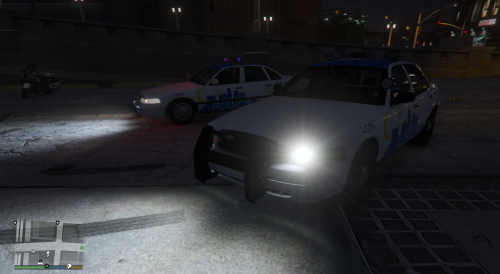 Actually, I like the idea you're going for, however it's not something I would use myself. I kind of agree with Chemo's points to a certain extent. - "Los Santos Police" could use a font change. - I think you could make the moon and stars work, but I personally think they are far too large. At their current size, they draw the eye in such a way that they almost look like a distinct picture, rather then a part of the skyline. Perhaps play with resizing, and re-positioning them. - The "Dial 911" area needs a little polishing. Either way, good idea, execution could just use some polishing in ways I think are well with'in your skillset.
- 4 comments
- 1 review
-
-

- 1
-
-
Pop open the agency.xml. and edit the LSPD to use the basic models. Example (Needed edits are bolded, ignore the other changes)
-
You're likely changing the wrong vehicles.meta, see thread above for a slightly more in depth explanation.
-
It must have outdated install instructions. Patchday4ng is the latest patchday to contain police3, you need to replace it there.
-
Negative on the infinite vehicle slots, you need to go about the add-on process the same as prior to 0.4 What 0.4 does do, is allow you to have any of those add-on vehicles spawn ingame, or be choose-able from the garage.

