


zach016
Members
-
Joined
-
Last visited
Everything posted by zach016
-
Choosing uniforms is a lot easier then it sounds. Focusing in on the area of the Agency.xml that impacts uniforms. What we need to do is determine what components you want the ped to have. If you open the .ydd file of the ped in openiv, you will see all of the components available to that ped, such as: accs_000_u accs_001_u head_000_r head_001_r So, to force the ped to use one of these components, you just put comp_accs="0" to use accs_000_u OR comp_accs="1" to use accs_001_u etc for each category of component. If you do not specify a specific component, the game will randomly choose one of the available options. So in the end, <Ped chance="15" inventory="patrol">s_m_y_sheriff_01</Ped> can turn into something like: Just add as much, or as little as you wish to create the perfect set of cops for your game. I haven't actually customized EUP peds, but I believe they are basically the same, except the amount of components available vastly outnumber the base models. To get the set of components you want, simply load into the game, visit a police station to customize your character (assuming it's not the first time), and go into the customization menu. Each number corresponds to a similar component as listed above. 0 -> head 1 -> berd 2 -> hair 3 -> upper 4 -> lower 5-> head 6-> feet 7 -> teef 8 -> accs 9 -> task 10 -> decal 11 -> jbib Record the section number, and component number, that you want the ped to have Now, in the agency.xml, the ped's refer to outfits. (Also note the model names, as that should stay the same for EUP peds. In the outfits.xml, you just need to create new outfits, based on the components that you determined beforehand. Furthermore, you can add further variations to any one outfit (by creating a new <variation></variation> between the <variations></variations> tags to have peds spawn with different variations of the same outfit.
-
Was the vehicle pack installed using an openiv installer? Were the ped's using EUP added components, or just the base settings of LSPDFR? What it sounds like to me from the information you provided, is the vehicle pack overrode the dlclist.xml, which would be what tell's the game to load the EUP added .rpf Without the EUP.rpf, the clothing that EUP overrode would revert to the base game components, which would put your peds all out of wack if you had overrode your agency.xml with one set up to support EUP peds. Changing the base models of the ped's in this instance would not effect the model's you see ingame, as you would need to edit the agency.xml as well to use the base models.
-
It's an issue with the game running out of memory. It was possible to hit this in 0.3, however it was not nearly as prevalent, as LSPDFR 0.3 doesn't have as much going on under the hood. The main culprit is custom vehicles, as they tend to be significantly higher poly's, and have much larger texture files across the board then the vanilla vehicles. The biggest fix, is to only use vehicles that are approximately the same filesize's as the vanilla vehicles (Typically the .ytd file, and .yft files will each be around 1200kb or less). From a quick look, custom cars, tend to be 7x to 10x the size of the vanilla vehicles. Personally, I switched over to templated versions of the vanilla cars so i could still utilize custom skins. If you can't do without the custom cars (and hey, I get it, the vanilla cars are weak ducklings in comparison), you need to do some hefty optimizing to the texture files. From a layman's standpoint, this will just mean going into the .ytd and +hi.ytd files using openiv, extracting the large texture files, reducing them in size while maintaining the same ratio (paint.net works just fine for this), and then replacing the old textures with the reduced texture. Trust me, the difference between a 4k and a 2k skin is negligible for any skins that are not overly complicated, and the carbine you only glance at really doesn't need a 4k skin.
-
Im pretty sure the system is still in place. I've had people get out of their car and begin shooting, begin shooting as I approach and drive off, give up after being pitted, etc. I believe all of those are tied to the scenario system as described.
-
Not sure I fully understand what exactly you're looking to do, however to make vehicles choose-able from the garage, all you need to do is add the vehicle to the loadout of an agency in the agency.xml If it is an existing agency, it will already be selectible. If it is a custom agency, you need to edit the duty_selection.xml Now, your vehicle will be selectable, however it's name will be the same as the model name. To give it a proper name, simply add it to the <VehicleDescriptions></VehicleDescriptions> section of the duty_selection.xml. A simple copy/paste/edit job of one of the existing entries will do the trick.
-
This actually gets a little harder to explain, the deeper down the rabbit hole you go. Much of this can be done with the use of the custom folder, however im just going to describe straight edits. You can modify existing agencies/create new ones by editing the Agency.xml Each Agency needs one or more loadouts. These are where you specify the Clothing and Vehicles. (Check LSPD entry for how to set up EUP type models) Alright, so at this point we have our custom agency, but we want it to spawn ingame. In the regions.xml, we can define a custom set of zones for our new agency. (LSPDFR wiki will direct you to what each zone encompases) Next, we need to edit the backup.xml This is where we will define our custom agency to spawn in our custom region. We only need to worry about Local Patrol to have the units spawn, however if your custom region does not overlap with an existing region (Which would only happen if you remove zones from existing regions), you may wish to define the custom region in the rest of the entries in the backup.xml, so the game will send the correct back-up when requested to the region. I know it looks a little messy, just give a shout about any particular area that needs a little more explanation.
-
Really, it seems more that everyone is too rushed to throw things on top of LSPDFR 0.4, that is causing most of the issues. The amount of threads requesting support, that also involve people having X-Y-Z installed on top of 0.4, vastly outnumber those people having issues with only the base mod. The only issue i've (thankfully, I realize experiences will differ) personally run into is the texture loss issue, which very well could just be running into a limitation of the game itself when combined with 0.4 (I've had it in 0.3 as well, just not nearly to the same degree). It sucks, and hopefully something can be done about it, but at the end of the day the game can only be pushed so far.
-
It needs to be a part of a loadout in the agency.xml. Base LSPDFR 0.4 doesn't have it as part of any of the loadout's.
-
I suspected that would work, but could get a bit painful if you want overlap in only certain zones that two agencies patrol, among a much higher set of zones. Im wondering if maintaining the same zone in multiple "Regions", and only assigning one agency to each Region will also have the same effect.
-
Just to give you a head's up on how to make this happen, in the regions.xml, create a new region with just the zone(s) you wish for your agency to patrol. (You may wish to also remove these zones from the existing regions). The LSPDFR wiki has a link to what each abbreviation the zone names are referring too. Then, in the backup.xml, assign agencies to the custom region for each of the categories (LocalPatrol, StatePatrol, etc.). If it is a custom agency, make sure that one of the loadout's has a flag to spawn ambiently in the agency.xml. Whatever agency you set to localpatrol in the backup.xml will then spawn ambiently in the zones you defined. What I havn't played with yet is the proper way to have multiple agencies cover the same zone, and ambiently spawn in the same zone as I see a few potential ways for that to happen.
-
If im understanding your question correctly, you need to change the ped lines in the agency.xml for the lspd. Those ped lines for males are all set to freemode models rather then the standard models. The easiest thing to do (for the patrol loadout), is copy and paste the sheriff ped lines over the lspd ped lines, and then just change the model lines to "s_m_y_cop_01" for males, and "s_f_y_cop_01" for females.
-
I don't believe police4 is set in any of the loadout's in the agency.xml. If you add it to an existing loadout, it should become selectable (and will spawn in the world/for backup/however the loadout is set up). You can also have add-on cars in loadouts under a custom agency be choose-able, by adding the custom agencies script-name to the duty_selection.xml, under <vehicles> Furthermore, you can define police4 (or any other add-on vehicle) in the duty_selection.xml, under <VehicleDescriptions>, so that it display's an actual name instead of the model name. (I believe police4 is already defined here, although you may need to change the defined agency in the description.
-
The custom character is independent of changing the ped lines. Have both continued to use my custom character, as well as created a new custom character with these lines in place.
-
You need to change the ped lines in Agency.xml for LSPD, so that it will use the base model's rather then freemode ped's. As an example, you can copy/paste the below for the patrol loadout: and in the end, it should all look something like this (Changes in bold):
-
Check to make sure you are actually on duty at the time (If hitting B brings up the back-up menu, you're on duty). LSPDFR 0.4 sometimes spawns you in on duty, and sometimes spawns you in off duty. You're treated as a normal ped still while off duty, even with the custom character.
-
Replacement vehicles tend to have much higher poly counts then the base vehicles, and they also tend to have liveries (skins), that are significantly larger as well. In LCPDFR, you can set it to not pre-load models in the .ini, which is a partial fix. For your custom vehicles, you can check the size of the livery textures. Anything that is 4k (4096x4096), I would suggest at least halving the size (2048x2048), or even bringing it down to 1k (1024x1024). The actual difference ingame for most skins is negligible unless you really stare at the car with the intent of looking at the detail. You can also split the difference on some models, and set the +hi liveries to 2k, and the regular liveries to 1k (In these cases, the +hi file is used for up close, while the regular file is used when at a distance). Thirdly, since you are using more taxing vehicles, you can turn down other graphic settings to compensate. At the end of the day, custom vehicles are extremely taxing compared to regular vehicles, and lspdfr 0.4 spawns more'of'em naturally. The best option for performance will always be the base vehicles.
-
You just need to edit the ped lines in agency.xml for the LSPD. Currently they use freemode models, rather then the basic ones.
-
Just copy and paste the below into the Agency.xml (While deleting the existing line) So that the LSPD Part of the file looks something like this:
-
You can also try, for any vehicles that utilize both the +hi.ydd, and regular .ydd for liveries, changing the liveries in the regular .ydd to 1k versions. Generally the cars that make use of both, use the regular .ydd liveries for the distant lod's, while the +hi.ydd liveries are used when you are up close. Just note that it takes a second for them to switch sometimes, and therefore you can potentially get close to the vehicles while they are using the 1k skin.
-
If you edit the ped lines in the agency.xml, you can change the LSPD to use the default models.
-
Edit: Misunderstood issue
-
The LSPD cops are set to use freemode models, rather then the preset model's you change out in openIV (Which is how they are EUP compatible). Other cops (such as the one your bikecop is replacing) are simply set to the preset models. What you want to do is edit the Agency.xml in notepad. More specifically, if you look under the Los Santo's County Sheriff You can see under the Ped's line The coding for standard models. Just delete the freemode ped. lines for whatever department you wish to change, copy and paste one (or both) of the above lines, and then change the model to the model name of your British peds. Make note that multiple "Loadouts" can exist for the same department, and each one specifies which ped's spawn with which vehicles.
-
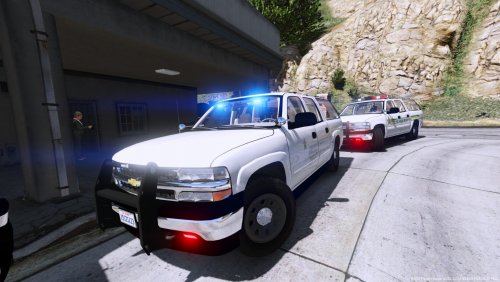 Did some playing around in the .vcf, problem seems to be tied to Extra05. Hope that helps.
- 24 comments
- 5 reviews
-
Probably my favorite model in a long time, however im having an issue where a flashing blue light is visible once the player is a small distance from the front/driver side of the vehicle. Not visible from the rear. Just wondering if it's an issue on my end, or something that needs to be fixed with the model itself.
- 24 comments
- 5 reviews
-
 Interesting for sure. Would be really good though if they were actually responding to some small issue created nearby. Car accident for fire/ems Downed pedestrian for just ems small fire for just fire Man with a knife/gun for police Small things that the player could jump into to assist, but are not overly complicated for the AI to "handle" on their own.
- 93 comments
- 18 reviews
-
-

- 1
-

