




Starmix
Members
-
Joined
-
Last visited
Everything posted by Starmix
-
Please head over to the Ragehook forums then - http://forums.ragepluginhook.net/
-
Does the regular game work?
-
We cannot view the .rcr files. Please post the regular text log.
-
Just make sure to reinstall them following the readmes to every letter.
-
-
Where have you installed it?
-
-
Boom. Get rid of it (move to desktop or something).
-
Give us some time, we all do this in our free time. Do you use a 'mods' folder for OpenIV mods? and have you installed any OpenIV mods at all?
-
Well, it is right at the top of the page and if you don't upload anything you do miss it.
-
The Create button on the top right of the page, next to notifications.
-
What are your computer specs?
-
Did it work before you installed it?
-
DirectX 9.0c comes embedded into Windows 8+ (which it seems he is running.) Plus, that link leads to the Windows 10 download page for me.
-
If you installed it into a 'mods' folder, you can simply remove the mods folder and re-add the skins. If not, you'll have to verify/reinstall your game.
-
As long as you have also edited gameconfig.xml to allow for the extra cars, it should be good.
-
I remember that @Kilyin had a method of adding them, but I can't remember it.
-
That's because they still download as .oac, which changes nearly every OpenIV update.
-
-
who's dat? ;) Benjamin, return.
-
Benjamin is now offline. :( The Prophet shall return.
-
I must always betray you, Benjamin. I'm not Empire! Next will be DroidRZRLover
-
1.0d is not the latest version, 1.1 is. Please get it and see if it resolves your issue.
-
 That's because it is an LSPDFR plugin, it loads WITH LSPDFR, it will not show up there.
- 1,915 comments
- 242 reviews
-
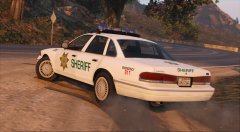 it basically looks in my eyes like a caprice, so I'll take it.


