OfficerFive0
Members
-
Joined
-
Last visited
Everything posted by OfficerFive0
-
test version of the hubcaps available here NOTE: there is only a L0 lod no 1 or 2 ill add it in a bit later to use it on the car you have to use the modded wheels menu in the trainer . put them here mods\x64i\levels\gta5\vehiclemods please post screenshots or videos of it here. (preferably in a spoiler)
-
thank you ;) reword the hubcap a bit.
-
made 3d keys for the laptop. i think ill have a open laptop for the hybrid and closed for unmarked
-
yes thats one of the projects im working on yes. only bxbuggs/friends cars have it so i want to release this for everyone to use on any crown vic. (to be clear the hubcap isnt buggs. it was scratch modeled by me)i meant the hubcap as a modded wheelthanks but i already have that covered after this next update to the hubcaps i think ill upload it here so anyone can test it and post their picturesbeen there done that. i may redo that partvsyea if i cant fix it soon i may release it so people can start using ittruetop left is bxbuggs versioni actually planned on doing that car sometime in the futureworking on the 03 hubcap atm the main problem preventing the release is the blocky look it has when viewed from certain angleshere are some close ups of the leads they use. its a lin6 500 series in a raider housingrockwell collins
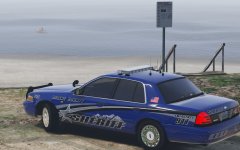
From the album: Five0 WIP
im thinking of releasing these 03 hubcaps as a add on wheel. it should be good to go soon but i still have to work out some kinks. screenshots taken by @steinberg4145 im not really sure but it looks like those new led beacons are code 3 arch 36 leds. they are mainly used on firetrucks though. anyways i made one so if you are interested in using it hmu pimdslr used it on his lafd firetruck
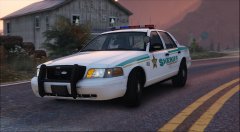 yea looks like it
whose model is that?
yea looks like it
whose model is that?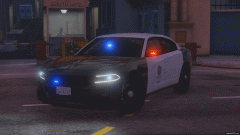 ah cool, i want to make some myself for some nypd cars i want to do
is that a ion v on the mirrors?
ah cool, i want to make some myself for some nypd cars i want to do
is that a ion v on the mirrors?