
RyWilson
Members
-
Joined
-
Last visited
Everything posted by RyWilson
-
 just wanted to stop by and give a quick review. congrats on 37k downloads Lowrider and you have earned it. this script is definitely coming along nicely. the noise complaint callout gives you a chance to do some actual footwork when you are looking for the troublemakers amongst the crowd. also the hit and run is about as detailed as you can get. also really unique to see the editor included in case anyone wants to tweak it. very shagadelic
- 166 comments
- 75 reviews
-
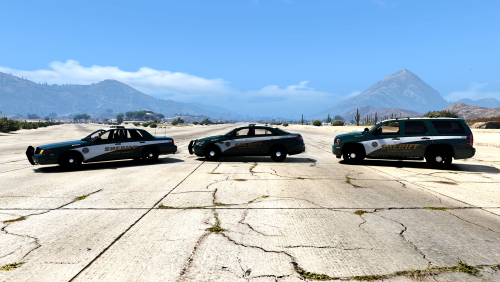 i just so happen to be looking for some skins for Captain 14s cars and here i am if you downloaded the sheriff pack from Captain these skins will fit the cvpi, the charger, and the tahoe!! they look very slick and that green is just the right color for a sheriff car. nice job Destroyer
- 1 comment
- 3 reviews
-
-

- 1
-
-
I understand, but how long do you think a group of people should live under occupation...There comes a time when push comes to shove and that is where the Palestinians are. Israel has shaped the way Palestines have evolved to hate them. After 40 years I would throw rockets too
-
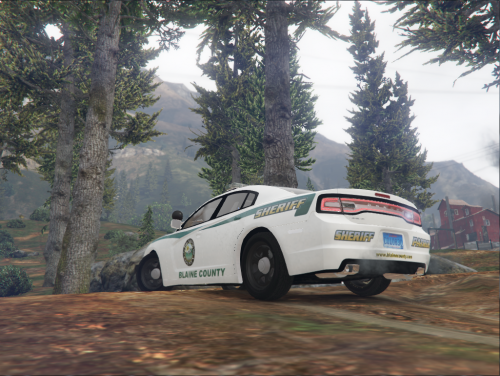 this is a really nice looking skin!! i like the green stripe for sure. i would love to see a different plate on that..all the sexy green and then that blue plate :P good job Hillman!
 -
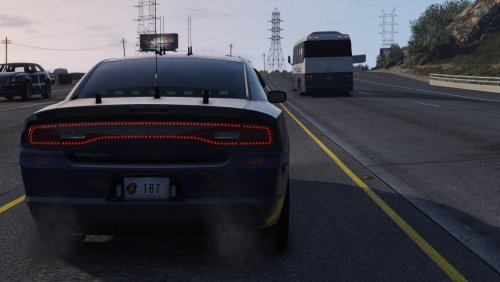 this is extremely nice. i love the extra details like the sunscreen on the back windows. the way the colors look in that third pic is amazing..it almost looks like a different skin i wish i had lol. also looks like you've used parts from the best of the best!
- 33 comments
- 17 reviews
-
-
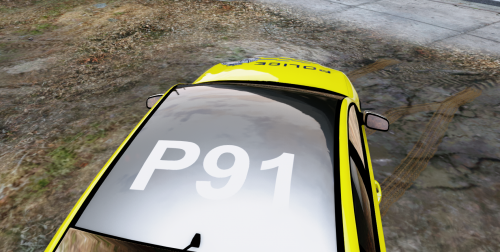 the skin itself is beautiful. for those who use a trainer and can change the colors, they will enjoy this. since the car you are making this for was made almost a year ago, i would recommend putting the link in the description. i'm not sure how many people will wanna go fishing for it through all those vehicle pages.
 -
im back. i guess you had too many threads started on the same thing because i can't find the one we were working on. okay here is the solution i will give. this thread was made for GTA IV, but the visual data settings are about the same. open your settings up and compare the numbers in this thread with the settings you currently have. just increase/decrease the numbers until you get the bloom reduction you are looking for. i hope this helps somewhat..if nothing else it should put you on the right track :) i do find it quite ridiculous that this thread sat for four months without any help. that speaks volumes about this forum.
-
OK thanks for letting us know. I had looked up that problem and wasn't getting much help on Google. Glad it's all working 😀
-
Dam! Idk what could be causing it then..But there are so many things that could :( maybe check your running processes once the game starts to see if there is something spiking and taking CPU away from you. Idk wat else to recommend. Am working now, but when I get home I can look for more solutions possibly.
-
okay so it looks like you have installed a trainer and els already. i do know that some of those scripts over write each other when installed. first i would remove everything from the game and re-verify it through steam to make sure all files are replaced and its all good. then re install lcpdfr and then start the game to make sure it runs right. then if the game works right move on to ELS. now when you are in the ELS folder look at every single file before you install them into your game. if you overwrite a newer version of a file with an older file from els your game will not work. for example, if your GTA IV main menu has a file called Apple.dll and its dated dec 2014, you dont wanna overwrite that with an Apple.dll file that comes with something else dated sept 2014. i hope all this makes sense..lemme know if you need any more help.
-
i was wondering if you had any success in getting your game working cheta.
-
you should be able to just aim at them and press LControl and E without tackling him. try that and see if that works at all.
-
hello. so how are things going? are you still able to get the police mod running for short periods of time? what do you have installed as far as mods and cars?
-
hmm. okay so you can't use any cars at all? does your game run fine with scripts installed?
-
alright since i can't see the dates for any of those files i will simply say to re install lspdfr. after you have done that, install ragehook 50. the ragehook has to be installed after lspdfr because the files inside it are newer than the police mod. make sure you run as administrator and lemme know if that helps you at all.
-
hmm double check your els folder in your open iv menu and see if the individual xml files for each car are in that folder. if nothing else, re install els. maybe somehow one file got deleted. its happened to me while i was messing around in my gta v main menu one day.
-
the easiest thing to do is remove your mod folder to your desktop and run the game. if the problem is solved then i would simply re install cars one at a time. its completely possible you installed one car before, but didnt uninstall it completely or didn't delete the meta/carvariation file that was with it. or its possible you installed a car in the wrong dlc folder and its conflicting with another pack you have installed. lemme know what happens..if its still messed up we can do something else.
-
well i would at least halfway guess its from the visual helpers or at least its helping cause issues. you have 3 installed..i think you could remove at least two of them. i've used them all and i do have loss when i used visual v. if i were you i would remove visual v and radiance v and leave in Make Visuals Great just to see what happens and let us know.
-
tons of people have had this same issue. the end result is starting over with a vanilla copy of GTA V and updating it before you install the mod. you can try uninstalling lspdfr and deleting your mod folder (deleting your mod folder is recommended for every gta update..it just cuts down on issues that can come up like this). if you decide to do the second choice, lemme know if it works for you. if not we'll have to probably start with a new copy. also, make sure you are using ragehook50 :D its the newest one. when you install the mods again always install LSPDFR first, then ragehook. never the other way around :)
-
so all you changed was a single vehicle? i don't think i've ever seen this before. did you try to un install it to see if the problem corrected itself?
-
let us know when you get those videos goin!

-
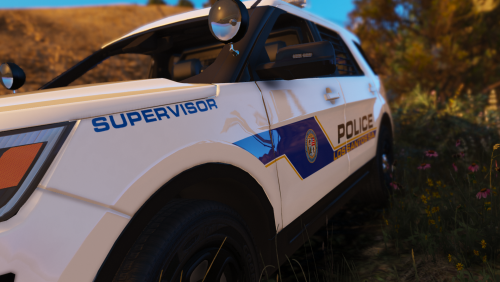 oooh those look kinda regal pretty nice work especially that blue zig zag thing on the door!
 -
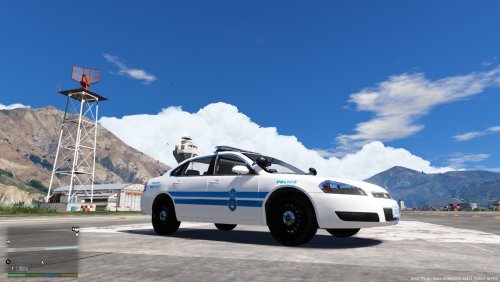 so for me, i'll literally drive anything with a siren on it on patrol as long as i like it. the colors on this car are extremely nice. it's definitely far from the black and white that i am tired of. you also picked a great car to wrap it around..and you have government plates. i like seein that alot! nice job and can't wait to check this out!
 -
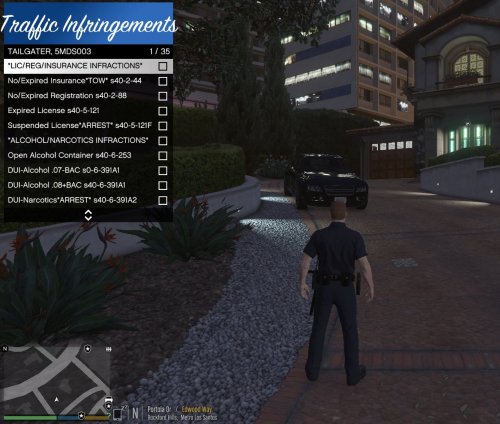 YES! i wanted to use the patrol toolkit forever, but i didnt really understand some of the stuff :P so this is perfect! i will be trying this out tomorrow.
- 13 comments
- 6 reviews
-
-
- 1
-