




CouthInk4
Members
-
Joined
-
Last visited
Everything posted by CouthInk4
-
This topic has been moved to the appropriate forum. Please post in the correct location in the future.
-
This topic has been moved to the appropriate forum. Please post in the correct location in the future.
-
a mods folder is the easiest way. Also no other mods should disable the folder.. the only time it'll be deemed unusable is if you remove ASIloader.dll and OpenIV.asi from your directory (which you should do if you want to go online)
-
Just use one version of the game, but use a mods folder.. that way you'll have both vanilla files online and modded files in single player (you'll need to remove a couple files each time you want to go online. but you can re-add them if you want to run mods. link on how to use a mods folder - http://openiv.com/?p=1132 it'll save a lot of time.. and it'll save a lot of space on your SSD drives.
-
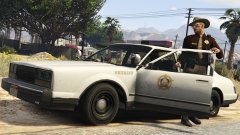 Really? For me everytime i crashed or bumped the model (both esperanto and rancher) the lightbar came completely off =/ If your model doesn't do that, then that will be going straight into my game the moment it (well, they) are released =D
 -
Have you tried playing offline rather than signing in? Actually, if i remember correctly.. you'll need to play offline as xliveless allows savegame mods but disables online.
-
Did you fix the issue with the lightbar? The one thing i hated about this model (well.. the snow model) was the the slightest bump and the lightbar detached. I'll definitely be putting these in when they're released =)
-
I understand English isn't your first language, however can you be a little bit more specific? Right now i don't know what you're asking.
-
http://www.gameinformer.com/b/news/archive/2015/08/12/capcom-says-yes-to-resident-evil-2-remake.aspx So a month ago many fans pitched an idea to Capcom to remake Resident Evil 2 (just like they did with the first Resident Evil, giving it HD version). They took it on board an now, Resident Evil 2 Remake has been confirmed. For me personally i think this is great, i've been a fan of the Resident Evil franchise since i was 5-6 years old, i've enjoyed most of the games (although i never really played RE1 or 2, i went straight in with Resident Evil 3: Nemesis) and have loved the films.. with my favourite being Resident Evil 3: Nemesis (weirdly enough my favourite RE movie is 2, which is based on RE3) Capcom themselves have been releasing HD remake of the Resident Evil franchise a lot lately, they've done the first one, now they're in the process of remaking and bringing Resident Evil: Zero to PC. They've also added features that were originally cut from the original game into their remakes. No official date has been confirmed yet, we just know it's in the works. I'm interested in knowing your thoughts about this, and whether or not more companies should remake older games and bring it to PC?
-
Are you running the game as Administrator?
-
It's not advised to buy pre-built computers as they tend to be expensive for their parts, but there is no harm in it. If you have a look around and find a PC that you like then post up their specs and people will tell you if it's worht the money, what settings it can run on, if it can run it and all that. =)
-
 I won't lie.. but before i saw the HUD and the bus.. i thought this was a RL picture.
 -
Nope, i don't believe so.. I've played both on PC on the highest settings and LA Noire runs a lot better than GTA 4
-
-
For the love of god change the motherboard! I have the Z97 Gaming 9 MSI motherboard and honestly.. it's the first and last time i'll go MSI. Their Wifi adapter is horrible, the slightest bump it will break (i learnt that from changing my cases).. The pins on the connector are that small and fragile that any slight bump (that's even including screwing the two wifi sticks in) can break it. and to replace it.. well you'll either have to put a warranty claim in or buy a new board. Stay clear of MSI.. go with a better brand.
-
Ah, first time i've seen a Windows 8 user get this issue, Still, it can be fixed with the link i provided =)
-
I'm guessing you're running Windows 10? It's a common error many people get, it can fixed by downloading and installing this - http://www.microsoft.com/en-us/download/details.aspx?id=30679
-
Did you download and install the x86 version?
-
you've deleted your LCPDFR save game, so it's trying to continue from the crash. go into your LCPDFR.ini and find the autosave feature, and set it to False.
-
Download and install this - http://www.microsoft.com/en-us/download/details.aspx?id=26999
-
It doesn't change my opinion. i still say it should run on low settings as it's just your processor that doesn't meet the requirements. Although it is wise to upgrade as your processor and board is about 6 years old now. Well for a good processor it costs around $300 and the board is about $100-$200. so if you have the money to upgrade i'd go for it. Processor 1 - http://www.newegg.com/global/uk/Product/Product.aspx?Item=N82E16819117369 (it is a great CPU, i own this myself and i love it. Processor 2 - http://www.newegg.com/global/uk/Product/Product.aspx?Item=N82E16819117372 - It's a cheaper processor, and is great for gaming (most gamers use this processor i believe. Motherboard - http://www.newegg.com/global/uk/Product/Product.aspx?Item=N82E16813157501 or - http://www.newegg.com/global/uk/Product/Product.aspx?Item=N82E16813132125 If you're not familar with PC building, i'd suggest you message the guys at newegg and see if they can attach the processor to the motherboard before shipping, if not then your local PC shop should do it (although it'l cost you some money)
-
Do you already own GTA V on PC? I wouldn't be able to give you a price on processors because i don't know the board you have (if you know it then please list it). If your internet is slow, then i'd stick with the disc version.. if you plan on upgrading your PC anyway it wouldn't matter if it's steam or disc (i suggested Steam just in case it didn't work then you could get the $70 refund for the game). In terms of script modding, they're the same. for other mods (like textures) the disc version requires a mods folder (easy to setup so it's not difficult). EDIT: after doing a search on your processor, i found out your processor is literally antique, so no boards on the market will be able to support it. So for an upgrade you'll need an upgrade your board and processor. (and possibly your RAM depending on MHz) if you give me a maximum price, i could have a look for a board and processor for you.
-
you'll need to use a mods folder, tutorial on how to create one is here - http://openiv.com/?p=1132
-
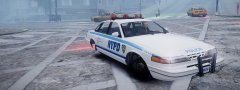 at first i thought that was a Vapid Stanier 1st gen. then i read the headline.. RL car that fits in the GTA world? That is the first time i've seen that happen and i actually like it! =)
 -
Guys, the OP is talking about LCPDFR and whether it's being worked on.. not problems relating to LSPDFR. OP: Right now, LCPDFR is finished. LMS and the rest of the Development Team (do we have a development team?) are fully focused on GTA V and LSPDFR. LCPDFR right now is as good as it will get in terms as stability and features. GTA IV was a horrible port with limited things. GTA V on the other hand has a wide array of possibility in terms of scripting and modding. LSPDFR is in it's beta stage and it's waay better and smoother than the final version of LCPDFR. so as of now, no more updates will be released. LMS may come back to it in the future to work on stability but i highly doubt it because he is more focused and enjoying V modding and LSPDFR. If you're debating on whether or not to get GTA V.. then you shouldn't be debating.. get it, because it's better than the PS4 version, apart from LSPDFR there are other pretty cool script mods available to download that you can have fun with.


