
GravelRoadCop
Members
-
Joined
Everything posted by GravelRoadCop
-
I plan on to. There aren't any good video of the siren in action that does not have background / traffic noise pollution. If I do come across a clean, good quality video, I will make one. I've done something similar, a Whelen mechanical tone -- you can check it out on my YouTube page.
-
When it comes out everyone will be coming back, lol.
-
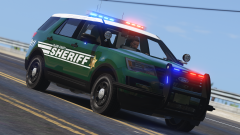 This right here is why we are extremely lucky to have Black Jesus part of our community that doesn't charge us money for this quality of work. Thank you, Black Jesus. Car modeller of the month #voteforjesus
 -
Here is my 'unsynchronized' Whelen ComAlert pattern sequences. It is best used for light-bars, but can be also used for exterior body LED lights if you shuffle the sequence orders around. sequencerBpm value 1250 - 1300 is recommended. ---------------------------------------------------- 01111000000001010111100000000101 [1] 2013624325 00000000101011110000000010101111 [2] 11468975 00001010111100000000101011110000 [3] 183503600 ----------------------------------------------------- 11110000000010101111000000001010 [4] 4027248650 10101111000000001010111100000000 [5] 2936057600 00000101011110000000010101111000 [6] 91751800
-
 Do you have details you wish to share with us about the firefighter models ?
 -
I know we have been quiet on the subject of ELS for a while, but please don't speculate that ELS is dead or the development is halted. It's not the case. We are on a slower pace but results are in the making. If I can ask the community to refrain from sending me messages to inquire when ELS is coming out, you won't hear it from any of the beta testers because we just simply don't know. Everything comes from Lt. Caine and he does a very good job to maintain a secured channel between all of the development asset. When we have something to share or if Lt. Caine wishes to make an announcement to the community, subscribe and monitor this thread for future activity. Thanks for your patience and lasting support.
-
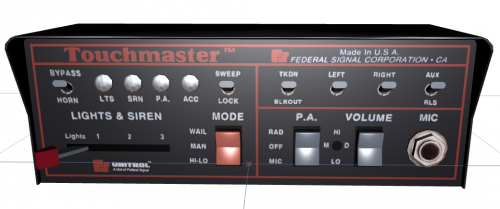 Have you done a Code 3 PSE Mastercom B or Code 3 RLS siren controller ?
 -
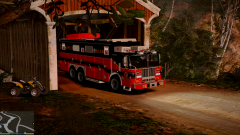 If he built this thing from scratch, I don't blame him if he wants to make a profit off his work, but if he just imported it from a pre-existing 3d model blueprint or package, then this is a shady form of practice. There will be free fire truck models coming in the future, and I'd much rather wait for them.
 -
What? You have to buy the models?
-
When do you plan on lighting them up ?
-
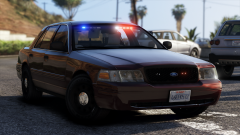 It reminds me of the RCMP set up ( especially in the rear, they have it exactly set up like that.) The only suggestion i can make is to add perhaps rear passenger door LEDs or mirror beams/mirror pucks.
 -
Your thoughts on this ? It's a little project of mine this month. I am working on a Whelen themed carcol file for models with Whelen products installed. The video shows some of the flash patterns in action. I think I need to throw in more types of flash patterns to mix it up. Edit : I just realized that i goofed up with video editing. Ignore the long black screen in the end.
-
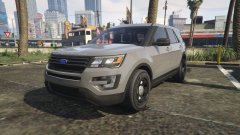 I like to believe in all the possibilities with a pair of Whelen vertex to direct light anywhere it's needed.
 -
I have never seen a FPUI 2016 configured with two Whelen vertexes in the headlight housings -- this makes your model different and unique :) Good work !
-
Yeah, I had a look at several choppers, and aircrafts in OpenIV. All of them has this mysterious siren 1, 2 and 4 assigned to them, but to know what the source is is the problem. It has to be hardcoded somewhere. I do know that in Carcols, under light setting 8 ( not siren setting), is tied to all aircrafts in the game but i don't see any lines that allows us to change the numbers of flashes.
-
Yes, I do understand that. I just want to see if we have the ability to customize aircraft lights. Since we have no answer, we will have to assume that either it has not been attempted yet, or its not possible due to encrypted files.
-
Has anyone look into editing helicopter NAV/marker lights ? Right now they are dull and needs improvement. It should look like this : I've done some poking around in OpenIV, looking for a carvariation file that contains vanilla helicopter values, to no avail. I checked out the polmav model and it appears that it has siren 1, 2 and 4 locked to it, but I am not sure where it ties to.
-
-
-
-
Okay, why don't you tell us the parameters you edited so we can enter our own custom values.
-
Having the same problem here. I am stumped.
-
Darn. I believe this may be the case. I hope that one day this will change with some reverse engineering. Here's pt.2 on my unsynchronized Whelen flash patterns. I've done some work to my carcol today, It's improving and falling into places. I'm loving at the possibilities I can do to bring real-world flash patterns to law enforcement/rescue models ! I will eventually release the carcol to the public. I need more time. ( mute if you don't want to hear sirens )
-
I am going to test this theory out but I just want to ask since I am at work for the next couple hours : will a 64, or 96 bit binary work in sequencing? Right now 16/32 bits work, but how high can we go?
-
Please provide a video of this in action. As for my "unsynchronized" lights, I haven't paid much attention to rotary lights as LED sequencing is easier to do. I will release my carcol sometimes this week for those who wants to have whelen patterns. I still have more working to it and I have ideas flowing to my head as I am typing this. I want to offer this community accurate, real world patterns, and it all starts now. So keep an eye on me and I will see if I can bring more patterns to the table. Simple ones first, then complicated patterns last. To clarify something here, this isn't actually a break through in achieving unsynchronized patterns - I still don't have a full understanding on pattern sync/unsynchronized BPM speed. But what I did here is still remarkable in contrast. Very exciting days ahead of us.