


Sgt.Kanyo
Members
-
Joined
-
Last visited
Everything posted by Sgt.Kanyo
-
-
Alright, I don't have the other tones ready, so I'll release that a bit later.
- 12 comments
- 11 reviews
-
You mean it uses the pants with the rain coat? Don't you have player selector or Simple Native trainer? Because if you do, you can easily select it there. Also are you sure you installed the lines in pedvariations.dat from the readme file? I'm using Custo's lines, so they should work.
- 13 comments
- 17 reviews
-
It does loop nicely, it sounds just like the video it's based on, and it's loud unlike some siren mods. I might try to get a video up, but it's been a very long time, since I made a video.
- 12 comments
- 11 reviews
-
-

- 1
-
-
They don't have that, that's why I didn't use that model. You could use this skin on a different model though, but then the short sleeve version would have gold buttons in the middle while irl, those buttons are all black: '>
- 13 comments
- 17 reviews
-
-
- 1
-
-
I might make a normal FS Smart Siren if people really want it. Under hyper yelp you mean pier tone right? What I could do is add only one of them though, or maybe add the other 1 to the ambulance siren. Also I forgot to mention, the airhorn is replaced with a small wail tone, so you can use that to pull people over with lcpdfr properly.
- 12 comments
- 11 reviews
-
The new policehelper sounds awesome. Also may I have a small request? You know how you place a barrier or a cone on the road, then the traffic will stop behind it, if you place it properly. Would it be possible to have that feature without spawning the barriers? If I'm not mistaken you used invisible faggios with a driver on it, to stop the traffic. The reason I'm asking this, is because every time I do a traffic stop people tend to drive insanely close to me, or even hit me. If I'm on the highway, I can easily be killed as well. Having a barrier or a cone behind my car is not really realistic, so it'd be nice if there was some invisible something there, that stops peds behind my car. I know there's a mod that stops peds behind my car, but it only works when I'm in the car (also that script tends to crash a lot for me).
-
Kind of offtopic, but to anyone who's interested, I've just updated my 2008 and 2003 LAPD Crown Vic, my CHP officer, and uploaded a new LAPD officer along with a siren mod specifically used by LAPD. It'll be up here, as soon as it gets approved.
-
This sound mod replaces the old GTA IV siren with a Federal Signal Smart Siren used by the LAPD. Only wail and yelp tone are featured. Wail tone is used normally on a code 3 run, and for clearing intersections, they use the yelp tone.
- 12 comments
- 11 reviews
-
-
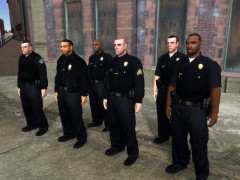 Yupp. They'll be released shortly, with some other tasty LAPD stuff :)
 -
-
-
I suggest copying the night times from a different timecyc mod, or from the original timecyc.dat and pasting it into the timecyc you are currently using. Just check out which hours are dark for you and copy those hours into your timecyc. If that doesn't fix the problem, then the problem is with ENB, probably somewhere in the enbseries.ini file. If that's the case, I suggest getting a different ENB, since I can't really help you with that stuff.
-
Nope, not that, besides it wouldn't have worked then before. Also sometimes it works, sometimes... well most of the times it's crashing.
-
You forgot to install the .wtd. The .wtd file stores the textures, and when a texture is missing, it comes up white. Install both .wft and .wtd and make sure they are named exactly the same. Or maybe you mixed up 2 wtds and you are trying to use, for example a charger's model, but with a tahoe's texture.
-
Since I have this crashing since almost month now, and I haven't installed any new mods since then. It was working perfectly fine, the only time I crashed while joining a server was at the loading screen. That means either someone has used something on the server or it was either my game causing me to crash. However, this time it's almost frequent, I crash like 9 times out of 10. The game crashes at exactly the same moment I double click on a server to join. When I open the "players" tab on GFWL (which shows the last people you played with), it doesn't show anyone on that server, which means I couldn't even actually start joining the server, it was just GFWL doing something. And the funny thing is, later on I can actually join that same server after a few trys. My guess is GFWL always checks sth online before you join a server, and well it fails and results in a crash. It doesn't matter if the server is populated, it doesn't matter if I'm trying to host, it just crashes most of the time. And when I'm lucky, it all works fine, which again proves that it's not the mods I'm using. EDIT: Also I've tried reinstalling GFWL a few times, so that didn't work.
-
Awesome, it worked. Thanks Custo.
-
I'm sorry I don't really get what you are asking, but if you mean the parking lights (front yellow lights), you need to have simple native trainer, and press this keycombination: "K" + "numpad 9" This will turn on all the indicators to fully on, so they won't be blinking just constantly on. Like here at 0:24
-
Yes ofcourse I'm on the latest patch, otherwise I wouldn't be able to play in MP. Yes ofcourse I'm running as admin, and like I've explained before, there's nothing wrong in single player, so it's not the mods. I'm almost certain it's GFWL, because when I start my GTA with my internet connection disabled, then there's no lag when I start up the game. Sorry if my first post was too long, then just read the last 2 lines of it. There I explained what is definately not crashing my game. I'm just interested who else has this problem, because so far only a friend of mine has this GFWL lag when you start up the game, however his game at least doesn't crash when he joins a random server.
-
Sorry for the bump, but come on, nobody has experienced that insane amount of lag when you start up the game? I'm pretty sure it's not just me and my friend.
-
So I've seen that it is possible to change the idle animation to something else on the player, like in Custo's Idle Animation Mod. How would I go about deleting all the idle animations, so any peds I use wouldn't wonder off every 2 second? I tried deleting all the lines, but that just leads to crashing. I don't want the peds on the street to stop their idle animations, I only want to get rid of the player idle anims.
-
Ah you said you used the TLaD handling line. However this bus is provided with one. Have you tried that? If it was a real car, I wouldn't hesitate making one, since I'm making realistic handling lines, but this bus doesn't really exist irl. Anyway if you used the provided handling and it still kept rolling over then let me know, and I'll make one for it.
-
I've updated the charger and also if you're interested all my CHP CVPIs with proper rear lights are unlocked as well.
-
Can you link it here please? I have no idea which bus is that.

