r.y.a.n
Members
-
Joined
-
Last visited
Everything posted by r.y.a.n
-
 Is there an eta to this pack?
 -
-
This thread..yikes
-
bruhh
-
 @PieRGud So if Computer+ requires LSPDFR+ but LSPDFR+ isn't updated, does that mean Computer+ works?
- 1,743 comments
- 172 reviews
-
Yea unfortunately I haven't played LSPDFR for a bit, and just have been lurking around and watching the new mods w/o using them.
-
Where are you finding Stop the Ped and Ultimate Backup? It looks like Bejolio removed their mods.
-
To be honest, I used Paperwork++ (your first version where you downloaded an application) as a tool for role play while patrolling.
-
It is always a shame when a creator removes their content. Especially Bejoljo since his mods were the closest to what Albo has achieved
-
I mean if I had to guess, I'd say it will either be the 22/23 (which is the last Friday and Saturday of the month) or the 28th.
-
Hey @Sam or @LMS will the ambient events automatically create a pursuit? (I never played LCPDFR). So for example we see a robbery or car jacking when we report it in, does it simply just make a pursuit?
-
And now with this new LSPDFR update, hopefully the ambient events will match the ones by Albo in terms of quality. Tbh, there are other light weight speed radar options to choose from that match Albos quality. It all comes down to the callouts and even then some of our new modders are quickly catching up. There is a new wave of LSPDFR modding and I am excited!
-
So what mods would become obsolete with this update?
-
Be patient. Development takes a while. Would you rather have a released version full of bugs that takes away from the experience?
-
Before you say it, yes I already changed the diffuse tint to <diffuseTint value="0x00FFFFFF" /> however there is still black tint on the light bar. I am also using Albos Modding pack. Any suggestions?
-
 Does the beeping sound play constantly if you are in first person? Is the idea of this mod to equate the first person view to the body cam view?
- 168 comments
- 36 reviews
-
So does this mean you can't call SAHP and LSPD in the same pursuit?
-
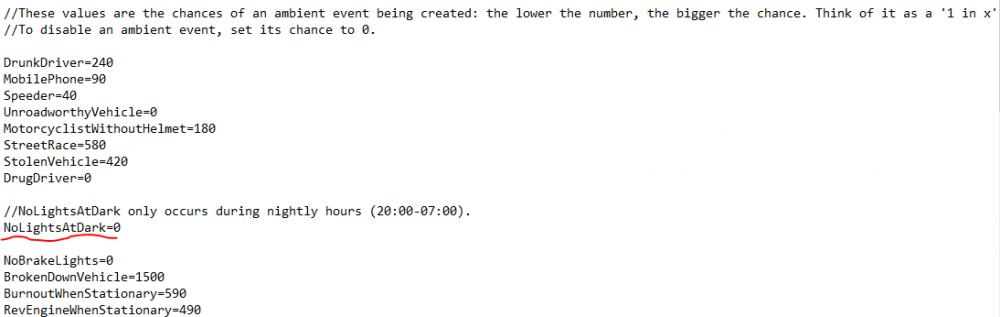
The reason why some of them are so high is because I don't want them to happen as often (higher the number lower the chance, 1/x ) He is a hard man to contact, so I am just going to try to change the 0 to an absurdly high number to see if that helps, cause it has with the others.
-
I thought so to, but this is what my config looks like for Traffic Policer
-
Every 30 secs some LSPDFR plugin is producing a No Lights at Dark event. I went through all my LSPDFFR callouts and turned the frequency to 0. My guess is it is coded into LSPDFR+, anyone know? It is just very annoying.

-
@Sam Will this new update improve the way AI cops react to on foot pursuits? More often than not if a pursuit starts on foot and backup is called the cops will drive in circles crashing into things.
-
@Sam This new preview looks awesome! Quick question though, in 0.3 you either could be the first or last car in the pursuit otherwise you would get rammed off the road by a fellow cop. Will this update give us the opportunity to be a 2nd, 3rd... and so on in a pursuit?
-
---Removed previous content--- Project is being restarted. Will update soon.
-
Can't wait!
-
-
 Been having this same issue, I have updated the game config and everything. What was your fix?
- 267 comments
- 36 reviews