


Hystery
Members
-
Joined
-
Last visited
Everything posted by Hystery
-
That's not as easy as that.
-
Pinned on the top of the page of the support section, just saying
-
The GT-R is so overrated. I loved all Skyline cars, but this one...
-
I do. Do you know why? Because it's been repeated, over, and over, and over and over and over everytime someone asked. Search for it, make some effort instead of wanting to be spoonfed all the time.
-
I'm not rude, I'm direct, and pointing at facts. There's this banner, and there's a search bar, and Google. Same as above.And this is on the top of the front page. #blindIt probably didn't have a massive audience. Channels often do that when something is a flop.You can't.This thing, along with Google, will give you what you need.By updating Ragehook to 0.38 like you should have done by yourself.Ehm... I'm pretty sure it'll still crash if it has to. I had "Out of memory" error crashes in the past, even though I always set the Ignore suggested limits to on since the first time I played the game. It's more of an hardware issue IMO, related to people having too many mods running/ENB/resource hungry stuff.It's been posted by a Rockstar employee, and I highly doubt they'd bother themselves just updating the GTA IV engine a bit to take a screenshot. Besides, the hill and the trees have completely different shapes, meaning they've probably been remodeled, and the water texture and physics look pretty similar to the one of GTA V. The textures are also from GTA V, so...This. Basically, a Rockstar artist recreated a small scenery from GTA IV with the GTA V engine, without precising why. It could be a marketing thing to draw attention, or a hint at future content release. Or neither. Even if it's just online, people will always manage to bring it to the single player, like all the rest.That's most likely not an issue with the ENB to begin with, so...
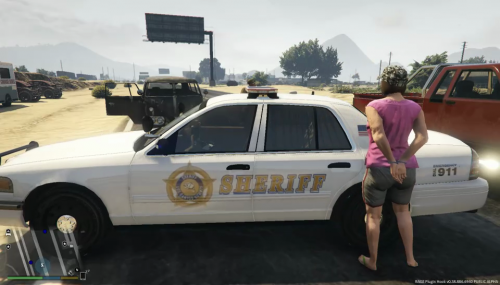 That 5 stars rating is way too kind and not representative of the real work that is posted here. Rating 5 stars something that doesn't deserve it doesn't help the modder to make efforts to improve his work. The skin is blurry (I suppose it's a 2048x2048, or that you scaled up the badge and Sheriff way too much) and it's really bland even for a supposedly 'vanilla'-like skin. Looks like something that was made in five minutes and posted here. Not that it is wrong, but it clearly lacks quality. Advices: work on a 4096x4096 template, and save it at this resolution, and then if you need to, scale it down to 2048x2048 to minimize quality loss. Try to also make your skins a bit less bland than that, there's literally nothing on it.
- 2 comments
- 2 reviews
Ehm... Okay?Quite the contrary, it's quite detailed. I literally detailed every single step. I do. Actually, I say it in those exact terms, quoting myself from the guide: "At the date of 04/04/2016, the latest DLC patch that has been released by Rockstar is the patch called patchday9ng. This DLC patch is located with all the other DLC patches, at this location: update/x64/dlcpacks. You will find the folder called patchday9ng there. Inside, a dlc.rpf. You will right click on it and click on "Copy to mod folder". Once done, you'll automatically be in the dlc.rpf archive, so you'll just have to navigate to x64/level/gta5, and you will find the vehicles.rpf archive." Strange that you speak about stuff called "patch3ng", which doesn't exist by the way, when in my guide I talk about "patchday9ng", which is completely unrelated. You actually didn't read my guide at all and you just want the solution to be spoonfed to you. Too bad, it won't happen. If you want to mod your game, you've to make an effort on your end. Everyone who read my guide managed to make their car mods work. I doubt you're less intelligent than them, so read the guide thoroughly, do as it is told, and by an incredible black magic, it'll work.How could we say that? It's up to your preference, if you prefer to play with vanilla cars, play with vanilla cars, if you want to play with IRL cars, play with IRL cars.The problem with plugins trying to take control over the behavior of a large number of peds is that they are very resource hungry and often result in performance loss (like the KeepCalm mod). That's how the AI was coded, be happy that you actually can play LSPDFR at all.Work on 4096x4096, and if your computer can't handle it in game, resize it to 2048x2048 afterwards.Well, technically, no. If something doesn't work, always start from the fact that you're doing something wrong on your end, unless you've an explicit proof that it is not the case. Make sure you install all the models and .meta files correctly.Possible. Overall I'm not hyped that much, it's going to be yet another update with stuff costing millions and I'm truly tired to farm the same heists over and over by now. The perpetual addition of new stuff to buy with the lack of new content to play (as in, new content that is actually rewarding and does not simply give 20k per game) makes the game really grindy and boring in my opinion. Never been a fan of PvP so I most likely will never be part of a VIP organization, so all the rest is pointless to me. Maybe one day they'll add new heists. One can dream.The new luxury SUV just looks like a bulletproof version of the Bravado Gresley like they did to the Baller.The lightbar doesn't light up because, I don't know if you noticed, but ALL your windows are blacked out. Including the lightbar. That's something inherent to the sheriff2 and pranger car slots. To solve this, go to the vehicles.meta file located in update.rpf/common/data/level/gta5, extract it with OpenIV, open the extracted file with notepad or similar, press Ctrl+F to open the search bar and search for the sheriff2 lines. Once done, look for a line that looks like this: <diffuseTint value="0xAA0A0A0A" /> and change it to this: <diffuseTint value="0x00FFFFFF" /> Then replace the original vehicles.meta file with the one you modified at the same location. It'll make your windows finally transparent, and the lightbar will light up. You're welcome.


