
DeputyJake
Members
-
Joined
-
Last visited
Everything posted by DeputyJake
-
Same for me. Takes around 2.5 minutes to load images and I often can't even access the site sometimes. Thanks Cyan for looking into it!
-
This would still be able to run GTA V fine, but as you can probably tell from the price it's a little lower in specs than the HP. To compare both of them real quick, we can look at the CPU's. HP - i5-7400 - I don't know much about this processor since it just came out this year, but I generally prefer Intel processors over AMD so I'm sure it will work great. CyberPowerPC - AMD FX 4300 - This processor came out in 2012. It's not a bad processor for what you're looking to do and I'm sure will work fine, but the benchmarkings aren't the greatest on it when compared to the i5-7400. As far as the Graphic's Cards go, with the HP's graphics card you'll have 3GB of Video Memory whereas the AMD one you'll have 2GB. Here's some benchmarks for both of them: http://gpu.userbenchmark.com/Compare/Nvidia-GTX-1060-3GB-vs-AMD-RX-460/3646vs3641. The HDD and RAM are the same in both builds, but the CyberPowerPC lacks a CD Drive (if you need it). In my opinion, if you can afford the HP (or convince your wife) I would go with that, but if not the CyberPowerPC will still be a good option, just compared with the HP it won't be as fast.
-
Haha, totally understandable. CyberPowerPC's are good too, just make sure you stay around the same specs as the HP or higher.
-
This definitely isn't a bad starting computer. However, I always recommend people building their own computers rather than buying it pre-built. You tend to get a better bang for your buck. But since this isn't going to be your primary gaming system (from what I've heard you say), going with a pre-built might not be that bad. Something to think about though, if you are wanting this to be your primary gaming system you might want to save up a little more money and get you one that will last longer and perform a little better. But don't get me wrong, the one you posted will perform great for the things you are wanting to do. If you are interested in building your own computer a great site to look on is PCPartPicker - they have recommended builds based on price range. If not, it is completely understandable as the one you provided would be a great starter desktop.
-
Looks like a great build that will last for awhile. Really like the case too. Enjoy!
-
Any idea on how much you are wanting to spend? Will help me and others give you suggestions.
-
+1 for this! I was having trouble with AI cop cars not despawning after pursuits, etc. This helped! Thanks!
-
Are you using ELS V8.5? If not, upgrade to that. Otherwise the only other thing would be to try reinstalling it.
-
Awesome job on fixing the 502 issue, unfortunately I'm getting a new error now.. http://prntscr.com/855zrc I'm not complaining about this one because like other people have said, it just takes a couple of refreshes. I know you guys are busy but just thought I would point it out. Thanks!
-
-
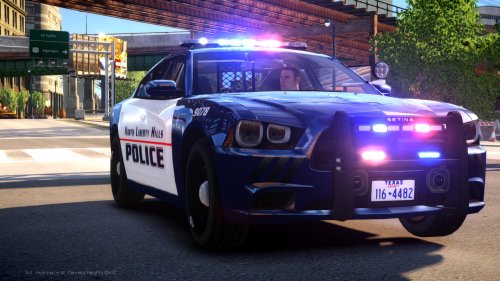
This car is AWESOME. Great job. I am, however, having some issues with the HG2 runners working. When I first installed the car they worked whenever I turned on the primary/secondary/warning lights, however now they don't work at all. I have tried installing the car again in the vehicle files but they still don't seem to work. Not for sure what is wrong but regardless the car is a 10/10. If there is a fix for this issue I would appreciate a response! Thanks and great job,
- 24 comments
- 9 reviews
-
-
I tried Traffic Load, it still makes me crash after 10 min. Also I noticed that whenever the police in game finish an arrest, they disappear and leave their cars around the city.
-
Thanks for the response! I think I tried TrafficLoad. Is this it? http://www.gta4-mods.com/script/trafficload-f9780 Whenever I downloaded it I still had a ton of taxis. Maybe I put the files in the wrong place? Where did you put it? Thanks again!
-
Hey Robert, Please do the following before asking for support Make sure you aren't using a crack - We don't support cracks or people using pirated softwareUpdate GTA IV to 1.0.7.0 (the latest version of the game, or 1.1.2.0 for EFLC) - These patches are needed. Make sure that you run the game as an administrator.Make sure that your GTA IV root folder (and every subdirectory) is not set to "read-only"Ensure that ScriptHook.dll, ScriptHookDotNet.asi and Dsound.dll OR Xlive.dll are in the GTA IV ROOT folderEnsure that there is a folder titled 'LCPDFR' in the ROOT GTA IV folder.Check that all the above files exist, if they do not, reinstall LCPDFR with the MANUAL installation.Ensure that you are using up to date versions of every LCPDFR dependency and LCPDFR itself.Install these: https://www.microsoft.com/en-us/download/details.aspx?id=30653 , https://www.microsoft.com/en-us/download/details.aspx?id=30679In some cases, your issue is resolved after following the above steps. If it did help, please let everyone know in the topic that your issue is resolved. If you do have to post a topic, do the following; Give a clear, detailed description of the problem.Explain any circumstances surrounding the problem.State what solutions you have tried.Post ALL relevant logs (LCPDFR.log, Scripthook.log, ScriptHookDotNet.log, AdvancedHook.log).Include as much information as possible.Post your system specifications.Post what other mods you are using. This includes car and script mods.Please note that failure to follow these instructions may cause your thread to be closed. We do not do this to increase frustration, we do it to lessen frustration. Following these instructions makes it easier for everyone to give you the support and solution you want! This topic is also important to read: http://www.lcpdfr.com/topic/38418-what-to-expect-in-this-forum/
-
Hey guys! I'm not for sure if I should post this here, or in GTA IV Support, but here's my issue. I have the Taxi Bug and read through LCPDFR forums and found that the Chikamru Real Traffic was supposed to help the Taxi Bug. I downloaded it and placed the two files in my GTA IV main directory. (msvcr100d.dll and RealTraffic.asi). It seemed to have mostly fixed the Taxi Bug (there's still more than I would like), however after about 10 minutes it crashes randomly. I pulled the LCPDFR log to see if it had anything to do with that but I'm unsure how to read it properly. I'll post the log below. If you guys have any suggestions about how to fix this issue I would really appreciate it. I have my Traffic Density at 4 right now in my GTA IV Graphics Settings. Thanks again for your help!
-
-
I fixed the problem with the fast lights and the blinking yellow arrow. The graphics had changed back to 800x600 for some reason. I'm still crashing here and there but in the logs it says it's probably not a LCPDFR error. Thanks for you help!
-
The second car I added wasn't the Tahoe, the Tahoe was working fine in the beginning when you first told me to delete those two files. I just tested out LCPDFR again, the lights are still super fast and the yellow arrow in front of the police department is flickering. Just tested the diagnostic tool again, and it still says I have a log check error. Here's the log: I really appreciate the help! Thanks!
-
Hey there, I deleted ELS, and LCPDFR, then downloaded ELS and installed LCPDFR 1.1. Then I just re-uploaded the 1 car file only (Tahoe) into SparkIV. Here's the log again, still says logcheck failed and system dependencies. http://prntscr.com/75qf83 Here's the log: Also, not for sure how to fix the flickering/flashing lights.
-
Alright so after I deleted those I was able to go on for about an hour without a crash, thanks! So thinking it was stable, I put another car from that pack I posted above in the game with SparkIV.. now the game is not loading half the time and freaking out if it does. I've noticed the yellow arrow to go into the police building is flashing and looks like it's "shorting out", and the police lights are now flashing SUPER fast. I did another diagnostic check, still said I had logcheck errors and the system dependencies error (I think because we deleted the AdvancedHootInit. Also, do these need to be deleted as well or no? http://prntscr.com/75psui Thanks!
-
Also, I just noticed my GTA IV folder went back to "read only". I just now went to my GTA IV folder and found that it said "read only", so I unchecked it, applied it and went back into the GTA IV folder and it says its "read only" again..? Here's a vid of what I'm talking about. https://vid.me/8T92
-
Hey Crypt, thanks for the reply! I'm looking in my GTA IV folder right now and I don't see a "AdvancedHookInit.dll", however there are some similar ones.. Here's a screenshot: http://prntscr.com/75ncnb Also, I do plan on installing an ENB, however I haven't yet. Thanks again!
-
Make sure your GTA IV root folder and other sub folders aren't set to "Read Only". Whenever I first downloaded GTA IV from Steam I saw that it was set to read only. Quote from Ineseri: Make sure that your GTA IV root folder (and every subdirectory) is not set to "read-only"
-
Hey guys, first of all I want to thank anyone who helps, I know this is a volunteer based support so I appreciate any time you take to help me out. I finished my computer build last week and installed GTA IV off of Steam and then installed LCPDFR. The only mods I have installed are ELS 8.5 and the Tahoe from this download: http://www.lcpdfr.com/files/file/350-liberty-city-police-department-pack-charger-cvpi-tahoe-els/ When I first started LCPDFR up, after about 5-10 minutes the game would crash. I then read the support help sections and found that I needed to make sure my GTA IV folder wasn't set to "read only", which it was. So I fixed that and tried playing LCPDFR again and it helped - but I still crash after about 15 minutes or so. The crashes happen at random times. I am also running the LaunchGTAIV as an administrator. I ran the Diagnostic Tool and it said I had some Log Check errors so I figured I would post the log in a spoiler below. This is my first time playing LCPDFR after watching it for years on YouTube. Thank you for all the hard work you put into making LCPDFR - it's awesome. My Build: MSI X99S SLI PLUS, i7-5820k, EVGA GTX 970 4GB, 8GB of DDR4 RAM. Anyways, thanks again for your time. DeputyJake