




DeputyJake
Members
-
Joined
-
Last visited
Everything posted by DeputyJake
-
Hey guys, I was wondering which one is easier for LCPDFR.. buying GTA IV on Steam or a physical copy of GTA IV? I appreciate the help! Thanks!
-
Would you guys recommend the EVGA 750W Bronze Semi-Modular or the Corsair CX 750W Bronze Semi-Modular? Thanks!
-
Awesome, thanks for the help! Here's the updated build: https://pcpartpicker.com/user/DeputyJake/saved/nqNTwP
-
One of my concerns is the fact that the i7-4790k is older than the 5820k.. Do you think the 4790k will be fine for future games? Also, CP, would you reccomend the MSI Z97 Gaming 5 or the MSI Z97 G45 Gaming?
-
Thanks for the replies! So, I really would like the build to be under $1200.. So since the x99 board costs $200 more than my original thought, would you guys suggest getting the i7-4790k CPU and keep the motherboard and DDR3 the same?
-
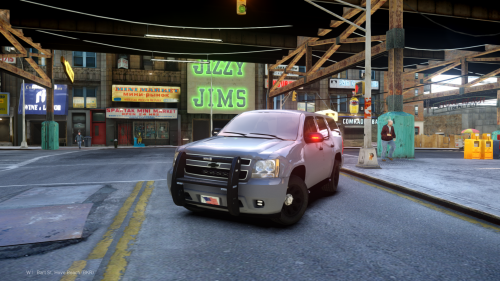 Really like the lights on this Tahoe. Great job matching it up with the one in the video!
- 9 comments
- 1 review
-
-

- 1
-
-
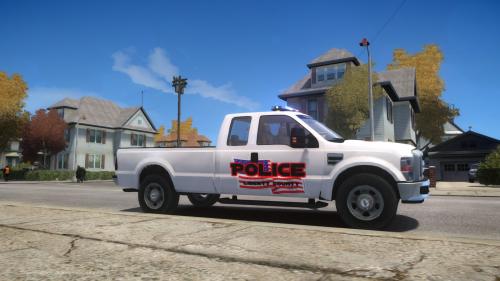 Looks really nice, especially at night! Great job on your first release!
 -
Thanks for the reply! I'd rather keep the i7-5820k CPU, so do you have a good motherboard you would recommend using with that? And do you mean getting a modular PSU instead of a semi-modular PSU? If so, do you think I'll really need a full modular PSU? Jake
-
Hello, First off, I would like to thank all of you who have helped me learn more about building computers and finding the best parts for my price range. The following link is the build that we have come up with. If you have any suggestions/input before I purchase the build I would really appreciate it. https://pcpartpicker.com/user/DeputyJake/saved/2DGNnQ Again, thank you. DeputyJake
-
Hey Luke, Forgive me as I am still trying to learn more about processors, but my question is will the gaming quality be worse by going with the i7-5820k instead of the i7-4790k or is it basically the same? I understand it's better to go with the newer one and that's most likely what I'll do but I just want to make sure the performance will still be worth the extra money. Thanks again for the help!
-
Happy Birthday!
-
I can't seem to find the old computer support thread, so I guess I'll just post this here. I wanted to ask you guys which proccesor, the i7-5820k or the i7-4790k, you would suggest buying. Right now there is a $20 difference between the two with the i7-5820k being the more expensive one. From what little research I have done, I basically saw that right now the i7-4790k performs better but in the future the i7-5820k will be better? I'm not for sure if this is true or not. Anyways, if it helps, plan on doing some editing as well as playing games on the computer. Thanks for your help! DeputyJake Edit: I also won't likely be overclocking.
-
I really like the new layout - It's clean and organized. Plus, the new "Photo Cover" on profiles is an awesome addition! I already made myself one. :) Great job LCPDFR!
-
You've probably heard this one before, but it's the only one that comes to my head right now. "Are you from Tennessee? 'Cause you're the only ten I see."
-
Hey Mr. Quiggles! I know you said te i5-4670k would be fine for my build but, theninja35 showed me that you can purchase an i7-4790k at MicroCenter for $249.99. I looked at NewEgg to see how much they offer the i7-4790k for and it is $339.99. So, right now I could get the i7-4790k for around $20 more than the i5-4670k ($229.99). Should I do that? Why are the two prices so much different? Here are the two i'm talking about: MicroCenter i7-4790k: http://www.microcenter.com/product/434176/Core_i7-4790K_40GHz_LGA_1150_Boxed_Processor NewEgg i7-4790k: http://www.newegg.com/Product/Product.aspx?Item=N82E16819117369&ignorebbr=1 (I know that the MicroCenter is in-store pickup only but I'm fine with that since it's around a $100 discount compared to NewEgg.) Thanks, Jake
-
Awesome! You're coming down to Texas to help me build this computer, right? ;) haha
-
Oh okay. Is that normal?
-
Hey! I noticed that the BestBuy 970 card has only 1 fan compared to the STRIX cards and etc. Does your card get hot a lot? Thanks!
-
Sweet! I'm glad you figured it out! Let me know when you post some LCPDFR videos. :D
-
Man! What were you doing up at 5:01 AM? I'm glad to see these builds are starting to fall into place, I know I've probably thanked you too many times but I really do appreciate it. And yes - please let me know if re installing GTA IV helps fix the problem.
-
I'm also unfamiliar with overclocking - but I don't think I will do that if it could harm the PC. So I guess I'll go with the i5-4670k. I really appreciate you taking the time to explain the HDD's and SSD's, I understand it now. I guess I will plan on getting the 1TB Blue Caviar HDD with the Samsung 840 EVO 250GB SSD?? (Link: http://pcpartpicker.com/part/samsung-internal-hard-drive-mz7te250bw) As for the Motherboard, do you think the MSI Z97 PC MATE ATX LGA1150 Motherboard is a good one? (I forgot to ask you this before) Also, like you suggested, I changed the PSU to a Corsair CX 750W 80+ Bronze Certified Semi-Modular ATX Power Supply. Will that work? And Lastly, the Graphics Card that you got at Best Buy is this one, right? (Link: http://www.bestbuy.com/site/nvidia-geforce-gtx-970-4gb-gddr5-pci-express-3-0-graphics-card-silver-black/9855169.p?id=1219441201895&skuId=9855169) Here's an updated build if it helps you: http://pcpartpicker.com/p/nwgq7P (The BestBuy Graphics Card is at the bottom of the list because I had to add a custom part.) I'm just a little concerned about the price of this build. I was originally looking to make this build no more than $1000. The Best Buy card is $40 more than the STRIX card, but since you own the Best Buy one and have had a good experience with it I'm guessing it's probably worth the extra $40 to spend on it. Also for the SSD I might have to save up some money and purchase it later on. Anyways, thanks again for all your help with this. You've put in a lot of time to help me out and I really appreciate it. :) Jake By the way, I checked out your YouTube channel to see if you had any LCPDFR gameplay videos with your 970 yet but I couldn't tell if you did or not. ;) Let me know if you do! I'm eager to see it!
-
Hey there! First of all, thanks for the reply. I do have a couple of questions though. You say that the i5 is fine, would you reccomend going with the i5-4690k or the i5-4670k? Also, I'm not very familiar with HDD's and SSD's.. Are you reccomending I keep the 1TB HDD the same and just buy another SSD? If so, which SSD do you suggest. Sorry for all the questions, I'm still learning. ;) By the way, the pictures are hilarious - did you put that together? Thanks again for your help! Jake
-
Hey Guys! I think I have found a nice build for my price range but have a couple questions about it and was wondering what you guys thought of it. The Build: http://pcpartpicker.com/p/qN4B4D My Questions: -Graphics Card So to start off, I have chosen the GTX 970 4GB as my Graphics Card. after seeing a lot of people happy with it - however I'm not sure which 970 would be best for me.. these are the ones I have seen. -Asus STRIXGTX970DC2OC4GD5 STRIX GeForce GTX 970 4GB 1.11Ghz ($334.99) Link: http://pcpartpicker.com/part/asus-video-card-strixgtx970dc2oc4gd5 -MSI GTX 970 GAMING 4G Twin Frozr V GeForce GTX 970 4GB 1.14Ghz ($354.98) Link: http://pcpartpicker.com/part/msi-video-card-gtx970gaming4g -Gigabyte GV-N970G1 GAMING-4GD WINDFORCE GeForce GTX 970 4GB 1.18Ghz ($359.99) Link: http://pcpartpicker.com/part/gigabyte-video-card-gvn970g1gaming4gd -EVGA 04G-P4-2974-KR Superclocked ACX 2.0 GeForce GTX 970 4GB 1.17Ghz ($344.99) Link: http://pcpartpicker.com/part/evga-video-card-04gp42974kr So the ones above are the main ones I saw - Which do you think is the best and for what reasons? Note: In my list I just selected a random 970 to get a feel for the price. -CPU For the CPU's I wasn't sure which to put in there, here are some I thought might work well: (Should I stick with an i5 or save up a little more and go with one of those i7s?) -Intel Core i5-4690K Devil's Canyon Quad-Core 3.5GHz LGA 1150 Desktop Processor Link: http://www.newegg.com/Product/Product.aspx?Item=N82E16819117372 -Intel Core i5-4670K Haswell Quad-Core 3.4GHz LGA 1150 84W Desktop Processor Intel HD Graphics Link: http://www.newegg.com/Product/Product.aspx?Item=N82E16819116899&nm_mc=AFC-C8Junction&cm_mmc=AFC-C8Junction-_-na-_-na-_-na&cm_sp=&AID=10446076&PID=3938566&SID= -Intel Core i7-4790K 4.0GHz LGA 1150 Desktop Processor Link: http://www.newegg.com/Product/Product.aspx?Item=N82E16819117369 -Intel Core i7-4770K 3.5GHz Quad-Core Processor? (Would this even work in my build?) Link: http://www.newegg.com/Product/Product.aspx?Item=N82E16819116901&nm_mc=AFC-C8Junction&cm_mmc=AFC-C8Junction-_-na-_-na-_-na&cm_sp=&AID=10446076&PID=3938566&SID= Those are pretty much the only questions I have at this point. If you see anything else that needs to be changed feel free to comment. I appreciate your time! Thank you, DeputyJake
-
I'm still looking for a computer. If you have a build or a list of parts for under $850 or a tiny bit over, please post them. Thanks!
-
Thanks for the response! I'm currently building your PC on pcpartpicker and was wondering what graphics card you used. Right now it doesn't look like it will be able to fit into my price range.. But might as well try! Also do you have any gameplay videos I can check out? Thanks again!

