


Emisanic
Members
-
Joined
-
Last visited
Everything posted by Emisanic
-
![[WIP] Slicktop CVPI](//s3-gallery.int-cdn.lcpdfrusercontent.com/gallery/album_3381/sml_gallery_130556_3381_796511.png) I love the grill lights
I love the grill lights -
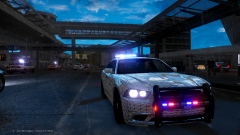 Can't wait for this.
 -
I've used one before but I'll give it a try from the ground up, starting with a new commandline
-
I wish I could, its part of the problem , medium is the lowest I can get, any lower and the game won't load
-
Is this okay? I've never used Speccy before. http://speccy.piriform.com/results/RXuT1J515TcNGuFlNE6SjHc
-
Hey, I've been trying for a while to fix this now but it's absolutely beyond me. I've had GTA:IV for a long time and put up with this issue but I'm quite sick of it now. My computer I believe ABSOLUTELY should run GTA:IV Here's a few reasons why. My PC Definitely surpasses the Recommended specs for the game, The Game istself once auto configured puts everything on HIGH with minimal memory usage. The Issue: don't get me wrong the game runs, the issue is that I have 10-15 Fps whereever I go and it drops to 6-8 Fps at night time or around headlights. This is when played on medium graphics, with no shadows, no reflections, low water, and next to none view and detail distance. If i even try to put the game on low graphics the game absolutely does not work at all, it will not get past the safehouse door. My Specs: Nvidia GT620 1GB Intel I3-3220 3.30Ghz x64 Windows 8 6GB RAM (And just incase it's needed, a 1920x1080 monitor) So those of you that are wizards and mages of a technology orientation please try and suss this out! Cheers,
-
The same as any author would keep their models locked. I made it, to I'll use it to its full extent and how I see fit and keep it to myself and those I trust it to.
-
-
Scottish is right, I am keeping the midimax very. very private.
-
Sure Bandits I'll work on some updated pictures, And swedish it's clearly KlingonModding that comes next!
-
For my first upload I wanted to present the first in my series of British vehicles. I plan on releasing British and American Vehicles in the future. What is it? This is a North Wales Police Vauxhall Vectra 2005. We only used them for a short time but I really like this car. Model status: L/U: LOCKED Optimised for: Police This model may be updated from time to time. Includes: Vehicle Files (police.wtf, police.wft) Template file Credits document I Haven't included an Els Config file because I'll leave it to you to make a custom one suited to you. Disclaimer: You may template the vehicle for personal use, You may upload the SKIN ONLY to lcpdfr.com with proper credits used and a link given to the model. Any reuploads will require permission first with a logical reason for wanting to reupload. HazardModding 2014
-
Welcome to my thread. Here I'll be posting videos and updates on what models or textures I'm working on. Enjoy. WIP: Vauxhall/Opel Astra estate: [pending pictures] A sleek looking astra estate equipped with a touchscreen MDT and a premier hazard midimax lightbar. Pictures being posted later. Mercedes Sprinter Ambulance Configuration https://www.youtube.com/watch?v=EyGS-bIykDU It's still very WIP so bear this in mind.
-
-
Let's not be totally unconstructive. Yes the post is a bit bare, however it does tell you how to spell the Zmodeler codes without making spelling mistakes. All the post needs is information on what each code does and make it understandable.
-
I can so this but it looks like it won't be today due to other things I need to do. All of those should be fairly easy to do if anyone does it.
-
You have no shader settings for your texture. I don't fully know the ins and outs but here's a try. Textures need to be followed with a setting name e.g: emerglights mesh (the mesh being the setting name) I don't know what yours needs to be but that's the cause I believe. You also don't appear to have the right speculars and shaders added to your texture order for the emerglights. Hopefully now I've detailed it someone can explain fully.
-
Follow kinksta100's tutorial, works a treat and it's easy to follow. Search his channel for it.
-
When you export your model do you get any errors relating to shaders? Not having the correct shader settings can cause a custom object such as siren boxes to not show in game. If you are having an export error, assign the correct shaders to the models and rexport.
-
I'll be releasing my Vauxhall astra estate very soon, which may serve you in place of the zafira.
-
If you still want this, I can make this. PM me.
-
I live in north Wales and my name is Jake too! Creepy! And I'm going to spend a lot of time doing some high quality skins, I hope to remake this vehicle if I can get hold of the new astra estate
-
Hey, I'm planning on simple adding some extra things on the GTA:4 peds and removing some things such as removing the holstered weapon and adding radios and ASPs. I have 3ds max so will this require me having to do loads of things such as re rigging models or is it simply just add the extras then export? Thanks guys
-
Hey all before I get stuck in telling you what this is just a reminder! You may not be used to seeing this type of file here but it's here because there is No section for it and i was kindly told to put it here after some time and effort (Thanks iconography! It now has a home) so bear this in mind folks! onto the file! Those who either live in Britain or have used some of the British vehicle mods will know that to add extra effect the battenburg strips have small markings in them. After messing with photoshop I've come up with some markings of my own that aren't the the usual hexagons. (This Image makes them look bigger, and the background isn't yellow you can add it to any colour you want because it's a fill pattern) How to Install them: Open the zip file and move the .pat file into your photoshop/presets/patterns folder How to use them: Open your photoshop, Hit G or click the paint bucket tool. At the top click foreground and change it to pattern and then select this pattern (It will look like a slightly messy white box) After you've made your skin and you're satisfied with it, bump up the image size to 5000x5000 and apply these markings to your battenburg. DO NOT FORGET TO RESCALE YOUR IMAGE AGAIN! That's it! If you want to give credits feel free however its a small detail and I can't really keep track of it if you don't. enjoy! Credits: Ukippy (Making the shapes and creative a fill pattern) Adobe (Program) Iconography (Finding the file a home)
-
Thank you very much!
-
I've been looking into making a pack and I've noticed that there are few light bars I could use that look like welsh ones. So hopefully I would like to make my own. I understand 3ds Max or similar may be required but is there a light bar making tutorial or thread? Many thanks

![[WIP] Slicktop CVPI](http://s3-gallery.int-cdn.lcpdfrusercontent.com/gallery/album_3381/sml_gallery_130556_3381_796511.png)
